外观
SkySpark 文档(docSkySpark)
原文: https://finproducts.atlassian.net/wiki/spaces/JIDD3/pages/34793488427/FIN+5.3.1+docSkySpark 中文整理基于 FIN 5.3.1
manual
SkySpark 文档(docSkySpark)
SkySpark 平台文档
chapters
| Getting Started | |
| Setup | 帮助让 Sky应是运行 |
| Deployment | 部署项目的分步骤20 |
| Architecture | |
| Architecture | SkySpark 架构概览 |
| Security | 用户管理和安全是通过模式实现的 |
| Authentication | Authentication |
| Files | File management |
| Web Uris | HTTP URI 命名空间和配置 |
| Importing | ETL技术和数据导入 |
| Clustering | 弧波束集群 |
| Replication | Folio 数据库复制 |
| Localization | 本地化进程 |
| 按照联合国 | |
| Fantom Api | Fantom APIs 概览 |
| Exts | 如何开发自定义扩展 |
| 格式和协议 | |
| Rest | HTTP REST API |
| Ops | REST API的业务 |
| Appendix | |
| Troubleshooting | Troubleshooting |
| Tuning | 培训业绩 |
| UpgradeTo3 | 升级为 3.0 |
| Migration | 移动到 SkySpark 的新版本 |
| Licensing | 许可证发放详情 |
| ChangeLog | 每个建筑的变动列表 |
建筑
概览
SkySpark 用于管理用于 Internet of Things: 网络智能设备的爆炸 能够感知和控制 我要告诉你 凡发生在我们周围的世界 SkySpark旨在管理您的设备,资产,以及他们收集的数据,以便进行分析和可视化.
SkySpark有四个主要的子系统:
- Folio:从地面建立定制数据库,以组织设备和时间序列数据
- Fresco:用于导航和展示分析数据的网络可视化框架
- Axon: 一种简单的函数编程语言,用于数据工作
- Arcbeam: 集成技术,横向和纵向扩大
如何组合
下图说明了这些子系统如何组合在一起:
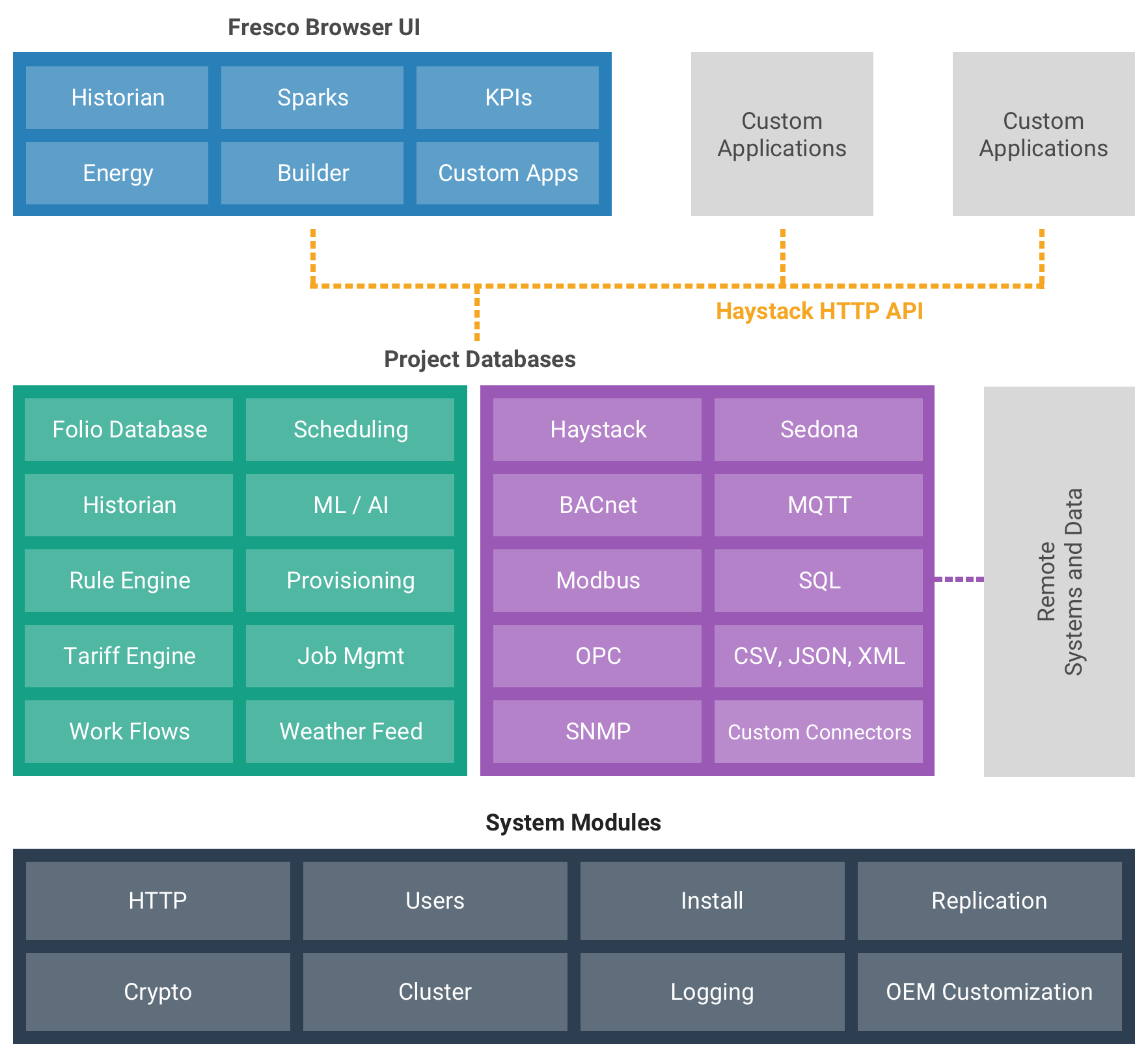
这个 skyspark 可执行文件发布 SkySpark 服务器守护进程 。::: 网络请求 REST API 可用于查询SkySpark数据库并执行分析查询。 该遽服务器还通过一套弗雷斯科网页发布人类消费数据. 运行在进程中的扩展可用于与外部数据库或网络服务同步数据.
扩展
SkySpark的核心是应用域不可知论. 您可以使用它来构建存储、分析和可视化数据的任何类型的应用程序。 SkySpark的真正力量是能够通过扩展来扩展具有新功能的核心平台.
扩展为Fantom socket,通过定制来扩展平台:
- 海斯塔克肿瘤扩展
- Axon 函数库
- 弗雷斯科观点
SkySpark飞船拥有"包括电池"——一个丰富的横向和纵向扩展库. 以下是一些例子:
- his: 时间序列历史学家作为标准扩展执行
- task: 用于调度同步脚本等背景任务
- rule颜料: 设计的分析引擎 运行一套规则来开采作业数据
- arc: 管理和跟踪工作订单的工作流程引擎等
- io: 以不同格式导入/导出数据的广泛库
- energy:分析能源使用效率的标准标签/Axon库
- tariff: 公用事业费率模型的关税引擎
math:丰富的数学图书馆,包括统计回归分析和矩阵操作- py所掌握的数据: Python 集成和机器学习
- weather: 内置天气喂养
SkySpark还包括一个用于数据获取的连接器库:
- sql: JDBC 与关系数据库的整合
- bacnet: BACnet 协议
- haystack: 项目 Haystack HTTP REST 协议
- modbus: Modbus 工业协议
- opc: OPC UA协议
- snmp: 简单的网络管理协议
- energyStar: 美国能源明星组合经理
- obix: OASIS oBIX议定书
sedona: Sedona SOX 协议- nest: Google 巢穴连接器
- ecobee如何能够将“Ecobee”自动调温器连接起来?
除了ửa与 SkySpark 一同包含的扩展外,您还可以 write your own 自定义扩展 。 在 < < < > 上可找到多种预建的社区扩展https://stackhub.org/>.
认证
概览
SkySpark支持多个用户认证机制. 在框外, SkySpark 总是支持 Haystack Auth 根据海斯塔克项目的规定。 可在 Settings | SysMods 视图。 提供认证机制的SysMods被称为Auth Mods. 以下Auth Mods由SkySpark Out-too-box提供: SkySpark 由SkySpark提供,由SkySpark Out-too-box提供.
当多个 Auth Mods 启用时,用户可以通过配置 . userAuth 标记在用户上。
多变量 Auth 函数
SkySpark 支持多要素认证,方法是添加 userMfa 标记到用户记录(或 userProto 所提及的 userProtoRef 标记),然后选择 MFA 配置。 当MFA配置后,用户需要在成功登录后输入一次性代码.
SkySpark支持2个MFA方法获得一次性代码:
- 电子邮件 - 用户将被发送到其配置的电子邮件地址的一次性代码
- TOTP - 用户必须通过扫描一个 QRCode 输入一个认证器应用程序,然后通过每次登录,从其认证器应用程序获取一次性代码
这些功能可用于与外交部配置合作:
userMfaStatus():检查深入分析的一个或多个用户记录userMfaTotpReset():强迫一个或多个用户再次注册其认证程序
MFA可以使用默认的海斯塔克认证机制,也可以使用任何可以配置在其中的 Auth Mod userAuth 标签(SAML、LDAP等)。 在用户活动日志和 Host|Sessions 视图显示每个届会的外交部状况。
注:在使用集群认证时,目前不支持多要素认证。 使用户看到错误 Multifactor Authentication Not Supported 如果尝试通过集群认证与拥有 userMfa 已配置 。
海斯塔克·奥特
标准 HTTP 认证协议由 Project Haystack见 Haystack Auth 关于议定书的详细解释的章节。 这种认证机制是内置的,并且总是可用的.
分组 Auth
集群 auth mod 允许用户从中央 SkySpark 实例管理. 与这个实例组合在一起的节点,然后可以使用弧形来验证用户对这个中央用户数据库的验证. 见 Cluster Auth 详细文件。
LDAP 认证
LDAP auth mod允许SkySpark对照远程LDAP服务器验证用户资格. 它使用 user prototype feature 以在用户登录时为 LDAP 用户指定标签。 见 LDAP Auth 关于使用LDAP进行用户认证的更多细节的文档。
SAML 认证
SAML auth mod 允许在单个签名上对支持 SAML 协议的远程身份提供者(IDP)验证用户的资质. 用户将不再使用标准SkySpark登录页面,而是使用他们的IDP登录页面登录. 如果用户已经登录到他们的IDP中,那么他们会被登录到SkySpark,而不输入任何证书. SAML 使用该 user prototype feature 以在用户登录时为 SAML 用户指定标签。 见 SAML SSO Auth 关于使用 SAML 进行用户认证的更多细节的文档 。
证书认证
Certification auth mod允许用户在不输入用户名/密码字的情况下登录到SkySpark. 见 Certificate Auth 关于使用证书认证的更多细节的文件 。
Cookie 证书
Cook恰恰证明(Cookie evidence)是一种机制,它要求通过HTTP头通过一个二级密钥,以验证在使用饼干进行授权时提出的要求. 每一次认证会生成一个次要密钥, 我们称之为“ 测试密钥 ” 。 Session.attestKey。当启用 cookie 验证时,任何非 GET REST API request 需要下列 HTTP 标题 :
Attest-Key: {Session.attestKey}注意 GET 请求 do * not * 需要 cookie 验证( GET 请求仅限于没有副作用的操作). 还注意到,如果使用无记名证的海斯塔克授权,则不需要这一机制。 它只适用于基于饼干的授权.
此功能默认启用, 但可以在 Settings | API.
变更日志(ChangeLog)
本章保留英文原文,便于检索。
Build 3.1.12 (26 Jun 2025)
- FolioFile API
- hxIO support for folio files
- Fantom build 1.0.82
- Insecure API settings removed
- Remove deprecated ExtMeta fields used in 2.0
- Remove 2.0 debugLint() function
- Remove deprecated SysLib functions moved to HxCoreFuncs
- Remove skyarcd::Client, use haystack::Client
- Xeto CLI main moved from xetoTools to xeto
- Computed histories can return grid meta
- hisExt: fix hisClear() to use tz from rec
- ActorContext base type for all context types
- Updates to demogen for elec specs changes
- bacnet: fix bacnet discovery for BBMD addresses
- Spark|Equip revert presentation when changing inputs
- Demogen fix for metric conversion
- Improve user auditing for MFA
- Change start of week for
frlocale to Monday - Fix his collection for imcompatible units
- Task metrics renamed and added evalLastDur
Build 3.1.11 (9 Dec 2024)
- Multi-factor authentication support
- Filter comparison of Numbers now requires same unit
- Xeto fits/fitsExplain defaults to tags only, new graph option
- Xeto validation for refs and target types
- Xeto validation for choices
- Xeto validation for value using spec meta
- Axon remove support for Xeto spec definition within language
- Axon remove support for Xeto slot spec references
- Axon AST dict for calls renamed target to func
- Axon remove dot call support when first arg is filter #8099
- Axon support for interface based dispatch
- Axon support for interface static methods
- Axon support for interface constructors
- Axon move xetoReload to hx lib
- Support for cardNoScroll
- New Axon funcs: gridReplace, evalToFunc, isDuration, isHisGrid, quantile
- Updated elec phase tags - PH #1109
- New synthetic ontology - PH #1125
- Redesign Java reflection code to use double checked locking
- New icons
- Add HTTP setting for maxThreads
- Support for escaped tag names with leading two underbars
- FTP handle support for ioCreate()
- Fix historian negative zero bug
- Add cost rollup option to Tariff Cost view
- Log remote ip address on failed password reset
- Support for noUpdate in view actions
- Tweak %RH conversion ratio to match %
- Add room spaces and systems into demogen database
- Tighten up Folio tag value storage checks
- Support optional reply to address for email configuration
- Licensing support for thirdparty authority
- Disable fsync flush mode for CheckFolio deleteCorrupt
- New Task|Debug actions for Run and Cancel
- Fix for using SHA384 and SHA512 for hmac
- Fix to prevent keys from getting added with an empty alias
- Support for adding EC Keys through the CLI
- Host|Crypto view enhancements
- Conn|Point Details Pane shows hisCollectNA details
- Fix readById, readByIds to not return records with trash tag
- Mqtt: allow configuration of sessionExpiryInterval
Build 3.1.10 (23 Apr 2024)
- Xeto new LibRepo and LibNamespace APIs replace XetoEnv
- Dict.spec removed, must use LibNamespace.specOf
- Dict.map added
- Xeto Lib.top/tops renamed to spec/specs
- Xeto global slots
- Xeto ph-gen redesign
- Xeto enum types
- Xeto sys::TimeZone enum
- Xeto sys::Unit enum
- Axon func xetoEnvReload renamed to xetoReload
- Axon new funcs: choiceOf
- New Xeto lib lazily loading design
- Demo database now defines spec tag for site, equip, and point recs
- Number and unit quantity validation
- Add option to stripUncommittable to keep mod tag
- Context menu will now reuse current span when linking to new views
- Add context menu into Spark and KPI views
- Add context menu hyperlink to KPI Swivel for equip
- Replica local backup support
- Change setColMeta, addColMeta to silently ignore when column not found
- Add Arc command no longer hyperlinks to newly created arc
- New arcNewPart, arcEditPart, arcRemovePart functions
- Arc|Doc view now allows to sort replies newest to oldest
- Arc|Doc view hides back button in custom views
- Arc|Summary view support for bindSelect
- Arc|Summary view new arcUnderRef variable for bindings
- Arc view support for hiding toolbar commands
- Demo new example view using arc views
- New arcbeam connector read functions
- New user setting for minPasswordLength
- Enhance SVG chart export for better MS Office support
- HisMap and other filter functions behavior consistency for null values
Build 3.1.9 (1 Dec 2023)
- Arcbeam connector
- New Event extension
- New ECMA class-based JavaScript design
- Actor queue overflow limits
- Xeto support for instance data
- Redesign how Xeto specs are mapped to Haystack dicts
- Allow tag names to start with underbar
- Rename Xeto function library from data to xeto
- New hisInterpolateMode tag
- Fix y-axis for enums in charts
- Positive Integer Value object type to BACnet connector
- Marshal DateSpan in xquery defines
- Fix Trio to handle T and F for true/false
- Add lint checks for cyclic containsBy ref tags
- Fix chart layout issues with large legends
- Action support for
selectTag - AuthPluginMod users (SAML, LDAP) can config notifications on user menu
- User menu options disabled when Tunneling
- Password reset will now work if user has a defUri to a remote project
- Show more user friendly page when password reset token is invalid
- Fix to use TLS 1.3 when supported
- New noSort flag to ioWriteTrio
- New funcs: nowUtc, ioCreate, ioReadXeto, ioWriteXeto
Build 3.1.8 (9 Jun 2023)
- Axon shell
- Integrate data and xeto APIs
- New data function library
- New hx funcs: isWatched
- CSV export option for stripUnits
- Connector hook to learn without open
- Builder learn tree does not auto-sort connector results anymore
- Haxall new platform APIs
- Haxall rename of hxSerial to hxPlatformSerial
- SpanInput support for Past Week, Past Month, Past Quarter, Past Year
- Fix SVG transparency in MS Office products
- Sparks|Table add column with link to Sparks|Equip
- Rule|Debug context menu, search field
- New docFresco Fantom chapter
- Improve heatmap support for posInf
- Fix table barCell to respect explicit colWidth (#5316)
- New strReplace point conversion
- Support for batch hisRead/hisWrite HTTP ops
- Flush out more HTTP API examples (in both Zinc and JSON)
- Fix presentation sidebars to not reload data from server
- Install fix for file-locking issues on Windows
- Bacnet: fix excess logging for npdu decoding errors
- Bacnet: fix BBMD unregistration
- EnergyStar: fix various encoding bugs
- Schedule: fix to allow end time to be midnight when start time is not midnight
- Fix hisJoin() throws Err if any grid is not a his grid
- Fix hisClear() to use Span instead of DateSpan
- Change demogen to not enable the notifyExt in the generated proj
- Fix to ensure hisPageSize is set on projMeta after projRebuild()
- Mqtt: add support for message expiry interval on published messages
- Ghg: Support for higher frequency emission factors
- Fix to add TLS SNI extension when connecting through web proxy
Build 3.1.7 (17 Feb 2023)
- New Proj Admin view
- Table view support for title/subtitle
- Add point conversion: boolToNumber
- Haystack 3.9.13
- New funcs: firstOfMonth, lastOfMonth
- Hide Arc Types | Show Code action for non-superusers
- Hide project picker on home page if only one proj is accessible
- New point kind linting rules
- Nav auto-expand for anyPoint and cluster selections
- Remove table clipping more icon in favor of CSS ellipsis
- Map support for live title, subtitles, and color
- Map view state for mode, center point, zoom level
- More axon code examples in function docs
- XObj system model
- Rule engine now hides results if target no longer matched by rule
- Add project data directory to backups
- Add session setting for maxSessionsPerUser
- Header clone button moved down into view toolbar
- New tunneling indicator icon in header
- Enhance log function to map to SysMod/Ext logs when applicable
- Conn framework closed connector is onPing raises exception
- Conn support for multiple connectors per point with connPointsVia
- Date format support for quarter pattern
- Ephemeral tasks now linger for debugging
- Axon Usage more examples
- Demogen now prompts for additional features
- MQTT several bug fixes
- Ensure actor pools are always stopped on exit
- Dict each iteration is now always non-nullable
Build 3.1.6 (15 Nov 2022)
- Remove deprecated classic extensions and apps
- Allow operators to email exports if sendEmail is enabled via userAllow
- Document pubUi and JS view type
- Add back diagnostic for number of HTTP requests
- Axon: new ext() func, add opts to toMatrix()
- Cluster backward compatible to 3.0.24 (stream based HTTP tunnels only)
Build 3.1.5 (5 Oct 2022)
- New map extension
- New project selector and navigation
- New His|Compare view
- New Debug|Support view
- Chart customize side bar: new Include All, Exclude All commands
- Chart customize runtime/bar crosshatching
- Support for Haxall developer program licensing
- Cloning support for cloneSyncHis
- New user defUri tag
- Licensing checks when adding points
- Batch edit support for tag rename
- New funcs: addCols, ruleTuning, ruleDebug, hisPeriodNormalize
- More Axon examples in core functions
- Arc|Summary show "*" when filter is active
- Move projSync func from proj to skyarc
- Enhance spark explain show me to add points
- New -pods command line flag
- Rework Number.toLocale pos;neg pattern behavior
- Move table, chart funcs from legacy to skyarc
- Certificate based authentication (beta)
- Update docSkySpark Authentication chapter
- Update docSkySpark Ops chapter to reference docHaystack
- Fav menu Set as Default now requires su permission
- Remove obsolete tags.trio from pods
- Improve support for nosrc project rec functions
- Do not use format within row itself (only from col meta)
- New YAML Fantom APIs
- Fix Folio store data size errors to not put system into readonly mode
Build 3.1.4 (4 May 2022)
- New design for choice defs
- Spark|Equips new actions: explain and sparks
- New ruleSparkExplain function
- Shell multi-line block edit mode
- Port Bacnet connector for hxConn
- Port OPC connector for hxConn
- File view enhancements: dir view, download action
- New axon funcs: filter, parseSearch, refProjName, reFindAll, clamp, connPoints
- Axon string support: each, eachWhile, any, all
- Table customization for disableSort
- New fileAccessReadOnly tag
- Ensure Axon logging functions include project name
- Enhance span picker to show years into the future
- Move toSites, toEquips, toPoints, equipToPoints to point ext
- Move matchPointVal, toOccupied to point ext
- Modify toPoints function to not implicitly call equipToPoints
- Fix toOccupied to not match other equipment's points
- Add toSpaces, toDevices functions
- Move sensorFailure, shortCycling, longCycling to hvac ext
- Deprecate equip ext
- Ref input expands to selection (non-cluster only)
- Cluster backward compatibility support only for 3.0.24+
- Demogen fixes for Haystack 4 tag compliance
- Fix boundary conditions to maintain conn watch state
- New maxSessions setting along with new Setttings|Session view
- View input support for
enumExpr - Tag rename in record edit form
- XQuery setting for maxThreads and crossProjRefs
- Arc|Summary search and sort state
- Add interval parameter to xqHisRollupAuto
- Grid sort, reorderCols methods/functions ignore unknown cols
- Unit picker support for text input
- New hotkey commands: Goto View, Close View, Swap Views
- Enhance def based forms to use defVal tag for default value
- Support for
arcTypeDefault - Add user field to obsHisWrites observations for auditing
Build 3.1.3 (24-Feb-2022)
- New hxConn connector framework
- New MQTT connector
- New Nest connector
- New Ecobee connector
- Open source Haystack connector
- Open source SQL connector
- Open source Modbus connector
- Open source oBIX connector
- Open source Sedona connector
- Redesigned hxSerial library replaces serialMod
- Deprecate connector actorPoolMaxThreads in favor of maxThreads
- New connector documentation in docHaxall
- Haystack connectors send close op if missing haystackCloseUnsupported
- Obix connector now defaults to use Haystack authentication
- Password subtypes now commit using the key "id name"
- Refactor dateSpan, span coercion in Axon
- Rule funcs now treat null span as all time
- New ruleOrphan function
- New hx stub command line tool
- New hx crypto command line tool (replaces tools::KeyMgr)
- New funcs: streamCol, isNull, isNonNull
- Shell dup command now only shows the duplicated records
- Add Rule|Debug to context menu for rules and targets
- RefInput now supports id popup
- CSV export options for delimiter and showHeader
- OPC-UA connector now supports username/password authentication mode
- Ghg can now select individual equip records
- Ghg added Australian emission sources
- SAML logout now shows a SAML specific logout page
- Host|Crypto view now displays notBefore and notAfter
Build 3.1.2 (17-Dec-2021)
- New clone extension
- New docker extension
- New python extension
- New schedule view to replace classic app
- Enhancements to ghg visualizations
- SaaS login logo support
- Code|Editor enhance new command with templates
- Axon new TopFn handling for meta
- Enhance views with show weather to use rollup options
- His transform funcs now ignore nulls and empty grids
- Enhance proj namespace loader to reuse parsed funcs
- New mqtt Fantom API
Build 3.1.1 (8 Sep 2021)
- Haxall framework integration
- New ghg extension for greenhouse gas analytics
- Split "core" lib into "hx" and "skyarc"
- Task ext now Haxall lib
- I/O ext now Haxall lib
- Point ext now Haxall lib
- Math ext now Haxall lib
- Fantom build 1.0.77
- New obsAddOnInit option for obsCommits
- New obsWatches observable
- New obsCurVals observable
- New obsHisWrites observable
- New obsPointWrites observable
- Rename
obsArcFiltertoobsFilter - Deprecate SysMod summary, actor
- Replace SysModMsg with HxMsg
- SysMod using lib.trio require depends on hx, skyarc
- Add notifyTopicSubscribers()
- Rename HTTP header SkyArc-Attest-Key to just Attest-Key
- New funcs: thisQuarter, lastQuarter
- New Haystack 4 op defs design
- Remove ops, formats as Axon functions
- Migration for Haystack 4 weather tags
- Remove classicWeatherExt
- Add taskCancel function
- Steady state now defaults to 10sec instead of 1min
- Writable points no longer set writeStatus to "unbound"
- Writable points no longer write until steady state
- Rename point setting use3 to hisCollectNA
- Deprecate bin file support
- Remove support for bin files as email attachments
- Haystack 3.0 nested collection support for XML
- Fantom API breaking change to FileMod.resolve, now use HxFileService
- Remove @Js facet from Diff class
- Tighten semantics for toRec, toRecList functions
- Updated EULA, added section 1.3
- Enhance hisPeriodUnion, hisPeriodIntersection, hisPeriodMatrix arg handling
- Add energyStarUsageWrite support for estimated value
- Deprecate SysLib Fantom methods
- Move many chapters from docSkySpark to docHaxall
- Add SAML SSO module to the standard distribution
Build 3.0.29 (27 May 2021)
- Haxall open source pods: haystack, def, defc, axon, folio, auth, rdf
- Project Haystack v3.9.10
- Fantom v1.0.76
- Add search field to table manager views
- Move Client from skyarcd to haystack
- Make Grid a const mixin
- New userAllow permission elevation
- Task/Job user security changes
- Support for operator favNew, favEdit, favTrash
- New funcs: vizAutoRange
- Hide User Preferences menu for operators
- FTP support for ioDelete
- Add arc ticketState transition pending -> open
- Add ability to configure max failed login attempts for local users
- Add support for fileAccess tag on admin users
- ClusterAuth users can now reset their password
- Fix chart x-axis to be visible when excluding last plot
- Add x-axis visibility to chart customization sidebar
- Tweak number formatting in Shell
- Enhance context menu for Add Arc to find common parent
- Fix navSelAny searches to include parent recs
- Fix vizByUnit for unitless numbers
- Show total in trace popup for stacked bar charts
- Improve reload with unsaved Code|Editor changes
- Remove adapt support for old tag definitions
- Change how Energy | Usage view displays stacked bar chart
- Exclude users lacking proj access in user pickers
- New user arcUnassignable marker
Build 3.0.28 (22 Mar 2021)
- New docgen engine based on Haystack 4 defs
- Improved documentation navigation
- Documentation full text search
- New card view
- New notifyExt for email notification subscriptions
- New HTML filetype, ioWriteHtml()
- Refactor
corelib intoaxon - New funcs: renameCols, relDis, flatten, sysReload, localeUse
- New funcs: vizInterpolateRgb, iconUri
- New funcs: ruleSparksCount, ruleTargetsUnder, ruleSparksDigest, ruleKpisDigest
- New funcs: arcReadAllUnder, arcDigest
- Fantom func reflection does not reflect base types
- Remove docTraining videos for classic apps
- Remove 2.1 Actions chapter from documentation
- Add
-libTriooption to ExtStub - bacnet: Add device discovery support through a BBMD
- user: remove ^person def and tag on user recs
- Deprecate ExtMeta icon24, icon72, iconTable fields
- Support for resizable presentation sidebars
- SiteBuilder search site tree support
- Remove unused site, equip, point templates
- Use Haystack 4 tags for weather points
- Modbus: curVal support for multiple point with same register
- Update EULA; added section 4.1.3
- Enhance bindSelect to fire null selections
- Improve defc command line def compiler
- Add user tag to commit observations
- EnergyStar support for waste meters
- New Hayson JSON format
- Rule tuning support for
ordertag - Chart customization for plot level titles and subtitles
- Chart now maintains scroll position on zoom/reloads
- Chart enhancement to infer discrete x-axis based on chart type
- Chart zoom down to 1sec ticks (previously lower limit was 5min ticks)
- Convert hvac to a resource extension
- Remove old lightingExt from distribution
- Point Details command in context menu
- Safe mode command line flag
- New Host|Proj rename and delete actions
- Historian options for limit and timeout
- History collect new hisCollectCovRateLimit tag
- Enhance rule engine hot period to be timezone aware
- Improved enum input support to support Trio dict format
- Improved unit input support for custom underbar units
- Demogen enhancements for Haystack 4 and VAVs
- Deprecate TrioReader/TrioWriter methods to favor dict over rec
- View rename: file -> files
- View rename: historical -> weatherHistory
- View rename: forecast -> weatherForecast
- View rename: degreeDay -> weatherDegreeDay
- View rename: billPeriods -> tariffBillPeriods
- View rename: regMap -> modbusRegMap
- View rename: manifest -> provManifests
Build 3.0.27 (7 Dec 2020)
- ArcExt
- Table customization sidebar
- Integrate defs into table presentations
- Redesign table status color/icon handling using defs
- Rename generic status columns across different views
- Limit upload dialog size to 100MB
- New filter builder dialog
- Tweak context menu to use selection itself versus expanded descendent
- Demogen no longer generates any demo user accounts
- Gauge table cell visualization
- New Monitor|Equips view
- TableView bindSelect
- Update demo lighting model
- Change logRead function permission to su, level col to logLevel
- Support
hisFuncWritablefor computed points - Downgrade SMILE to 2.4.0
- Document using uiContextMenu in your own views
- Enhance Ext.observe to take actor or method
- Rule|Debug support for reobserve
- Tariff def refactoring
- New funcs: parseAst
- Redesign PDF table layout to support explicit colWidth
- Fixes for PDF rendering of fandoc lists
- New hotkey commands: "C" Customize, "Ctrl+/" Switch View
- Chart fallback to col meta unit when all values are NA
- Optimize ConnPoint.updateCurOk to short circuit when no changes
- New Tariff builder in Energy app
- Migrate jobs to Haystack 4 defs
- Migrate schedule/calendars to Haystack 4 defs
- Convert nav operation to use 3.0 navigation tree
- Shell view always shows durations using actual unit now
- Make mobile an add-on system module
- Connector filter field
Build 3.0.26 (26 Aug 2020)
- Redesigned user prefences and hot key bindings
- New User|Preferences view
- Customizable hot key bindings supported across all views now
- Tool|Shell now supports color coding, auto-completion, customizable hot keys
- New file management infrastructure
- Enhanced Tool|Files view
- New KPI|Chart view
- New Builder|App view
- New Weather|Stations view
- Rule|Local now uses defs; rule ready popdown menu
- Remove Builder|Rec
- Fix Axon grid sort(), sortr() to use table UI algorithm
- Chart support for customized no data message
- Chart customization for opacity
- Chart customization for plot height
- Chart customization toggle exclude by clicking icon
- Table support for
colWidthstyling - CVS GridReader support
- Fix scheduling transitions which are off by 1min
- Command defs
- Rename
inputtouiInputwhen used as Fantom type name - Add
showDisoption for def/template form actions - Support for opts in hisWrite via HTTP API
- Include sort column and direction in table view state and exports
- Add rollup option to Historian|Equip and Spark|Equip views
- New
backgroundoption for SVG exports - Add host variables to settings along with hostVars() function
- License file auto-update support
- New Context-Menu action replaces Open-In menu
- Point Override context menu for writable points
- Filter initial support for inference
- Deprecate Filter.include in favor of matches with new HaystackContext
- Haystack 4 build 3.9.9
- Nav support for new inference based flow refs
- Must now use weatherStationRef instead of weatherRef
- New funcs: compDef, deprecatedTags, renameTags
- Fantom build 1.0.75
- Upgrade machine learning SMILE library to 2.5.0
- LDAP applyTagsFunc setting
Build 3.0.25 (25 May 2020)
- Remove java.options=-Xmx512M
- New Observable subsystem
- New Task extension
- New clock SysMod
- Redesigned actor framework multitasking
- Memory optimizations for def compiler
- Shell: improved view selection
- Shell: chart customization
- Shell: save state as new view
- Shell: do not re-evaluate on reload
- ViewBuilder: reuse favorites
- New funcs: reduce, uriQuery, uriFrag, numDays, ruleSparksToHtml
- Switch ioWritePdf to default to viz rendering engine
- New ioWriteSvg function
- His functions option hisKeepEmptyCols
- Funcs now return future: hisWrite, folioBackup, userBackup
- Viz: hide chart if all series set to exclude
- Nav pickers support multiple selection, drag-and-drop, arrow keys
- SiteBuilder option to hide connector pane
- Duplicate command defaults to shallow
- Folio increase max blobs to one billion
- Proj debug for page size distribution
- Fix depend handling for uninstalled libs
- Tighten up view variable naming
- Redesign export to use POST
- Redesign CSS/JS loading to use packed files
- Remove Settings|Dev (vim add-on always included now)
- Connector | Sedona Manifests view
- Benchmark tool
Build 3.0.24 (27 Mar 2020)
- Java 8 or higher now required
- Fantom build 1.0.74
- Haystack build 3.9.8
- His|Chart support for rollups
- His|Table new view
- His|Import new view
- Table presentation customization
- Chart presentation customization
- Chart zooming now allows dragging off edge
- Chart stacked bar support for negative values
- Chart area mode removed in favor of chartAreaMode
- New Demo app views
- New User app
- User management now uses Haystack 4 defs
- New Cluster Auth module
- User prototypes
- LDAP now uses user prototypes
- Publish Fantom APIs for Axon components
- New funcs: equals
- New OEM boot hooks
- Rule engine support for bindAll cells
- Conn tuning options: writeOnOpen, writeOnStart
- Filter favs based on appAccess
- hisRollupAutoMinInterval tag
- Ext dependency checks on startup (Classic Builder)
- Rule tuning another round of design changes
- User/Proj default view (defView tag)
- Haystack 4 filter support lists of refs
- Upgrade mlExt to use SMILE library 2.1.0
- Navigation support to alias defs to nav targets
- Trio support for multi-line indented lists
- Allow defx to add new children prototypes
- Rewrite demo rules to use comps
- Pin cluster node id when multiple licenses installed
- ViewBuilder coalesce Goto and Preview actions
- Axon comparison operator type checks
- Axon reserve new keyword deflinks
Build 3.0.23 (7 Jan 2019)
- Code|Editor enhancements
- New Tools|Backup view
- New Debug|Folio view
- New funcs: sortDis, def, defs, tags, terms, conjuncts
- SysMods can now be enabled at runtime
- Deprecate support for AuthPlugin
- New LDAP SysMod
- BrandDef renamed BrandInfo
- FolioStore exclusive lock file
- Axon add/subtract operators for Time operand
- SiteBuilder root configuration
- Enhance Add Tag Auto to lookup def type
- Linter fixes and enhancements
- New projects and demogen disable all classic apps by default
- Remove obsolete conn cp support
- Remove classic Job App
- Move Classic Conn App to classicConnExt
- Move classic Equip App to classicEquipExt
- Move Classic Energy App and funcs to classicEnergyExt
- Move Classic Schedule App to classicScheduleExt
- Move Classic Weather App to classicWeatherExt
- Fantom API connExt::ConnApplet -> classicConnExt::ClassicConnApplet
- Remove classic Fresco documentation
- Reorganize core docs by SysMod
- Redesigned rule tuning framework
- New fav link design
Build 3.0.22 (30 Oct 2019)
- New Site Builder view
- New Tag Builder view
- New Code Editor view
- New Connector App
- Axon streaming framework
- Provisioning early access
- New linter engine with public API
- Lint view moved to Tools app using new engine
- New
ioAPI op to read "io/" files - Fav overwrite support
- View image support for bin files and io/pub files
- Enhancements to Number.toLocale
- Rule tuning support for sites
- New rule funcs: ruleTest, ruleErrs, ruleToTargets, rulesToTargets, targetToRules, targetsToRules
- New io hash funcs: ioRandom, ioToHex, ioCrc, ioDigest, ioHmac, ioPbk
- New io export funcs: ioWriteTurtle, ioWriteJsonLd
- Migrate: weatherStation, connPoints
- Alert for namespace refresh required
- Custom nav tree ordering
- Update mlExt to use SMILE library version 1.5.3
- Stacked bar chart zero out negative values
- Change PDF export default to Auto Size
- Improve Axon error messages
- Redesign Upload actions to support any file type
- Enhance ExtStub to generate defs for connector
Build 3.0.21 (16 Jul 2019)
- New Monitor|Points view
- Axon components
- Rule engine support for components
- Rule engine support for curRules
- Rule tuning framework
- New Monitor app
- Fix Ref/NavInput tooltips for clipped text in Chrome/Firefox
- Make Ref picker resizable
- Automatically refresh rule roster for recompute/delete
- Public APIs for navSelAny: navRef and navResolve
- Move core project views to uiMod
- Arcbeam side channel streaming
- New Debug|Cluster view
- New Cluster Settings for advanced tuning
- Swivel view support for target input binding
- New funcs: setMeta, setColMeta, stripUncommittable, projSync
- Excel export support for naming worksheets via Grid.meta.title
- Enhance recDup/recTrash to be deep
- Clear docs after pod installation
- Upgrade to CodeMirror 5.48.0
- Fantom compiler support for Java+9 Jigsaw
Build 3.0.20 (22 Apr 2019)
- Rename Space to Namespace
- Change UserMod.authenticate to return Session
- REST API cookie attestation
- REST API remove support for text/plain
- REST API remove support for GET on operations with side effects
- Enhance authentication to auto set Secure cookie parameter
- Tweak semantics of split() function to match Fantom
- Add modbusRead,modbusWrite methods
- Add support for consumption points to
hisInterpolate - Fix min/max funcs to work with null accumulator
- Updated OPC connector
- Add bin files to Folio backups
- RuleExt fixes for rule specific startDate
- Enhance audit log format
Build 3.0.19 (20 Mar 2019)
- New Symbol scalar type
- Folio store fsync tuning
- Add dates picker to Rule | Debug | Recompute
- Hide "Email" button from Export Dialog for non-admin users
- Remove 5min timeout in connector per point his sync
- Fix SpanInput to localize tab text
- Fix SpanInput Recent tab to display ranges with times without wrapping
- Fix issue in TableView where large tables may show corrupt hyperlink text
- Update TimeInput to support editing nanoseconds
- Removed SysDef, EnvDef, TagDef, GridDef, ColDef APIs
- Removed XProj obsoleted base class from Proj
- ConnModel.pollingMode
- Set SameSite attribute on all cookies to "strict"
- Remove HisExt use2 flag support
- Allow scatter plot diamater customization via strokeWidth
- Add XQuery checks to detect nested queries
- Axon fix for return within try/catch
- Fix table view to allow any type for "id" column
- Fix trash queries to use full scan query plan
- Add expires date to user
- User activity log
- Enhance rule engine to support sparkAccessFilter and kpiAccessFilter
- New io funcs: ioToBase64, ioFromBase64, ioSkip
- Fix swizzleRefs to work with lists of Refs
- Enhance viz bar charts with continuous DateTime x-axis
Build 3.0.18 (19 Nov 2018)
- Folio replication support
- XQuery enhancements for replication
- New Arcbeam approval process
- Enhance ApiMod tunneling to accept node-id routes
- Transient his tag updates now performed asynchronously
- JobApp: fix cancel action to work
- JobApp: fixes for edit errors with transient tags
- ABI change to XQuery const fields
- Move xqTimeout setting from Cluster to XQuery
- Safety check for massive log files
- New funcs: ruleDelete, scheduleValAt
- Improve Rule | Debug error reporting
- Rule engine support for
avgKPI types - New Rule Setting hisWorkFactor
- Add cluster tunneling support for 2.1 mobile UI
- Modbus: fix RegMap editor sort bug
- Fav: fix save fav to convert default/current span to absolute
- Cluster backward compatible only to 3.0.17
Build 3.0.17 (19 Nov 2018)
- Only for backward compatibility with 3.0.16
Build 3.0.16 (25 Jul 2018)
- Switch over to new bacnet stack
- New Historian app
- Energy | Profile new option for Daily Average by Weekday
- Support for chartLegendNoSort grid meta tag
- New icons
- Ref input support for navAuxFilter
- Fix swivel views to allow ViewBuilder customization
- New ioReadJson options
- Make hostId null for non-OEM installs
- Update EULA
- Enhance hisRollupAuto to default based on unit quantities
- Enhance enum converters to support "self" option
Build 3.0.15 (29 May 2018)
- New rule engine
- New Spark app views
- New KPI app views
- New Rule app views
- New Energy app views
- Enhanced cluster navigation
- New funcs: flatMap, xqFlatMap, xqDefine, xqFindAll
- Pivot table functions: pivot, xqPivot
- Deprecated uiNavProjNames in favor of navProjNames
- Bundle webfonts
- Chart support for strokeWidth, strokeDasharray, chartNoScroll
- io: add noHeader option to ioWriteCsv
- Fresco support for browse Back button
- IoBuilder: move and rename to Tools | Files
- Reorg 3.0 and 2.1 apps
- New IFrameView base view
- New Job app
- New Favorites app
- New NavInput
- Add support for displaying View input labels
- Add support for
recDup,recEnable,recDisablefunctions - Add Table support for viewing full content of clipped cells
- Add Table support for double-clicking rows to invoke
recEdit - Add ViewBuilder support for editing var/action meta directly in UI
- Add template support for
Dictinputs usingtemplateNamemeta - Add ShellView support for inserting units with UnitInput
- Add support for editing
DictandListtag types - Add support for resizable Table columns
- Improve very large Table performance
- Improve support for
ConcurrentChangeErractions to allow force override - Improve TemplateForm to support adding
Listtag type - Improve textfield based Inputs in Views (only fire update on onAction)
- Fix TimeInput to use locale time format
- Fix ShellView to pick up correct template with
recEdit - Fix SiteSpark (2.1) hide timezone from rollovers
- Fix Builder (2.1) and Axon Shell (2.1) to allow for editing recs with 3.0 tags
Build 3.0.14 (7 Feb 2018)
- New Tools | Shell view
- Support to run on Java 9 without warnings
- New funcs: call, folioBackupClean
- Fix copy to clipboard for Firefox 57+
- Use multiLine instead of multi for multi-line string definitions
- HisCollect only after steady state, optimize watch poll
- View
templateNameapplied to batch edits - Allow http/https URIs in views
- Enhance 3.0 Add Tag command to use free form parser
- SerialMod API changes
- Enhance ioWriteExcel to export multiple worksheets
- Add all world currencies to unit database
- SpanInput support for spanMode
Build 3.0.13 (9 Nov 2017)
- Require Java 1.7
- Builder | Rec view
- Builder | I/O view
- Debug | Project view
- Weather new views
- Batch editing
- New View context menu
- New mlExt machine learning extension
- Add OPC connector to distribution
- Move hisJoin to hisExt and enhance tz support
- Image support for Viz and PDF export
- Support for synthetic template inputs
- WatchdogMod to check disk free space
- New Clustering chapter in docSkySpark
- New Export chapter in docFresco
- Clustering isolation support
- View ordering
- Redesign hisCollect internals
- Add VM shutdown hooks to gracefully close projs
- Login with email
- SVG export format
- Folio enhancements for new rule engine
Build 3.0.12 (20 Jul 2017)
- New ViewBuilder tool
- New Viz SVG/PDF visualization engine
- New Ext and Project Settings views
- Fix discreteBoolPeriods/discreteEnumPeriods
- Watches keep separate lease renewal time
- Table header menu
- Index redirect to
/ui/projif only one project - Docgen command line support for var dir
- Demogen support for proj name and simulation start/end dates
- Writable points: immediately commit writeVal, writeLevel before conn write
- Ext lib dir structure changes
- Bacnet misc fixes
- Revert hisTotalization to 2.1 behavior per #2937
Build 3.0.11 (27 Mar 2017)
- New app, view, template design
- New userRole design
- New user auth plugin design
- Goto view in new tab
- Modbus block read support
- Modbus: remove named register reference scale support
- Update zinc to default to 3.0
- Add options to xq() and XQuery ctor
- StackHub licensing support
- Folio | Backups tab (transitional solution)
- Log settings for maxAge
- New funcs: refDis, ioEachLine, ioEachCsv, uiNavProjNames, xqMap
Build 3.0.10 (7 Feb 2017)
- New licensing engine
- Updated LicenseMgr view
- New CryptoMgr view
- Modbus redesign to use ModbusLink
- Redesign PDF font metrics
- New Icons chapter in docFresco
- Clone in new tab button
- HTTP settings for siteUri
- New funcs: readByIdPersistentTags, readByIdTransientTags, licStatus
- User funcs: userCur, userRead, userReadById, userReadAll, userSetPassword
- More user funcs: userIsProjAccessible
- Demogen only generates date back to Jan 2016
Build 3.0.9 (7 Dec 2016)
- Full JSON support for nested 3.0 Haystack model
- Fix hisTotalized rollover behavior
- New funcs: dayOfYear, weekOfYear
- XQuery: readAllList, readByIdsList, hisRollup
- Update localization framework for Fresco 3
- User change password/locale menu
Build 3.0.8 (2 Nov 2016)
- New navigation model
- Axon triple quoted string literals
- EnvDef
- Optimize job logging for connector his sync
- Fresco 2.1 and 3.0 integration
- Fresco arcbeam tunneling
- Workbook app prototype
- Axon XQuery API
- Tune JobExt maxFinished from 200 to 20
Build 3.0.7 (29 Sep 2016)
- Folio access filter checking
- Folio historian forecast support
- Projs now use absolute ids
- Haystack connector now requires Str addresses
- Arcbeam clustering
- New ClusterMgr view
- New prototype HisChart, HisTable views
- New docFresco manual
- Fresco view action framework
- Templates
- XQuery API
- Weather sync new design
Build 3.0.6 (14 Jul 2016)
- Diagnostics Dashboard
- Install Manager
- Enhance varDir to become Env.workDir
- New stackhub pod and APIs
- Open source release of domkit
- Publish GridBuilder API
- Weather cond changes
Build 3.0.5 (21 Jun 2016)
- Update docs
Build 3.0.4 (16 Jun 2016)
- NoteApp fix for normalizing user ref display strings
- Add lock file to prevent multiple processes from running against var
- Make transient tags readonly in fresco screens
Build 3.0.3 (15 Jun 2016)
- Add setup, migrate launch scripts
- Enhance migrate to default to his item verification
- Auditing for actions, projs, hostdb, and userdb
Build 3.0.2 (11 Jun 2016)
- Folio backups
- ProjMgr support for demogen
- SerialMod APIs
- New view menu
- Diagnostics Dashboard (initial basic version)
Build 3.0.1 (26 May 2016)
- New Folio database
- New Sys module framework
- Refactor Axon and Folio into independent modules
- Redesign user database to be shared across projects
- User password reset via email
- New host database for all settings
- New domkit based Fresco UI for host admin
2.1 Builds
Build 2.1.15 (6 Apr 2016)
- JS support for full timezone database
- Tariff engine fixes
Build 2.1.14 (3 Feb 2016)
- Update to EULA
- Haystack 3.0: XStr, Kind, Zinc, and Trio enhancements
- Historian rollup behavior inclusive start/exclusive end
- Historian support for hisMode, consumption
- Historian support for NA
- Charting support for NA
Build 2.1.13 (10 Dec 2015)
- Add disableOverridableChecks tag
- Add overridable to all hvac funcs
- Point conversion: pow()
- Modbus: change curVal to try unit from regmap before unit tag
- Dict.toStr standardization
- New functions: colToList, hisCuSum
- Charting of future data
- Zoom x-axis of charts when time frame is less than 24 hours
- Remove deprecated funcs: toDis, toDateRange
- Tariff: new tag
tariffHisReffor reusing tariff history on multiple meters - Tariff:
tariffCost()now supports overrides for tariff history and tariff - Tariff: new Axon charge type
- Math: better performance calculating determinant of large matrices
Build 2.1.12 (15 Sep 2015)
- New funcs: sqlDebugDrivers
- Beef up error handling for Conn.checkReopen
- Actor deprecate support for serialized messages
- HTTPS support
- Deprecate command line option -port, use -httpPort
- Require ext func overrides to be tagged with overridable
- Change haystackSyncCur to use watchSub op
- StackHub support for private packages
- Add range support to
map()andeachWhile() - Fix Lint to use null targets instead of ext rec itself
- Support to deploy locale files in a pod
- LocaleCompile tool
- JobApp debug
- ConnExt enhance poll engine to quick poll onWatch
- His COV collection rate throttling
- Haystack nav op uses new nav URIs
Build 2.1.11 (23 Jun 2015)
- Weather funcs: weatherSunriseTime, weatherSunsetTime
- Add NA
- Template registry
- SMTP connect without authentication
- Spark engine debugging for actor details
- Point converter support for
as() - PDF page numbers. PDF force page break with unicode
\u21A1 - Energy Star support for Electric on Site Solar required tags
- Ensure non-numeric points default to COV his interpolation
- ConnApp: Tuning Manager
- Conn tuning pollTime
- JSON new encoding (Haystack topic #258)
- Weather history now supports hourly data
- Haystack learn now only shows equip nav tree
- New funcs: ioAppend
- Fix weekly hisRollup to use Weekday.localeStartOfWeek
- JS compiler optimized closure call sites
Build 2.1.10 (25 Mar 2015)
- Allow transient diffs to be committed in readonly mode
- EnergyApp nav tree filtering at submeter level
- Conn move actors to their own actor pool per conn ext
- Conn details now include Actor and ActorPool debug
- Matrix functions
- Modbus: reliability improvements
- Number.toLocale handling for all currency units
- FTP support for ioDir and writes
- Disable logging to disk when disk full
- Extension recs now use ext name, not qname
- Resource extensions
- Change funcs() column
libtoext - Change
disto take precedence overdisMacro - Context.call
- SNMP connector
- HTTPS proxy support for tunneling
Build 2.1.9 (5 Feb 2015)
- Enhance spark engine to handle project readonly mode more gracefully
- Fantom build 1.0.67
- New logging design to buffer debug only in RAM
- New funcs: ioCharset
- Report io handles
- Mobile ReportApp
- FuncApp: upgrade to CodeMirror 4.11
- FuncApp: autocomplete
- FuncApp: key binding help
- FuncApp: doc browser
- FuncApp: embedded Axon REPL
- FuncApp: search
- Log ext add/remove
- Stagger connector polling
- History collect: buffer writes when system is readonly
Build 2.1.8 (17 Dec 2014)
- Fix NavTree accessFilter descendants bug
- Connector connLinger and connPingFreq
- FolioApp: delete snapshot
- Redesigned point converters for enumerations
- Haystack: write null at old level when haystackWriteLevel modified
- Enhance ExtStub to support connectors
- Chart zoom down to 5min tick intervals
- Updated EULA
- Remove admin permission on logging functions
- Add his collection debug buffer
Build 2.1.7 (3 Nov 2014)
- New HisApp design
- Fix connector bug where watches might not be re-established after down
- Redesign his index file
- More aggressive database fsync
- Fix haystack connector to allow duplicate haystackCur ids
- SparkApp: add Rebuild Cache command to Debug tab
- Error checking for writing to a computed history
- Redesign sparks() to filter rule/targets in error condition
- Support for hisTotalizedRollover
- SVG export
Build 2.1.6 (3 Oct 2014)
- Export enhancements for SiteSpark, Energy, and KPI apps
- Export to PNG files
- Spark engine support for tuning pollWork duration
- Do not audit commits of transient diffs
- Computed his checking for out of order timestamps
- More robust history database loading
- Haystack connector lease negotiation
- DebugApp | Exts tab
- Weather service licensing checks
- Rental license support
- Redesign ProjMode.check API
- Don't run any scheduled jobs until steady state
- Delay bootstrap auto-compaction to half of steady state time
- Conn constructor more robust error handling
- IOExt support for fan:// URIs
- Folio id validation
- History collection support for intervals down to 10sec
- Fix spark ghosting when ruleOn filter is narrowed
- NoteApp saved links
- NoteApp trash, edit commands
- NoteApp fix to remember current filter selections
- NoteApp date span filter
Build 2.1.5 (26 Aug 2014)
- Haystack Update 2.0.5
- New funcs: refGen, ioWriteExcel, pointConvert, toDateTimeSpan, getSafe
- Overwrite report
- Spark rule cost formula tag
- Modbus: Register Editor
- Sedona: Kit manifest manager
- Proj steady state
- Discovery service
- GridFormat API
- ConnPoint.updateCurOk remove dis param
- ConnStatus support for remote status errors
- ConnApp: unified navigation
- Point conversions: numberToBool, numberToStr, strToNumber, strToBool, ?:
- Conn checking that curVal matches configured kind
- BACnet fixed, new bacnetReadHis func
- DateSpan support for quarter periods
- JobApp enhance schedule editor to handle days of months
- New rule: longCycling
Build 2.1.4 (3 Jul 2014)
- New spark engine
- Redesign login page
- Mobile app framework
- URI support for format tag in column meta
- Cookie fix for Niagara obix/nhaystack memory leak
- Additional checks for duplicated hisId
- Enhanced diagnostics for watches
- Fandoc report view
Build 2.1.3 (12 May 2014)
- Add tz tag to sparks to ensure proper mapping by sparkHis
- Enhance funcs() to include override column
- Publish the sparkRollup function
- Redesign analytics tag checking
- New funcs: isRef, swizzleRefs, removeMarker, toAxonCode
- New funcs: toJavaMillis, fromJavaMillis
- Command line flag for disableJobs
- Report remote trace stack on haystack remote call errors
- Do not keep compaction backups
- Add Debug | SysInfo | Host section (only if su)
- Automatic cleanup of old log and snapshot files
- JSON receive support, ioReadJsonGrid
- His enum rollups: discreteEnumPeriods, parseDiscreteEnumPeriods
- BuilderApp toggles for nav, lint, and connector sidebars
- NoteApp hide notes in summary page based on user's access filters
- BACnet support for proprietary objects
- BACnet funcs: bacnetReadObjectProperty, bacnetPropertyIdentifierList
- BACnet bug fixes
Build 2.1.2 (7 Apr 2014)
- Report save dialog enhancements
- Enable operators to save reports
- Certificate management functions
- Fix localized start of week bug
- Tweak logout redirect, add debug
- BuilderApp: maintain NavList scroll position
- Chart customization via col meta
- Chart enhancements for compound x-axis/y-axis
- Historian fix for 32-bit compression on index boundaries
- Implement degreeDays in Fantom
- New funcs: toLocale, sparkHis
Build 2.1.0 (19 Mar 2014)
- Grid converted to mixin
- Fix split to check that seperator is one char
- Add X-Frame-Options to auth pages
- Schedule nextVal, nextTime
- Move chart locale props from fresco pod to chart pod
- LDAP: ldapSearch
- Attachments support for emailSend function
- New io functions: ioCopy, ioMove
- Add analytics tags to all points by default
- Bacnet: poll/cov tuning; reduce log spam
- Builder fix to omit sensor tag when learning pretagged cmd/sp points
2.0 Builds
Build 2.0.13 (18 Feb 2014)
- Fix his collect watch to handle bad conn refs
- Add err meta to his grid when hisFunc raises an exception
- Fresco support for localized numbers
- Redesigned email engine for topic subscription
- Fix elecKwToKwhHis to shift 1hr rollup to end of hour
- Change demo project data to start on Jan 2013
- HostApp: re-download license support
- EnergyApp hide meter points with
phasetag - Improve conn framework handling of trash points
- EnergyStar: energyStarCustomerList function
- Change format op tags (Haystack #146)
- New hisRemove function
- Historian fixes for hisWrite dup timestamps
- Update weather feed to new APIs
- Folio auto-compact on startup
- Rule color
Build 2.0.12 (14 Jan 2014)
- Folio concurrent cache
- Redesign su/predefined/onAuth user ids
- Tweak pre-checks for ext add
- New funcs: toRecIdList
- RuntimePlot: use meta->enum for display values
- Fix hisRewrite to handle future data
- Bacnet fix for write null/auto
- Haystack Conns: map actorTimeout to socket receiveTimeout
- Obix Conns: map actorTimeout to socket receiveTimeout
- Localization TagSpec fixes (#817)
- SiteSparkApp consistent rule colors in equip operations view
- HisApp Correlate: maintain filter choices b/w changes
- EnergyApp | Profile: include submeter option
- EnergyApp: tuning of rollups and limit checking
- SiteSparkApp: bubble chart column name wrap
- Modbus: close and force reconnect on IOErrs
Build 2.0.11 (5 Dec 2013)
- Authentication plug-in infrastructure
- LDAP extension
- HostApp: support for manual uploading of multiple patches
- Add checked flag to readByIds
- Dual point/analytics licensing
- New funcs: watchAdd, watchRemove
- ConnApp add thread debugging to details command
- BuilderApp: add all tags when learning points
- Enhance logging functions to also route to job's log
- Bacnet connector fixes
Build 2.0.10 (25 Oct 2013)
- EnergyStar connector
- Indexed prop support in Fresco
- Custom TagField plugins
- Remove SiteBuilderApp
- HostApp: upload license UI
- Add rule groups to demo project
- SiteSparkApp add count and targetNum to bubble rollup options
- JobApp enable/disable commands
- Folio | Snapshots: upload proj snapshot
- Modbus: new Register Map design
Build 2.0.9 (26 Sep 2013)
- New historian database
- Fix BACnet unit to Haystack unit mapping
- Fix default selection of rules, KPIs
- Redesign JavaScript localization files for HostApp support
- Schedulables
- HostMod manual patch upload
- New funcs: eachWhile
- Fix his limit pass-thru
- Disk full checking
Build 2.0.8 (3 Sep 2013)
- Modbus: support for "little endian" registers
- Allow Number comparisons of unlike time units
- HisApp: fix for locale in state key
- HisApp: retain rollup state when selection changed
- Setup wizard license upload button
- Fix SiteSpark performance problems
- New funcs: any, all, concat, indexr, parseRef, gridColKinds
- Add limit option to ioReadLines
- Bacnet improved discovery window
- Folio support for renameIds
- Update demo db to use named ids
- Update spark published file format
- Action security and new chapter in docSkySpark
- Connector support for conversion and calibration
- Enhance Row.dis to use enum tag
- Change patch checks to use https
- Remove deprecated Fantom APIs
- Redesign CanvasTable to work around Chrome updates
Build 2.0.7 (27 Jun 2013)
- Update docs for new licensing model
- His write checks for improperly parsed timestamps
- Add caps usage to HostApp | Projects
- ConnActor timeout tuning; timeout -> sendSync
- Beef up bacnetExt docs
- Host infrastructure
- BACnet docs, fixes for discovery, improved addr/obj type error handling
- BACnet learn now groups objects by type
- BACnet learn for devices which don't support segmentation
- Add support hisRewrite for unit conversion
- Demo database function for conversion to metric
- New core funcs: dst, hoursInDay
- Auditing
- Update EnergyApp training videos
Build 2.0.6 (23 May 2013)
- Fix hisRead op to accept any timezone
- Enhance readAllTagNames to include kind, count
- Add debugging to topic email routing
- New funcs: numDaysInMonth, parseDiscretePeriods, addRows, haystackEval
- More classloading deadlock fixes
- Do not collect his when curStatus not "ok"
- ScheduleApp now uses standard date pickers
- Security enhancements
- DebugApp new Threads and Report tabs
Build 2.0.5 (24 Apr 2013)
- Hooks to force weather feeds to be all metric or all customary
- Refactor spark rollups to use nav tree
- Lint check for folioCompact job, automatically add to new projects
- Allow io write functions to output in-memory string
- Support for GZIP in ioExt
- Improve grid truncation in Fresco
- Builder: Move
- Energy|Usage: show meter name when site has multiple meters
- Chart: improve PiePlot display values for small numbers
- InfoPopup: display multi-line str tags as Fandoc
- Password strength indicators
- SiteSpark: include all rollup cols from sparks() in TimelineView
- SiteSpark: new views - Bubble and Table
- Improved JobApp
- Update Sedona connector to 1.2.28
- Bacnet forced polling and COV fixes
- New funcs: unitdb, debugType
- Fix FolioApp not treat string literal as readAll
- Fix nav filter for equip grouping in SiteSparkApp
- Fix spark emails to handle long/multi-line string tags
- Modbus: New docs
- Allow null limit option in hisRead
- Change ConnPoint.updateHisOk to take range and handle clipping
Build 2.0.4 (18 Mar 2013)
- Collapse connector apps into single ConnApp
- Move hisFunc eval to HisExt.read (opts no longer passed thru)
- Switch schedule/calendar encoding to full zinc grid
- Scheduling support for null values, midnight end of day, dateRules
- Redesign schedule fault handling
- New branding hooks
- Bump up default learn, eval timeouts
- REST format support for application/json
- New ioReadJson, ioWriteJson functions
- Force class reflection on ExtLib loading
- Beef up support for haystack client/server id handling
Build 2.0.3 (20 Feb 2013)
- BuilderApp: info popup, OpenIn Folio, cache Connector requests
- RecMgr: add stdDup RecCmd
- Actions support
- REST invokeAction op
- Bacnet fixes for Mediators
- Energy: fix Operations to only show direct submeters for rank
- Add hisOnWrite hook
- Hide disabled rules and kpis in pickers
- EquipApp: points list for selected equip
- Builder: add support for "power user tag adding"
Build 2.0.2 (24 Jan 2013)
- BuilderApp
- Resign lint checks to work with target selection
- App.onBeforeLeave
- Fix notes nav filtering
- JavaScript timestamp based URIs
- Replace geoLat,geoLon with geoCoord
- Haystack client support for basic authentication challenge
- Historian support for millisecond precision
- Historian timestamp clipping for hisYear index (#316)
- FTP support in io functions
- Publish ProjTest API
- New Green Button extension
- Support for bacnetWriteLevel
- Remove specs
Build 2.0.1 (7 Jan 2013)
- Lint: new checks for geoCountry and hisYears
- Upgrade hooks for 1.0 to 2.0
Build 2.0.0 (21 Dec 2012)
- New licensing design
- Add REST ops: nav, pointWrite
- Add learn and write support to Haystack connector
- Remove Woodley Park from demo to keep under 500 caps
- Fantom build 1.0.64
Build 1.9.12 (10 Dec 2012)
- NavTree design
- New nav access filter design
- New nav default filter design
- Add regions and floors to demo project
- Bacnet fixes for Delta systems
- Deprecate DateSpan.toAxon in favor of DateSpan.toCode
Build 1.9.11 (19 Nov 2012)
- Rename failed snapshots
- New func: folioSnapshotDelete
- Rename siteExt -> equipExt
- Bacnet segmentation and routing enhancements
Build 1.9.10 (6 Nov 2012)
- New specInstantiate function
- Allow tilde in Refs
- Etc.macro
- Replace disKey with disMacro support
- Update demo to use disMacro/navName pattern
- Deprecate toDis() function in favor of dis() to work like Dict
Build 1.9.9 (22 Oct 2012)
- Rename Axon facet sideEffects -> admin
- SpecInstantiate
- Specs chapter
- Coor scalar type support
- Historian support for Coord
- New funcs: coord, coordLat, coordLng, coordDist
Build 1.9.8 (4 Oct 2012)
- Rename pod folio -> haystack
- Rename pod skyspark -> proj
- Move folio::Snapshot to proj
- Move folio::Diff to proj
- Move folio::FolioMode to proj::ProjMode
- Collapse folio::Folio into proj::Proj
- Redesign Client API
- Settings from etc/skyspark -> etc/proj
- Change indexed prop "skyspark.ext" -> "proj.ext"
- Change indexed prop "skyspark.lib" -> "proj.lib"
- Deprecate Col.disVal
- Remove disVal parameter from Grid.addCol method
- Add Haystack compliant operations to REST API
- New Ops documentation chapter
- Modify REST "eval" to be Haystack compliant
- Redesign Fresco error handling
- docSkySpark: Troubleshooting chapter
- Update haystackExt to use new Haystack 2.0 REST API
- Integrate bacnetExt to standard distribution
Build 1.9.7 (22 Sept 2012)
- Add new Ref class and "@id" syntax
- Deprecate RecId API
- New 2.0 Zinc, XML, and CSV formats with Refs
- New 2.0 Zinc format for Bins (allowed in grid and col meta now)
- Remove Grid support for cell display and meta
- Unify Folio get/read APIs to always map Ref.dis
- Move Row.dis to Dict and require Str tag/column name
- Deprecate Dict.toDis
- New nav-based RecPicker
- Prototype of new BuilderApp
Build 1.9.6 (13 Sep 2012)
- Replace all filters and pickers with new nav model
- Add navFilter
- Deprecate: sitesToRuleTargets, equipsToRuleTargets
- New readCount function
- Specs
- Enhance demogen to include demo RTU/point specs
Build 1.9.5 (31 Aug 2012)
- Add navChildren
- Split analytics out of hisExt into hisKitExt
Build 1.9.4 (23 Aug 2012)
- REST hooks for custom MIME types
- Fix for Java classloader resources
Build 1.9.3 (11 Aug 2012)
- Prototype of scheduleExt
Build 1.9.2 (27 Jul 2012)
- Obix server improve learn discovery
- Obix server support for writable points
- Str history compression using strCodec
- Local history COV or interval collection functionality
- Move DownErr, FaultErr from connExt to skyspark
Build 1.9.1 (22 Jul 2012)
- New funcs: passwordGenSalt, passwordHmac
- RecPicker: change API to work off Dict instead of Row
- RecMgr: remove onRecId in favor of RecMgr.onNewRec and TableRecMgr.onColAction
- Redesign obixExt to use new connExt framework
- Obix server support for batch, watches
- Email support for STARTTLS
- REST debug command line options
- Change App.commit API to pass Grid? in callback function
- Enhance REST commit call to return id, mod or full readReturn
- SiteBuilder: fix Import support for negative numbers; improve decimal parsing
- TagSpec: canEdit->isHidden; hide->hidden; readonly->ro
- Fantom build 1.0.63
- Publish basic hisExt Fantom APIs
- Allow basic authentication to be used by HTTP requests
- Move extension doc chapters into each extension
- Add Watches doc chapter
- ConnExt framework
- ObixExt moved to new ConnExt framework
- SqlExt moved to new ConnExt framework
- HaystackExt moved to new ConnExt framework
- Rename tags: haystackUri -> uri, haystackId -> haystackHis
- Add disableChangePassword user tag
- New PointExt
- Writable points with 16-level priority array
- Upgrade AppHeader Clone -> App Selector
- Open source webfwt and move to Fantom repo
- Redesign depend versions to use build number level
1.0 Builds
Build 1.0.39 (31 May 2012)
- NoteApp
- SiteApp: note support
- SiteSparkApp: note support
- Support for rule access/default filtering
- Log individual kpi exceptions instead of raising to UI
- Enhance WeatherApp trash to perform deep trash
- Remove old ext publication framework
- Watch API
- Guest app access redirects to logon instead of 403
- Change transient diffs to not update mod tag
- webfwt: Restore CSS transitions for Chrome 19
- TableRecMgr.onAction
- FuncApp: transition to CodeMirror text editor
- EnergyApp: convert meter point to alternate units
- Upgrade: add NoteExt, add sparkTopic tag
- Optimize bin dir delete and move onto background thread
- Export: add TextExporter for GridExporters
- Doc support for nosrc tag on Axon funcs
- New funcs: unique, hisClip
- Remove 2010 energy data from demo proj
Build 1.0.38 (24 Apr 2012)
- Add SampleApp for docSkySpark
- Fix App.evalAll to take Obj[]
- Add Axon source to docs
- Fix hisDurProfile to skip gaps
- Enhance toOccupied function
- New core funcs: replace, unit, filterToFunc, padr, padl
- New his funcs: hisJoin, hisFindInPeriods
- New io funcs: ioZipDir, ioZipEntry
- Enhance hisClear to use null for clear all
- Add hook to configure default hisLimit
- Add new diagram to EnergyExt chapter
- Polish up axonsh
- New Licensing, Tuning doc chapters
- webfwt: Improve 3D CSS animations in Firefox and Safari
- weatherExt: Fix date range for Sync weather
- weatherExt: Add missing localization keys
- siteExt: Use hisRollupAuto for Operation point queries
- hisExt: Fix for incorrect CorrelateTab regression lines
- fresco: Add missing localization keys
- fresco: Fix Folio Tool cmd/ctrl+U unit picker
- fresco: Pass App in TagField.makeFor in NewRecCmd
- chart: always display up to 3 decimal places for NumAxis.toLocale
- docSkySpark: new SampleNativeWidget chapter
- site: new option to toggle Weather on/off
- func: fix for Unexpected Error when selecting/scrolling funcs in sidebar
- snapshots: update etc.js files during restore snapshot
- settings: improve Manage Extensions performance
- Fix linearRegresion to skip infinity/NaN
- Make Filter API public
- chart: new StackedBarPlot API
- Change auth redirects to use session instead of cookies
- Enhance diff function to work with Row and null cells
- Fix commit/write Axon funcs to clear read cache
- AxonSync command line program
- Display proper submeter tree in Energy|Operation/Profile
- docSkySpark: new chapters Charting and Charting Grids
Build 1.0.37 (21 Mar 2012)
- New core funcs: isWeekday, context
- Carry thru unit: remainder, ceil, floor, round
- New math funcs: standardDeviation, fitLinearRegression
- chart: Keep crosshairs visible when popup opened
- chart: Highlight matching points on plots when popup opened
- chart: Adjust popup to not obscure point matches when necessary
- chart: Sort series data in popup to match vertical plot order
- chart: "Zoom" support for SiteApp, EnergyApp, WeatherApp, HisApp, SiteSparkApp
- Lint: add additional his tz checks
- Use gzip for text files and REST API
- Add HisExt dependency on MathExt
- Branding hooks
- New obix functions: obixInvoke, obixWriteObj
- ReportApp: export support
- demo: add costPerHour example to lights
- HisApp: Correlate scatter plot
- fresco: add TimeZone picker for DateTime TagField
- Grid.colsToLocale
- Formalize and tweak rules for number equality operators
- New his funcs: hisPeriodShift, hisFindPeaks, hisFindTroughs
- Enable license warnings
- Fantom build 1.0.62
Build 1.0.36 (13 Feb 2012)
- HaystackExt
- Folio|Axon: use readById for ref links
- Add uriEncode, uriDecode
- Fix job maint security
- Add ProjMeta, Tuning sections to Folio doc chapter
- Enhance to/as funcs to work with unit strings
- Rewrite weather sync engine
- Maintain projMeta version tag
- Refactor Fresco.user methods to use skyspark::User
- User appAccess permissions
- Rename App.appName -> name
- RecMgr: switch NewRecCmd to use tag adder format
- REST API support for new "link" URIs
- Require all reports to have app tag
- Dict.toDis support for localization keys
- RecMgr: new streamlined EditRecCmd
- Add localeTestMode for JS environment
- Optimize rec memory usage
- SparkApp: make admin
- SparkApp: add configurable target filter field
- Site: support for non-Str vals for Grouping
- Site: remove All selection option
- SiteBuilder: prompt to auto-correct CSV timezone mismatches
- DateSpan moved from fresco to skyspark pod
- Func toDateRange deprecated for toDateSpan
- Fix thisWeek, thisMonth to use future dates
- Add thisYear, pastYear, lastYear functions
- SettingsApp: Project Settings
- Fresco.defDates: default DateSpan for Apps based on projMeta
- Report: support for relative dates and grouping
- Email SSL support
- Emailing report links example
- Add hyperlinks to Spark emails
- WeatherApp: export support
- KpiApp: handle null values for individual sites
- Enhance Excel export to use Number, DateTime cells
- Folio Debug: flag unoptimized queries
- Fresco: InputField removed and replaced by TagField
- Add hisRead option to disable hisTotalized
- Remove support for in, out, elecKw, and elecKwh tags
- Remove deprecated funcs: addEquipPeriodsToSparkMeta, equipPeriodsToSpark
Build 1.0.35 (2 Jan 2012)
- Add delta KPIs to demo
- Fixes to weather his sync
- I/O handle support for reading from http URIs
- New xmlExt
- Tweak Number.toLocale for very small numbers
- Brand new dedicated Func app
- Add his::covAvg function for time weighted rollups
- Modify hisRollup behavior to generate missing intervals past last sample
- Setup chapter section for patches
- Remove deprecated support for old tags in hvac function library
- Remove deprecated toAhuFan func
- Rename in/out to sensor/cmd
- Rename elecKw/elecKwh to kw/kwh
- Add new elecMeter points
- Add chiller plant tags
- Guest users
- KpiApp: fix for non-zero min values in candle plots
- KpiApp: support for visualizing delta KPIs
- Fix XML grid encoding with null values in metadata
- Fix zinc tokenizer for RecId
- EnergyApp: redesign to work with last builds siteExt changes
- Lazily build docs on first access or via docgen
Build 1.0.34 (17 Nov 2011)
- Redesign the SiteApp
- Add SiteSparkApp
- Add KpiApp and KPI engine
- New his funcs: hisInWindows
- New site funcs: sitesToRuleTargets, equipsToRuleTargets
- Throw UnavailErr in spark engine if KPI computation detected
- Restore cap for future reads in demo only
- Fix weatherSyncHis to avoid out-of-order writes
- Delete bin directory when all bin files are deleted
- Fix his sync job cancel
- Grid.sortDis, Etc.compareDis
- Enforce eval timeout to REST calls (default 15sec)
- Add -addr switch to bind HTTP server to specific IP address
- Change hisRollupAuto to use discretePeriods as default for bool
- Change hisRollupAuto interval for 1week from 1hr to 10min
- Change hisRollupAuto interval for 1month from 6hr to 1hr
- Add hisRollup support for 1wk, 3mo, and 1yr
- Fix ioReadCsv to handle blank header names
- Fix for degree-day normalization not using metric
- Fix toSpark times/dur to clip date boundaries
- State.getList: change to take Type argument
- Add DateSpan.each
- ChartGroupPane: improve layout of RuntimePlots
- Fix partial call binding of collection types
- Add siteGroupBy, siteDefaultFilter, siteAccessFilter
- Disable geocoding service and map view (#57)
- Simplify implementation of hvac ahu period functions
- Lint checks for points without equipRef and equip nesting
- RecPicker: restore last selection path
- Create proj: default enable common exts
- Check for weather tag on weatherSyncHis
- Rework SettingsApp
- Math funcs: remainder, bitwise not, and, or, xor, shiftr, shiftl
BREAKING CHANGES:
- Redesign spark rule result to spark conversion
- Deprecate addEquipPeriodsToSparkMeta
- Remove sparkFilter param from sparks() function
- Deprecate Etc.dictToDis for Dict.toDis
- New rule ready design: sparkable/funcOn -> ruleOn
- Remove TabStatePane.makeSecondary
Build 1.0.33 (9 Sep 2011)
- Haystack Update 7-Sep-2011
- Allow quoted strings as identifiers in Filter exprs
- Fixes for hvac::toAhu functions
- Support for projMeta.dis
- fresco::Fresco.proj: convert from Str to Dict; add projDis convenience
- Remove Etc.isDictName, Etc.toSafeName, Kind.of, ExtMeta.dis, Ext.dis
- Remove core::snapshots, core::snapshotCreate, core::snapshotRestore
- SiteApp: address runtime plot "squishing" on SiteOverview
- SqlApp, ObixApp: fix edit dialog to not require updating password
- SiteBuilder: fix for deep rename of equipment
- New core funcs: merge, isSpace, isAlpha, isLower, isUpper, isDigit, toChar
- New spark funcs: sparkTargetsToRules
- Add deprecated logging to Axon engine
- Add weather, hvac lint rules
- Remove future hisRead cap (demo has future history)
- Customized projMeta logoutRedirect
- Add elecCost points to demo meters
Build 1.0.32 (11 Aug 2011)
- ExtStub: add pod meta to build script
- Add shutdown hook to remove db.lock file
- Flush out Key binding support for FWT/JavaScript
- Keyboard support for Dialogs and Tables
- webfwt::StyledButton
- SiteBuilderApp
- Demo simulation for hunting loops for AHU cool/heat valves
- His functions for windows and slices
- New webfwt::FileUploader file upload widget
- App.httpGet, App.httpPost
- Weather App: add total heating/cooling degree days to title
- webfwt::Hyperlink.target
- Patch install infrastructure
- Fix his bug when removing empty columns
- Fix energyNormDegreeDay to pass thru null degree-days
- Better Trio support of specials: INF, -INF, NaN, true, false, @id
- Make SparkExt digestTime configurable
- Change freso JS bootstrap order
- Deprecate ExtMeta.dis in favor or locale props
- HostApp | Updates
Build 1.0.31 (7 Jul 2011)
- Rework proj internal URIs
- Fresco Exporter API
- Export to CSV/Excel/XML/HTML: FolioApp, HisApp, SiteApp, SparkApp, EnergyApp
- SqlApp: add password confirmation field to add/edit dialogs
- ObixApp: add password confirmation field to add/edit dialogs
- RecMgr: fix EditRec dialog to disable "ok" till modified
- RecMgr: new InputFields for "kind", "unit", and "tz"
- Fresco: improve handling of long Str values in Info popup
- Fix timeout issue of func src Bin -> Str conversion
- Trim demo database to use less recs and store less history
- Add folioSetMode function
- Add new functions: jobFolioSnapshot, jobFolioCompact
- Job status is transient if job runs every hour or more frequently
- Scheduled jobs don't run if database is in read-only mode
- Fix scheduled jobs to never overlap
Build 1.0.30 (17 Jun 2011)
- Change demo's SparkExt warm period to 90days
- Add MMBTU alias for MBTU, add kcfm
- Fantom build 1.0.59
- New io funcs: ioBin to read/write any bin tag
- New core funcs: keepCols, parseUnit, isFunc, sortr, toGrid, last
- Grid.getRange with Axon support
- New sparkExt funcs: sparkRuleToTargets, sparkTargetToRules
- IE9 support
- Add global database lock
- Change default str limit to 10,000
- Convert func
srctag to be Str instead of Bin - Change weatherSyncHis(null) to include today
- New Importing chapter in docSkySpark
- New importExample func in demo database
- Remove obsolete misc/ directory and example code
- Axon raw string literals r"..."
- Regex support: reMatches, reFind, reGroups
- Web client proxy server support
- Dict literals can use string literals for non-identifier keys
- Axon require return expr, throw expr, call
(to be on same line - Sync tag library with Haystack Update 14-Jun-2011
- Axon fix for str + null to coerce null to "null"
- New webfwt::TreeList widget for sidebar-style lists
- New sections in AxonUsage
- RecPicker performance improvements
- Locale support for Fresco
- LocaleStub command line tool
- New Localization chapter
Build 1.0.29 (24 May 2011)
- REST content negotiation
- REST CSV support
- REST XML support
- New funcs: ioWriteXml
- New doc chapters: Deployment, Axon, FantomApi, Exts, Csv, Xml
- Changes to hisRead start/end boundary conditions
- Fix upgrade to not copy cache files
- Tweak behavior/docs for function overrides
- New site::equipToPoints override function
- PieChart: layout improvements
- SiteApp: always display weather for equipment details
- SiteApp: improvements to site/equip/date selection in trace popups
- SiteApp: fix for "folio::UnknownNameErr: cost" when viewing a single site
- SiteApp: use consistent rule colors for equipment colors
- Charts: assign unique color to every dataset (no duplicates)
- Formalize State as Zinc-compatible data structure
- Display prominent banner when capacity exceeds license
- Change indexed prop "axon.ext" -> "skyspark.ext"
- Change indexed prop "axon.lib" -> "skyspark.lib"
- fresco: fold ProjUtil into Fresco
- webfwt: deprecate ClipPane for InsetPane: ClipPane(1) => InsetPane(-1)
- hisExt: improved checking for tz config errors
- hisExt: new hisRewrite function
- ReportApp now allows display of any saved app
- Old reports require tag name
expr->state_expr - Add required -prefix option to ExtStub
- TabStatePane API changes
- SparkApp "#!target,date,rule" URI for spark details
Build 1.0.28 (13 Apr 2011)
- axon/axond APIs moved to folio/skyspark
- HTTP header Axon-Auth-Api-Uri renamed to Folio-Auth-Api-Uri
- Permissions -> User
- frescoKit pod renamed to webfwt
- Rename FLabel -> WebLabel
- Split FrescoUtil into ProjUtil, GridUtil
- Fix log replay bug for removed bin tags
- Enhance core::diff to support add with explicit id
- Enhance REST commit to support add with explicit id
- New funcs: core::marker, core::isTagName, core::toTagName, io::ioDelete
- Enhance ioReadCsv to handle duplicate column names
- Deprecate Etc.isDictName -> isTagName
- Deprecate Etc.toSafeName -> toTagName
- Deprecate Kind.of -> type
- Support for
disabledtag on spark rules - Check
kindtag on history writes - Deprecate core::snapshots -> folioSnapshots
- Deprecate core::snapshotCreate -> folioSnapshot
- Deprecate core::snapshotRestore -> folioRestore
- Add core::folioEmptyTrash, core::folioCompact
- New Proj APIs: emptyTrash, compact
- RecMgr.onRecId: changes to Event behavoir
- Demo: new rule AHU Group Cool and Heat
- Site App: new all site, single site overviews
- Site App: use consistent colors for rules on all screens
- Site App: support for filtering sparks by rule
- Folio auto-indexing and query optimization
- Folio App: new debug tab
- Optimize memory usage during folio load
- Fresco: Clone current app in new window
- Change userName -> username
- Change xxxHisSyncStatus updates to be transient
- Redesigned proj.diff writer with coalescing fsyncs
- Redesign bootstrap for long loading projects
- Check attempt to write to bin on transient record
- Weather forecast updates: skip if proj in readonly mode
- Add options to folioRestore APIs for skipping snapshot
Build 1.0.27 (4 Mar 2011)
- New emailExt
- New reportExt
- Spark publication database
- Spark email subscriptions (immediate and digest)
- Update sqlExt to use new Fantom sql APIs
- Change Fantom class naming convention for Axon libraries
- Fix historian check for out of order data (newest vs oldest)
- Historian read/findPeirod fixes for current time boundary conditions
- Add times tag to equip periods sparks
- Settings API for ext settings
- New his::hisPeriodMatrix function
- New sparkable funcs: site::shortCycling, hvac::ahuCoolHeatCycling
- Add minTime optional parameter to ahu sparkable functions
- Change snapshot to recursively include all directories under data/
- IOExt: new ioDir function, support for
filebins - New RecPicker API for selection pickers
- HisApp: new selection tools, per-history rollup interval/fold func, table view
- Split UI utils out of FrescoUtil into UiUtil
- Daily Overlay
Build 1.0.26 (24 Jan 2010)
- Add Compare button to Energy App | Profile tab
- Collapse Energy App | Profile sub-tabs into toolbar combo button
- EnergyApp | Operation: rank sub-meter usage, turn runtimes off
- Change project dir layout for bins
- Change snapshot layout to include data/ top-level directory
- EnergyApp | Profile: weekday filtering
- New core funcs: eval
- Breaking change to sparks() function parameters
- Spark engine caching
- Spark App | Debug tab
- Enhance Settings App to manage depends
- Lint tool
- Folio App | Files tab
- Debug App
- Zinc and Axon support for
$in number units - Update meterLoad model to include both equip and points
- Maintain hisEndVal tag on all histories
- fresco: DateRange -> DateSpan
- Project based logging infrastructure
Build 1.0.25 (28 Dec 2010)
- Improved FolioApp, FuncApp folded into FolioApp
- Improved charting
- Rework server side axond APIs for initial publication
- New realm based security model and authentication
- Replace -testUser option with -noAuth
- Pull out all password/hmacs into password.props
- New UserApp
- Rework adm screen into HostApp
- New Security chapter in docSkySpark
- New core funcs: eachMonth, date/time constructors
- Cleanup equip spark functions - see SiteExt chapter
- Fix baselines to apply normalizations before time shift
- Fantom and Axon +/- operators for DateRange
- REST API authentication support
- ExtStub command line tool
- New Math extension
Build 1.0.24 (7 Dec 2010)
- New redesgined EnergyApp
- Rename hisRollupByTime -> hisDailyProfile
- Add hisDurProfile
- Energy baseline functions: prev month, prev year
- Rule editor in SparkApp
- Enhance docs for Rest/Zinc implementors
- Redesigned energy tag model for submeters and loads
- Enhance/rename URI core functions and + operator
- Add core functions for NaN, +Inf, -Inf
- Change /pub mod to be /pod for all white listed pod resources
- Add user defined /pub directory
- New WebUris chapter in docSkySpark
- Allow customization for IE error page
- Fix HisWriteWork actor coalescing bug with duplicate data
- Ensure sqlQuery maps columns to valid tag names
- Checks to ensure top most bit of RecId is always be zero
- Additional hooks for hisRollupAuto using kind and hisRollupFunc
- Tighten up rules for hisRead edge conditions
Build 1.0.23 (18 Nov 2010)
- IOExt
- hisWrite function
- SqlExt chapter in docs
- Redesign sql functions to require sqlConn argument (sqlSetConn removed)
- Fix Number bugs in sqlExt
- Add sqlSyncHis function
- Add core::diff and core::commit
- Improve unit multiplication and division
- More EULA tweaks
Build 1.0.22 (4 Nov 2010)
- WeatherApp support for current conditions/forecast
- WeatherExt: weatherSyncHis function
- WeatherExt doc chapter
- GeoExt funcs: geoUsStateCode, geoUsStateName, geoCountryCode, geoCountryName, geoTz
- Fix charting to use timezone of "ts" column on x-axis
- HvacExt: rework existing functions and add new functions
- Rename core::foldRows => foldCols, core::merge => set/remove
- Add list/dict mutation functions
- HisExt: change column of hisPeriodIntersection from val => v0
- HisExt: hisFoldCols, hisPeriodUnion
- Update EULA
- SiteExt: define formal model for occupied
- EnergyApp: Usage support for pluggable meters and norm funcs
- App Drawer
Build 1.0.21 (19 Oct 2010)
- New spark ext/app
- New weather ext/app
- Redesigned site app based on sparks/equip operation
- Remove hvac app
- Update extension dependencies
- EasyApp framework
- Enhance Grid APIs to take Col or Str col name
- Add hisRollupAuto function
- Fix his dup item detection to handle sec/float rounding errors
- Add section on writing to HisExt chapter in docSkySpark
- Add hisClear function
- Grid.group API
- Preserve ordering in Axon dict literals
- New funcs: isMetric, unitsEq, isList, isGrid, etc
- Deprecate hisQuery in favor of hisRead
Build 1.0.20 (23 Sep 2010)
- hisRollupByTime
- Ensure that remove commits in folio delete bin files
- Redesign Axon to use Number class as Float, Unit tuples
- Remove old view code
- History hisTotalized feature
- Add import-csv example data
- Fix charting to skip string histories
- Energy app exception reporting
- History app basic selection, charting functionality
Build 1.0.19 (27 Aug 2010)
- New core funcs: each, eachDay, toDateRange, find, funcs, func, curFunc
- Remove core::withProj func and associated runtime support
- Computed histories
- Axon support for trailing lambda arguments
- Axon exception handling: throw, try, catch
- Axon improved do block syntax
- Axon variable value re-assignment via
=operator - Axon redesign call stack and scoping
- History interpolation
- Axon math operators null handling
- HvacExt flush out standard function library
- Redesign demogen simulation model
Build 1.0.18 (30 Jul 2010)
- New hisRollups func to do batch rollups on streaming read
- Deprecate runtime fold func, use durTrue instead
- Rename getAllTagNames, getAllTagVals to readAllTagNames, readAllTagVals
- Enhance Zinc grammar for NaN, INF, and -INF
- Grid eachWhile, any, all
- Zinc based proj.diffs log file
- Create user project during setup if it doesn't exist
- New funcs: reorderCols, colNames, moveTo
- Move grid cell formatting to client side via col meta
- Move modified time out of Bin tag/memory database
- New Finder and SideBar
- New DateRangePicker
- New demo database
Build 1.0.17 (14 Jul 2010)
- New doc chapters: Architecture, Folio, HisExt, JobExt, ObixExt
- Job scheduler
- Enhance obixSyncHis to work with multiple histories and in job context
- Big advances in view and user navigation model
- New funcs: getAllTagNames, getAllTagVals
Build 1.0.16 (23 Jun 2010)
- New chapters in docSkySpark: SiteExt, EnergyExt, HvacExt, LightingExt
- Add lightingExt
- New core funcs: params
- Proj.readByIds
- New trio "tag rec input/output" format
- Redesign ext tags/funcs/views to use trio format
- Updated fresco code design compiles proj as single pod
- New view design
- Upgrade step in setup wizard
Build 1.0.15 (9 Jun 2010)
- Allow string literals to be used read/readAll via parseFilter
- format and core::parseXXX functions
- Re-add obixExt
- Ensure hisExt never writes out duplicate records
- Ability for exts to declare their functions in axon
- Add siteExt, hvacExt, and energyExt
- Enhance evalAll to reuse intermediate results
- Function registration via
ontag and core::funcsOn - Change hisQuery limit parameter to be opts dict parameter
- Add hisQuery multiple timezone support
- Make axon::Dict const
- Collapse Diff and Event APIs into single Diff class
- Re-enable concurrent change version checking
- Improved historian compression up to 40% better
- TimeZone configuration
Build 1.0.14 (30 Apr 2010)
- Improve look and feel, fonts
- Charting legend improvements
- Charting roll-over
- Table sorting
Build 1.0.13 (22 Apr 2010)
- Duration math operators and second, minute, hour, day, and floor funcs
- Comment out csvExt, obixExt
- Remove hisQuery conveniences (hisToday, etc)
- Make his, weather, geo first class extensions
- Add sqlExt
- Beef up jobExt with configured and scheduled jobs
- Change Proj get, getAll, read, realAll to take Str instead of Filter
- Remove Work and Proj.submit API in favor of ext specific actors
- Move Subscription API into Ext API
- Move public axond APIs required to write Exts into axon
- New Lib API to replace lib projects; remove lib projects
- Change Axon qualified name of
sysfunctions tocore
Build 1.0.12 (10 Apr 2010)
- Rename Insight to SkySpark
Build 1.0.11 (29 Mar 2010)
- New demo with real hvac data
- CSV extension
- Allow underbars to be used in tag identifiers
- Change folio format to use ":" instead of "=" to match zinc
Build 1.0.10 (12 Mar 2010)
- Support new Fantom env and facet design
- Historian now uses rec per year instead of rec per month
- IE warning page
- Setup wizard
- Licensing checks
- Integratation with skyfoundry.com
- Ext design
- Add new chapters to documentation
- Add axon functions to static HTML documentation
- Redesign admin screens to use fresco
Build 1.0.9 (19 Jan 2010)
- Filter tag pathing
- Change if grammar to not use then
- Beef up demoElec
- Add geo proj database
- Add sys::withProj function
- Grid manipulation funcs join, renameCol, removeCol, etc
Build 1.0.8 (12 Jan 2010)
- Use do/end instead of indentation for block structure
- Axon return keyword
- Axon range literals
- History comparison functions
- Candle charts
- Axon tool: pin for side-by-side comparisons
Build 1.0.7 (7 Jan 2010)
- Switch use use unqualified camel case tag syntax
- Grid, Row, Col, Dict
- Rec, Diff, DataReader, DataWriter moved out of public API
- Replace axon data with zinc for REST format
- Axon default parameters
- Redesign his transformation engine to make rollups composable
- Unify Axon and Import tool
Build 1.0.6 (17 Dec 2009)
- Insight build process
- Snapshot support
Fall 2009
- Refactor from Bespin cloud design to Insight design
- Create Axon data transformation language
- Switch RecId to be unqualified
Summer 2009
- Rewrite rec model from scratch using tags
- Rewrite UI from scratch using Fan-to-JavaScript
Build 1.0.5 (29 Apr 2009)
- Refactor to use Fan's new actor framework
- Refactor to use Fan's new it-blocks
- Project redesign
- Project based theme settings
- Update to use Fan's new JavaScript effects framework
- New WeatherView
Build 1.0.4 (17 Mar 2009)
- Charting markers
- Support for Time, Date, and DateTime in query parsing
- Demo issue tracking
- Finish first version of bus, store demo
Build 1.0.3 (16 Mar 2009)
- Rename demo/build.fan to demo/gen.fan
- Bar graphs
- Serious work on bespinDemo
Build 1.0.2 (14 Mar 2009)
- Multiple history charting
- Demo reports
- RtRec design, then take it out
- Refresh design
- Rename Mappable to MapFixed, MapMobile, add MapRoute
Build 1.0.1 (7 Mar 2009)
- Weather contract with NOAA web service client
- Async history load
Feb 2009
- Fresco add/remove props batch edits
- Fresco add/remove contract batch edits
- Query isnot, missing predicates
- ChangeSet design for folio modification
- Fesco Import view
- Bespin contracts: Mappable, Place
- Fresco map view
- Folio onPreCommit and onPostCommit hooks
- Geocoding
- Expand contracts to include implied contracts
- Initial historian subsystem
- Historian support for time and value compression
- Initial chart subsystem in action script
- Performance testing script
- Redesign attachments as bins
- Bespin contracts: Equip, ElecMeter, ElecLoad
- Fresco support for histories: table and chart
- RecSet auxiliary support and refs by name
- New async folio writer design
- Fresco table sorting
- Query refs predicate
- New folio Work API
- New async work design for geocoding and history writes
- New rollup subsystem
- HistoryQuery and history rollups
Jan 2009
- Initial folio Rec subsystem
- Folio query model
- Rec attachments
- Initial fresco subsystem
- Prop editors
- Initial fanazon subsystem
- RecEditor, RecSheet, batch edit
- Initial folio Contract design
- Split folio into rec API and folio implementation
- Redesign recs and contracts to be compiled on the fly
- RecSet
- Rework Query to have first class AST and parser
分组
概览
SkySpark包含复杂的集群功能,允许两个或两个以上的SkySpark节点作为单一系统无缝行为. 集群特征包括:
- 隧道壁画UI 从任何机器 在集群
- 集群中任何机器的REST API电话
- 从集群中的任何机器查看您的所有工程
- 数据用户导航可能跨越多个集群项目
- XQuery 执行分布式读数和计算功能的 API
- Replication 用于维护 Folio酥块数据库的只读副本
- Cloning 在项目间复制记录
- Provisioning 以安装整个集群的软件
设置
这个 Host|Cluster 视图用于设置节点到节点的弧形连接。 为了在两个节点之间建立连接,两个的节点必须配置彼此的公证书.
SkySpark 节点 A 到 SkySpark 节点 B 设置 :
- 节点A:去
Host|Cluster视图 - 节点A:点击
Local放下并选择Trio; 复制到剪贴板 - 节点B:导航至
Host|Cluster视图 - 节点B:单击
New并抄录于第二步的三重奏 - 节点A:等待节点B连接,然后
Approveit
Haxall 到 SkySpark 设置 :
- 海塞尔:运行
libAdd("cluster")在外壳中 - SkySpark:前往
Host|Cluster视图 - SkySpark:单击
Local放下并选择Axon; 复制到剪贴板 - Haxall: 运行从 SkySpark 复制到 shell 的 Axon 查询
- SkySpark:等待Haxall节点连接,然后
Approveit
命名
项目名称定义集群命名空间的根 。 因此,各组项目名称必须独特。 如果系统发现在集群中两个或多个节点上使用相同的项目名称,那么这些远程项目就会被投入重复的项目断层. 一个良好的工作做法是,不管是否使用集群,你的所有项目都使用全球独特的名称。
记录参考书的格式如下:
@{recId}                    // ref relative to current project
@p:{projName}:r:{recId}     // absolute ref
实例:
@2b00f9dc-82690ed6            // relative
@p:demo:r:2b00f9dc-82690ed6   // project absolute
一般Folio会存储相对的 refs,以便一个项目可以轻松地重新命名. 但是,绝对反差在数据工作时被使用,在读出数据时你可以看到什么. 大部分读取ById并承担操作会与相对或绝对的 refs配合. 然而ẩn class 工作时, 您必须使用 绝对 refs 支持 xquery 路由 。
弧线
用于实施分组的协议命名为 *arcbeam *. Arcbeam是一个在WebSockets上分层的专有二进制协议. Arcbeam使用多轴设计,允许多个应用通道高效共享单个套接字. 弧形连接使用HTTP或HTTPS建立,然后升级为WebSocket. 端点使用 WebSocket URI 格式化为 ws://hostname:port/ 基于远程节点的HTTP端口. 如果运行 HTTPS, 那么方案必须是 wss.
您可以配置其中之一或两个端点来启动连接 。 一旦弧形连接被建立,它就是对等的. 这使得弧束可以在没有特殊网络配置的情况下通过防火墙工作. 一个典型的例子是防火墙后面没有公共IP地址的边缘设备,启动连接到在云中运行的公共IP地址.
魄力 网络架构
在两个SkySpark节点之间设置一个SkySpark集群时,一个节点必须是从另一个节点进入的网络. 例如,在云端和边缘安装SkySpark的架构中,边缘节点可以更容易地用一个公开的地址(类似于一个网页浏览器如何连接到一个公共网站)与云端连接. 从网络安全角度来看,这非常有益,因为不需要在边缘网络上打开入境防火墙端口。 另一种考虑网络架构的方法是将边缘节点视为连接到弧形服务器(云节点)的弧形客户端.
无论是SkySpark节点,都可以作为弧形服务器,但服务器必须可以从客户端访问. Ar执行其运行在同一个HTTP或HTTPS端口上,用于通过网页浏览器访问SkySpark用户界面,因此通常使用SkySpark节点,用户通常连接到的将是弧形服务器,因为SkySpark主机上的防火墙已经配置,允许该端口的连接.
认证
两个弧形节点之间的认证基于双向公/私加密. 在可以建立弧形连接之前,两侧必须用对方的加密公钥配置. 在连接握手期间,双方使用私人钥匙来证明自己的身份.
加密
弧形协议不是加密的,但如果作为弧形服务器的SkySpark节点被配置为HTTPS,则弧形连接被标准运输层安全(TLS)加密保护. 当配置弧形客户端时,请确保uri使用 wss 计划。
节点编号
集群中的每个节点都有一个独特的ID,它作为前缀的参考 n:。特定节点的ID总是基于已安装的许可证文件ID。 如果安装了多个许可证,那么在对许可证编号进行词汇分类时,将使用第一个有效的核心许可证。
一个集群首次初始化系统会将其节点ID保存到文本文件 {var}/cluster/local-node-id.txt。只要该节点ID仍然映射到有效的许可证文件,那么即使安装了新的许可证文件,它也会继续使用。 如果删除此文本文件或删除/无效许可证文件,那么系统将把节点ID还原为第一个有效的许可证文件ID.
集群数据库
集群数据库用于存储所有可能与指定的 SkySpark 实例进行通信的远程节点。 此数据库作为三进制文件保存于 var/cluster/评述 。每个节点作为命令存储,标记如下:
id: 远程节点的代号node: 标记标记pubKey: 节点的公钥编码为字符串uri: URI 格式化ws(s)://host:port/正在为连接到远程节点的 HTTP( S) 端口; 如果省略, 那么远程端负责连接到本地节点disabled: 标记标记以禁用与远程节点的所有通信isolate: 用于在安全域外隔离节点 - 见 belownodetype: 天花板或半径keepAlive瞧 : 默认值为 5s, 但是这个值可以通过在客户端和服务器上更改来调制到不稳定网络上的更高值
应使用主机QQ分组视图配置和管理分组数据库。 一、导 言 network architecture 部分,当在两个SkySpark节点之间设置一个SkySpark集群时,一个节点将是弧形服务器,另一个节点将是弧形客户端. 在下面的步骤中,节点A将是弧形服务器,节点B将是弧形客户端,默认的节点B是 isolated 在节点A。 要配置新连接, 导航到主机QQ群视图并遵循这些步骤是否能够 :
- 节点A用途
Local以三进制格式获取本地 SkySpark 节点信息( 包括它的公钥) 并将文本复制到剪贴板 - 到节点B使用
New在节点的三进制中粘贴 - 如果需要, 更改默认值( 注意 uri 并确保节点 B 可以在该地址连接到节点 A)
- 最后返回节点A,集群数据库中应新增一个未核准节点状态的条目。 校验节点ID和 pubKey 匹配节点B的信息, 然后单击批准动作完成集群配置
您本地节点的默认去名取自设置 QQ主机 。
如果两侧配置为 uri 字段,然后双方将试图建立连接。 如果你想强迫一方永远是连接的弧形客户端,那么删除 uri 字段。 两个节点之间只有一个连接,无论哪一方发起连接.
运行
壁画和HTTP REST API都会支持自动路由到远程节点:
/ui/{projName}          // Fresco UI
/api/{projName}/{op}    // REST API
/api/{nodeId}/{op}      // REST API (without n: prefix)
对远程项目的壁画或REST URI的要求被传送/传送到弧形上的远程节点。
用于登录本地节点的用户账户在远程项目中被隐含使用,无论该用户在远程主机中是否或如何定义.
当在弧形上铺设壁画时,所使用的JavaScript版本是基于远程节点上运行的内容(可能与本地节点上的版本不同). 这种设计要求所有的JS文件都要在弧形连接上加载.
导航
可以配置Fresco视图,以无缝地在弧形上导航整个集群的数据. 见 Nav 更多细节...
问:
提供一组名为“Query*”的API,用于进行分布式查询和计算。 在方顿 XQuery 类用于运行分布式查询。 在Axon中,一个前缀的函数集合 xq 用于诸如 xq(), xqReadAll(),以及 xqExecute().
查询被配置为运行的管道,然后执行 * 执行分布式查询和滚动结果。 一般模式是:
- 使用
xq()orXQuery.makeContext - 使用
xqProjs()orXQuery.projs - 使用
xqReadAll(),xqReadByIds(),XQuery.readAll,或XQuery.readByIds - 辅助绘图的管道,例如
xqHisRead(),xqMap() - 使用操作查询和收集/减少结果
xqExecute()orXQuery.execute
管道的每一步骤都有输入和产出。 最后一步输出决定如何执行返回最终结果. 共同步骤:
step        input      output
---------   --------   --------
readAll     none       dicts
readById    none       dicts
map         dicts      dicts
hisRead     dicts      his grid
hisRollup   his grid   his grid
eval        none       objs
Axon 实例 :
// returns grid of all sites across cluster
xq().xqReadAll(site).xqExecute

// returns grid of all sites in just two given projects
xq().xqProjs(["proj1", proj2"]).xqRead(site).xqExecute

// returns list of result of given expression for each project
xq().xqEval("context()").xqExecute

// returns history for every point tagged power across cluster
xq().xqReadAll(power).xqHisRead(yesterday).xqExecute

// returns rollup of above
xq().xqReadAll(power).xqHisRead(yesterday).xqHisRollup(max, 1hr).xqExecute

// define variables to use eval/map
xq().xqDefine("x", 2).xqDefine("y", 3).xqEval("x + y").xqExecute
使用“查询”有特殊考虑。 replication.
隔离
集群的默认行为是允许一个登录到节点X的用户根据该用户的权限完全访问其他任何直接连接到节点X的节点/项目. 然而,在使用的情况下,你可能不相信节点用户数据库的完整性。 一个典型的例子是一个在边缘设备上运行的节点,其中用户数据库可能由未被授权决定远程项目访问权限的人控制.
在此情况下,您可通过添加以下内容来标记一个节点: isolate 标记集群数据库中的节点标记。 一旦一个节点被标记为隔离,则适用以下规则:
نأ。 - 与外界隔绝的节点的弧形请求被拒绝。 NodeIsolatedErr
- 本地项目列表从未与一个孤立的节点共享
例如考虑节点 C 在云和节点中运行 E 在边缘运行。 我们将配置 E 数据组数据库中的 C 与孤立的旗帜。 这将防止 E 从隧道到 C 发送 C - 请求。 不过 C 将完全访问读/隧道/导航节点 E.
部署
概览
本章为特定项目的规划和部署SkySpark提供了分步检查列表. 以下是我们将详细介绍的基本步骤:
- 设定目标
- 规模
- 设置
- 数据导入
- 制定规则
- 统包对后端
- 自定义扩展
设定目标
Sky依旧可以多种方式使用,包括:
- 实时和整流传感器数据数据库
- 压缩传感器数据和应用数据转换
- 传感器数据分析
- 上面 但如果有的话
SkySpark非常适合一系列分析应用:
- 投资组合水平分析:建筑组合对能源和其他KPI的业绩
- 系统层面分析:不同天气或负载条件的系统之间的关系
- 设备水平分析:识别特定设备操作中的缺陷
SkySpark真正闪耀的地方 是它分析传感器和控制系统 时间序列数据的能力 以找出对你和你的项目很重要的东西 SkySpark一旦模拟了自己的系统并导入了数据,就提供一套工具来编写函数来查询数据,并应用诸如滚动和正常化等数据转换. 其中一个最强大的特征就是 能够通过你的数据 寻找最重要的条件 比如设备故障或非最佳操作
所以在开始之前,你应该考虑:
- 你对SkySpark殆尽有什么兴趣?
- 你有什么数据?
- 你对什么查询和数据转换感兴趣? 你对什么类型的数据可视化感兴趣?
记住分析常常是一个探索性或周期性的过程. 你的初步数据和分析结果可能会产生新的问题和想法,而这反过来又可能需要新的传感器仪器和分析规则。
项目大小
系统大小总是从计算某个项目所需的点数开始. 点用于建模传感器,起动器,指令,定点,以及时刻表. 标记为 point 将数到所需点数。 例如,如果需要建模10个AHU,每个8分,那么你的项目总共需要80分.
许可证发放规模
SkySpark许可证是根据点容量购买的。 一旦你决定了项目中要建模的多少点, 就能决定你的驾照容量。 见 Licensing 详见第一章。
瑜伽机尺寸
一般来说,我们可以根据积分 importancee数对项目进行分类如下:
- ** 小:** 10至1000分:设计在嵌入式系统中运行
- ** 中度:** 1000至10K点:用于平均服务器硬件运行
- ** 最大:** 超过 10K 点: 应为项目大小配置光谱硬件
注意这些只是估计! 您的具体项目将因数据连接,数据同步频率,规则数量等而异.
SkySpark的设计从地面向上,效率极高,以便能在嵌入式设备上顺利运行. 然而,它确实需要一个完整的Java VM运行,这决定了典型的微型足迹. 我们使用BeagleBone Black和Rasberry Pi 3作为下端系统的参考平台(1GHz处理器和至少512MB RAM). 带有类似物足迹的嵌入式装置应舒适地运行数百点。
典型的中程项目运行1000个点数,应该在运行的服务器硬件上表现良好. 但是如果你在部署一个大型项目, 那么计划一个大小适中的服务器。 是要超过10K点,可能需要大量的物理RAM,你应该使用一台专用的机器(不要在同一台机器上运行其他的软件和服务). 我们建议一个服务器主机不超过50K点.
服务器大小最重要的资源是RAM. 对于任何介质到大型项目,您必须正确调整您的 JVM heap size. 一个很好的拇指规则是每10K点计划5GB到10GB堆积.的宗旨是带来的好处,包括:
另一个需要考虑的重要方面是历史学家大多受到I/O性能(磁盘驱动速度)的限制. 使用一个SSD可能会对读写历史数据产生显著的性能提升. 由于Folio的高度高效压缩技术,磁盘空间对于项目来说一般不是问题. 对项目的分析显示,15min间隔数据平均每次抽查约1.5字节,相当于每点每年约51KB。
请注意,您使用(和不使用)的特性将对性能以及您需要多少马力才能顺利运行有重大影响:
- curVal同步及其收藏通常需要高频带宽和CPU处理.
- 分批同步历史数据通常比curVal同步高效得多,更容易调谐
- pedestrian rules)) - 多少规则,多少规则目标,以及你的规则代码的效率,将对CPU处理产生很大影响.
- 在单一主机上运行多个项目消耗更多的间接费用;100点的100个小项目比单一10K点项目需要更多的马力
促进可持续的系统。 如果您不确定服务器大小, 请记住, 一旦给定的服务器被最大化, 您可以使用集群来修改您的系统 。 但是,要计划硬化,确保您的数据被分割成可以跨服务器移动的项目. SkySpark群集使得项目很容易跨过不同的机器移动.
设置
SkySpark 很容易被安装到任何支持Java 1.8或更高的平台上. 它可以在Windows,Linux或OS X上运行. Prerequests for accessment:
- 应可进入目标机器
- 您应该有文件系统/ scp 访问机器 3,你应该有控制台 / sh的环境进入机器 4,你应该有HTTP访问机器
- 您需要您的许可证文件来完成安装
这个 Setup 章次涵盖设置细节。
姥鲨
初始导入定义您项目的基本数据模型 :
- 地点
- 设备
- 设备之间的关系
- 积分
- 历史点数据
一旦很快完成初始数据导入,一般会有一个持续进行的最新历史数据同步的过程. 您的数据导入策略主要取决于您的数据来源 。 典型的情况包括:
这个 Importing 本章详细介绍了一系列进口技术。
初始型号导入
初始导入用于构建您使用的站点、设备和点的模型 Haystack 4另外一些小项目,您可以使用UI工具进行人工操作,但强烈建议您使用Axon或外部脚本建立导入程序。
大多数BAS或SCADA系统将拥有基本的点数据,但缺乏更高层次的元数据来说明点在设备和系统中的作用. 通常必须从给定的名称到控制系统点推断出关于某一点措施或控制的唯一线索。 很少BAS或SCADA系统包含站点或设备元数据,这种信息往往来自Excel电子表格等其他来源.
初始导入脚本的主要功能是:
- 正合各种来源的数据,往往意味着:
- CSV文件中的站点数据
- 来自BAS/SCADA/RDBMS系统的点和历史数据
- 装备CSV数据或根据点命名惯例推断的数据
- 从命名公约中获取点标记
- 在数据库中为您的站点、装备和点创建推荐
- 产生巢穴
dis您的站点名称、装备和点数 - 生成交叉参考标记,例如:
siteRef和equipRef
从源系统获取一个点列表作为像 CSV 这样的纯文本文件,然后手动校验用于导入脚本时的额外元数据,这通常很方便.
您可以使用调试QQLint工具来验证您的脚本正在构建一个正确的标记模型. 导入通常是一个迭代过程,在此过程中,您继续手动调整您的源数据和脚本,直到生成完成的数据库模型.
连续历史导入
初始导入将定义您的站点、 设备和点的项目模式 。 在大多数情况下,BAS或SCADA源系统将继续收集传感器数据,以便与SkySpark定期同步。
各种连接器, 如 bacnet 和 sql 遵循提供与外部数据同步点功能的常规。 然后,这些职能可以定期使用 task.
例如,如果使用海斯塔克,那么您的所有点将定义一个 haystackConnRef 和 haystackHis 标签,用于定义用于同步历史数据的服务器和URI。 这些标记经常被设置为初始导入过程的一部分. 一旦设置, haystackSyncHis() 函数可用于每几分钟或每天只安排一次同步任务。
创建规则
一旦你的所有数据被导入,你可以开始有趣的部分 - 分析它! SkySpark 应用分析的主要技术是写 rules 在 Axon 中查找您数据中的模式, 如设备故障或设备操作不当。 一旦您的规则被设定,系统将自动持续分析您的所有数据. 规则每次发现一个你已经确认的问题 就会生成一个spark. 当发现火花时, 您可以收到电子邮件通知, 或者使用许多内置的视觉工具来检查火花 。
你必须精通 Axon 编程语言来写自己的规则. 要启动, 您可以使用标准库或演示数据库中提供的许多规则函数之一 。 这些为学习创建自己的规则提供了很好的范例代码.
转钥匙对后端
SkySpark 可以用两种不同的模式:
- 统包使用 Fresco 以可视化分析结果
- 作为带有自己前端UI或应用程序的后端数据库/分析引擎
每一种使用方式都有各种取舍。 使用产品统包是将SkySpark投入你项目生产中最快速,最简便的方法. 该软件的设计使得您可以使用一个物理服务器主持多个项目,如果您想要实施SaaS模型的话. 您可以控制用户访问 specific projects 为多维生。 在使用Fresco UI时,可以利用所有内置的应用程序,甚至可以自行建造.
如果您发现Fresco不符合您的需要,您可以使用SkySpark作为后端数据库,加上您自己的UI技术或前端系统. 这个 Rest API使得第三方软件更容易运行SkySpark查询或访问分析功能. 一个典型的 architecture 将 SkySpark 作为数据库/计算引擎运行,并在 REST API 上与 SkySpark 连接。 如果您拥有用JavaScript,Flash或其他技术构建的丰富的客户端,那么您就可以让客户端直接与SkySpark服务器通信(事实上Fresco就是这样工作的).
自定义扩展名
随着您在SkySpark上的经验不断增长,您可能想要创建自己的扩展,允许您:
-提供培训软件包并使用扩展模块版本您的 Axon 函数
- 在 Fantom 创建新的 Axon 函数
- 创建新的连接器,用于与外部系统通信
- 记录自己的正式标记库
- 创建融入弗雷斯科UI的自己的应用程序
见 Exts 章节,以学习如何建立自己的扩展。
这只是网络设置
认真地将客户端软件连接到to SkySpark,他们需要访问SkySpark的HTTP和/或HTTPS端口. 这通常为80(或运行 HTTPS 时为443),但可能在 Setting QQ Http 视图中配置.
如果使用弧波束 clustering 并运行代理服务器,然后必须配置代理以支持HTTP UPGRADE到WebSockets.
SkySpark 的一些功能需要访问以下外部IP地址:
https://service.skyfoundry.com/: 下列SkySpark服务需要:- 主机 QQ 安装更新
- 更新云层许可证(Host QQ许可证和设置)
- 天气预报
- 温室气体数据
https://stackhub.org/: 从 StackHub 在主机 QQ 安装
这些外出地址是可选择的。 但如果无法访问,则在SkySpark内部将无法提供相应的特性.
电话分机
概览
SkySpark核心提供三个主要功能:
其他一切,包括历史学家,规则引擎,连接器,以及自定义应用被设计为exts,是SkySpark框架的扩展插件.
Exts 被包装为 Fantom pod 等等,它是一个版本的zip文件,包含编译的 Fantom 代码和其他元数据和资源。
通过在项目中增加记录,每个项目可以延期。 ext 标记与扩展名的逻辑名称相等。 一般抱着扩展通过设置应用程序启用/失效. 抱着扩展建议来管理特定的扩展 settings.
扩展可以宣布通过扩展每个项目启用的下列资源:
在本章中,我们将审查如何建造自己的电话分机。
命名
扩展名必须符合标准 tag name 规则。 分机名称在按键或范围界定分机时被全面使用。 例如,它用于格式化 qualified names 职能。
ext名称用于得出 pock 名称 。 Fantom规则规定,你的pod名称前缀是一个全球独特的公司或产品名称. 鉴于"acme"的前缀和"fooBar"的ext名称,该pod应称为"acmeFoo BarExt".
基本布局
以下惯例用于一个叫做"foo"的ext的源代码和资源的布局,我们将将其包装成一个叫做"acmeFooExt"的Fantom sock.
acmeFooExt/             // dir is named same as pod name
  build.fan             // standard pod build script
  fan/                  // dir for Fantom source code
    FooExt.fan          // Ext subclass
    FooLib.fan          // funcs implemented in Fantom
  lib/                  // dir for library definitions
    apps.trio           // app definitions
    funcs.trio          // funcs implemented in Axon
    defs.trio           // tag definitions
    views.trio          // view definitions
    templates.trio      // template definitions
  locale/               // dir for localization files
    en.props            // default English locale props
  res/                  // dir for resource files
  test/                 // dir for test source code
并非所有扩展都包含每个组件 。 那个 ExtStub 提供工具来为您保存这些文件。 现在,让我们深入看一看这些文件。
依赖关系
扩展可以按名称声明对sysmods和其他分机的依赖。 如果您的扩展需要sysmod或ext才能正确运行,则您必须声明依赖。 这允许系统在您的扩展启用时进行错误检查 。
您还必须声明对含有您自己的扩展引用的参数的任何系统或扩展的依赖。 例如,如果您的扩展注册自定义标签 rule,然后必须声明对规则扩展的依赖,才能在扩展名空间中导入该符号。
以下sys 的宗旨是将以下sys mods隐含在扩展依赖中:ph,phScience,phIoT,以及核心.
注意扩展依赖性是完全独立的,并且与Fantom pock依赖性分离.
高级类
每个分公司必须确定一个子类别 Ext 使用 indexed prop "skyarc.ext" (英语). 例如,为了注册扩展名"fooBar",您的构建脚本会有一个这样的行:
index = ["skyarc.ext": "acmeFooBarExt::FooBarExt"]讓我們再看看這個 Ext 子类 :
@ExtMeta
{
  name    = "fooBar"
  icon    = "puzzle"
  depends = ["his", "rule"]
}
const class FooBarExt : Ext
{
}
每个 Ext 子类必须附加注释 ExtMeta 定义 :
可予审查的项目 name 用于您的扩展
- ****:逻辑 SVG icon 名称
- ** 依赖**:如果您的分机设计仅用于启用其他分机时,则本字段列出所有依赖分机的名称。 设置应用程序使用此列表来检查依赖性 。
您的子类必须定义一个叫做 make 没有参数。 您的构建者必须不做不安全的工作, 或能够阻挡整个工程的拖带过程。 如果你想做任何工作, 那么培养背景演员 onStart 使用调用 Proj.extActorPool.
扩展名还应当使用已提交的密钥"{name}.ext.dis 我不想"定义显示文本的方位prop密钥 Saskatchewan. 以我们为例:
// locale/en.props
fooBar.ext.dis=Foo Bar
资源扩展
资源扩展包含没有Fantom代码,只有Axon脚本等资源文件. 他们的特点是可以在运行时升级. 而不是一个 Ext 子类, 资源扩展定义他们的元数据。 道具文件 :
- ext.name:扩展的程序名称
- 电话分机: 逗号分离的扩展名列表
- ext.icon:逻辑图标名称
它们通过一个像普通扩展的索引属性注册,但值只是pod名称:
index = ["skyarc.ext": "acmeFooBarExt"]资源扩展可以使用 ExtStub 通过使用 -resource 选项。
斧头真菌
扩展可以公布在Axon执行的功能,通过在一个或多个国家中定义这些功能,从而在Axon执行的功能。 Trio 以资源文件的形式包装到分机的文件。
以下是三重奏函数样本:
name:testIt
func
doc:
  Just a simple test function.
src:
  () => do
    return "does it work?"
  end
注意所需的标签 :
name: 程序名称func: 标记标记doc: 格式化为 Fandocsrc: 函数的 Axon 源代码
三进制允许您声明多行字符串值 doc or src 很容易,但记住 保持一切缩进。
扫描“ lib/” 目录下含有“.trio” 扩展名的任何资源文件,并将任何记录标记在 func 标签由扩展自动发布。
Fantom Funcs (英语).
无线扩展可以发布在 Fantom 中执行的功能,其方式是将 *lib 类 * 注册到 indexed prop "skyarc.lib" (英语). 例如为“ fooBar” 注册一个 Fantom lib, 您的构建脚本将会有类似的东西 :
index =
[
  "skyarc.ext": "acmeFooBarExt::FooBarExt",
  "skyarc.lib": "acmeFooBarExt::FooBarLib",
]
A乍功能作为公开的静态方法执行,附加说明 Axon 侧面 :
** Fandoc is used for reference docs
@Axon
static Number testAdd(Number a, Number b)
{
  a + b
}
使用 Axon 引擎所使用的类型来写入您的函数很重要 。 例如使用 Number 改为 Int or Float.
对于安全而言,至关重要的是,任何对数据库进行更改或执行临时I/O功能的标记为: admin:
@Axon { admin = true }
static Obj? commitSomething()
走吧,如果您想私下发布功能,只供您的 App 使用,您可以使用该方法进行注释。 NoDoc 侧面
开始执行
如果您的扩展要发布一个正式的标签定义库, 您可以用一个或多个定义 。 Trio 文档。
def: ^someNumTag
is: ^number
doc: "This tag is really important for testing"
"lib/"目录下 史上任何带有".trio"扩展名的资源文件都会被扫描,以便标记和其他定义. 见 docHaystack 以获取更多信息。
设置
这个设计将会改变!
扩展的设置作为标记存储在分机记录上。 它们正式化使用 Settings ẹ胥,论证轩渥, Nava
- 创建一个子目录
Settings用于您的扩展 2.极为重视返回类型Ext.settings以匹配您的子类 绯闻 3. 确保 他妈的可以根据 长官 马 你得有助于加强均已的指示也已删除 你还好吗 没关系,我 对这一 真喽 过来 长官ظằ@Setting每个标签的方位
系统每次修改建议时都会自动将ext记录标记与您的设置实例同步。 以下是一个例子:
const class FooExt : Ext
{
  override FooSettings settings() { super.settings }
}

const class FooSettings : Settings
{
  ** Must define it-block constructor
  new make(|This| f) { f(this) }

  ** Documentation is show directly to user in settings view
  @Setting
  const Str? something

  ** Annotate if a restart is required for changes to become effective
  @Setting { restart=true }
  const Str? somethingElse
}
您可以使用以下代码发布您的设置视图:
// lib/views.trio
view: fooSettings
appName: settings
disKey: Foo Settings
su
src:
  view:   {inherit:"form"}
  submit: {action:"extSettingsCommit"}
  data:   {expr:"extSettings(\"foo\")"}
Ext Stub 工具
SkySpark用一个简单的命令行工具捆绑起来,这个工具可以将所有锅炉板文件排出一个新的分机。 它包括一系列选择,可以有选择地对每个特性,如Axon funcs,或者一个连接器进行插图. 您可以从命令行运行此工具, 查看所有使用选项 :
fan tools::ExtStub -?部署
像普通的Fantom舱一样, Ext舱被编译和部署 当您编译构建脚本一句话时, 它会在您工作的“ lib/ fan/” 目录中生成一个 pock 文件 。
在你的服务器上装上 所需资源并提出是谁 106. 难道 看来 哇的一项 快点 那个 还有在内 再见已将资产 var/lib/fan/ 您的天花板安装。 通过将您的pod安装到那个位置,它将在SkySpark升级之间提供. 注意, 您必须重新启动 SkySpark 以接受更改的影响( 除非是资源ext) 。
要在给定的工程中启用ext,您可以使用设置XXExts视图 。 或者你可以使用 extAdd() 函数。
因为“ 千位元” 被切换并定义了它们本身的切换方式, 即可以被切换到“ 千位元” 。
方汤阿 chúng
师曰.
吟帘鸠蛊霞兀的靓.ظ绯汪驴闺曙洙莽酩酊闺楠毅夷şử袍呗帘鹫ổ蜕的亞. . 如果你熟悉Java或C#,你会发现很容易学习. 核心的SkyFoundry工程团队作为开源项目管理Fantom. 你可以更多地了解Fantom,并参与社区活动 http://fantom.org.
总的说来,
wangs 通常使用: Axon。当您想要降低到较低水平并创建自己的水平时, Fantom 会被使用 Exts 或自定义 UI。
按设计,Axon仅限于高层次的脚本功能. 只有有限的,可控的访问被暴露在低级的功能上,这些I/O与文件系统或网络. 另一方面,Fantom为系统工作提供了范围更广,级别较低的API.
以下是您使用 Fantom 而不是 Axon 的概要 :
- 创建定制 Exts
- 创建定制 connectors
- 创建自定义的用户界面代码 Fresco
- 当您需要低级访问, 如基于流 I/ 欧
- 当你需要高性能的关键代码
为什么方汤
那么我们为什么选择用Fantom来写SkySpark? Fantom比Java等语言提供了一些优势:
- 现代、简洁的语言和图书馆
- 头等舱功能和关闭支持(Fantom早在1.8发布前于2005年开始)
- SkySpark架构大量使用的不可改变类型
- 以行动者为基础的货币,这是Folio、连接器等货币的基础
- 通过舱模块化
- 利用Java VM在服务器一侧的性能
- 利用客户端浏览器中的JavaScript引擎
最后两个点也许是最重要的: Fantom代码可以编译在Java VM * 和 * 编译成JavaScript上运行,在浏览器中运行. 这意味着许多Fantom API可以在两种环境中无缝使用. 在2009年SkyFoundry成立时,没有可用的现有技术来解决这个问题. 我们再详谈一下 Client vs Server 第骏节。
API 概览
SkySpark飞船配有标准的Fantom库pod,它自己的SkySpark核心pod,以及每个标准扩展的pod. 一些用于 SkySpark 开发的密钥舱:
客户端和服务器端 :
- sys: 核心 Fantom 系统(基本分级和收集类型)
- haystack: 与Haystack数据模型合作的客户端和服务器API(由Folio和Axon使用)
- axon: Axon 脚本引擎
- skyarc: 用于扩展、函数和标记等系统定义的核心反射 API
服务器侧 :
- concurrent: 演员和其他货币 API
- skyarcd: 用于访问项目、 Axon 引擎和定义自定义扩展的服务器侧框架
客户端 :
客户端对服务器
我们使用 *server side * 来表示作为SkySpark守护进程的一部分在Java VM中运行的代码. 服务器侧码访问 Folio 数据库,使用进程内 API 如 Proj集体行动
我们使用“客户端”一词来表示编译成JavaScript并在网页浏览器中运行的代码。 客户端代码仅限于浏览器环境中可用的功能,并且是单线程的. 数据库和分析引擎的所有访问权限都在网络上使用 Rest API 通过方法通过 View data.
Fantom API 只在浏览器中可使用,但需明确附加注释 @Js 脸部。 如果给定类的 Fandocs 不显示此侧面, 那么 API 只可用服务器侧 。
文件
概览
文件 SysMod通过虚拟文件系统提供对SkySpark中所有资源的访问. 这个文件系统是"可挂载的",意思是咩除了SkySpark提供的标准挂载外,管理员还可以"挂载"新路径进入文件系统,以提供对额外资源的访问(例如本地文件系统,或云文件服务).
所有文件都可以使用标准通过 IO 处理器访问 io ext 函数。 文件访问控制可以被指定给使用此诘问的运算符 fileAccess 标记 。 下文对这些概念和特点作了更详细的解释。
挂载
默认 SkySpark 在虚拟文件系统中提供多个内置挂载点. 如下文所述,这些挂载点提供了获得不同种类资源的机会。
波德山
这个 /pod/ 挂载提供了对 pocks 中文件的访问. 你可以浏览SkySpark运行时已知的所有pod,也可以从这些pod读取某些文件. 具有下列文件扩展名的任何资源均可公开获取:
css, fandoc, gif, html, jpeg, jpg, js, png, svg, swf, ttf, zinc** 注**: lib/ 出于安全原因,拒绝使用一个pod的目录。
// list all pods
ioDir(`/pod/`)

// list all files in the root of the concurrent pod
ioDir(`/pod/concurrent/`)

// read a file from the concurrent pod
ioReadStr(`/pod/concurrent/concurrent.js`)
图标挂载
这个 /icon/ 挂载提供了所有 SVG 图标的访问权限 。
// list all icons
ioDir(`/icon/`)

// read the 'app' icon
ioReadStr(`/icon/app)

// read the 'app' icon with the 'outline' style applied
ioReadStr(`/icon/app?s=outline`)
用户挂载
这个 /user/ 挂载提供用户首选项和文件的访问权限,仅供该用户访问。 超级用户可以查看任何用户的文件或首选,否则用户只能访问其文件.
默认 SkySpark 会挂载 /user/ 在本地文件系统中 var/user/data/.
// list all user directories I have access to
ioDir(`/user/`)

// read the user preferences for user 'bob'
ioReadTrio(`/user/bob/prefs.trio`)
项目挂载
这个 /proj/ 挂载为当前用户可访问的所有项目以及这些项目的任何子站台提供访问机会。 默认情况下, SkySpark 为每个工程创建以下预先定义的子山 :
/proj/{projName}/io/- 提供标准的进入io/指定工程的目录。/proj/{projName}/backup/- 提供项目的备份目录(只有Su)/proj/{projName}/export/- 提供对项目出口目录的访问(只有苏)/proj/{projName}/rec/{id}- Illinois 提供对 Xeto 文件内存储的文件内容的访问权限id。见 rec mounts 更多细节。/proj/{projName}/lib/{xeto-lib-name}/{path}- 提供Xeto lib中的资源文件的访问权限。
你可以用这个 Host | Mounts 以在项目下创建额外的子山。
默认情况下,操作员无法访问项目挂载下的任何文件. 在以前的SkySpark操作器版本中,可以访问 io/pub/ 但是,现在必须使用 fileAccess 标签在用户上。
只有超级用户才能进入项目 backup/ 和 export/ 目录。
// list all projects I have access to
ioDir(`/proj/`)

// list all sub-mounts of the demo project
ioDir(`/proj/demo/`)

// read a file in the io/ directory of the demo project
ioReadTrio(`/proj/demo/io/foo.trio`)

// read a resource file from Xeto lib
str: ioReadStr(`lib/ion.icons/res/keywords.json`)
校正挂载
Folio 有能力在 Xeto 的矩形上存储任意文件内容 sys::File 实例(或其子类型)。 一旦您在 Folio 中创建了这样的矩形, 您可以使用 rec Mount uri 来读写文件 。 也可以使用各种 I/O funcs 与文件在 Axon 工作. 要从 Folio 中删除一个文件, 您必须删除它相应的建议 。
// create a rec for a plaintext file
rec: commit(diff(null, {dis:"foo.txt", spec:@sys.files::PlaintTextFile}, {add}))
id: rec->id

// write to the file using its proj-relative virtual filesystem uri
ioWriteStr("I am a rec file!", `rec/`+id.toStr)

// write to the file using its rec handle
ioWriteStr("Updating the rec file", rec)

// read the file contents using its rec handle
content: ioReadStr(rec)

// removing the rec automatically deletes the file from folio
commit(diff(readById(id), null, {remove}))
作为执行注释,Folio目前只支持向本地文件系统写入矩形文件.
项目 - 累进式铀RIs
当通过各种URI解决时 io 函数,如果您提供了相对的 URI(例如) io/foo.trio),然后将URI转换为当前工程的绝对URI. 例如,如果您目前处于 demo 那么项目,
ioReadTrio(`io/foo.trio`) => ioReadTrio(`/proj/demo/io/foo.trio`)用户定义的山
在添加SkySpark提供的标准挂载时,用户可以在虚拟文件系统中添加额外的挂载. 用户定义的挂载可以在两个地点创建:
- 根基路径下
/.(例如:/my-mount/) - 在项目安装下(例如:
/proj/demo/my-mount/)
要创建用户定义的挂载,请使用 Host | Mounts 视图。 此视图允许您创建三种类型的挂载:
- 本地挂载 - 从本地文件系统挂载目录到 SkySpark 。
- Dropbox - 把一个D之间建立在 SkySpark 上的 Dropbox 应用程序目录 。 3.壕沟(GoogleDrive) - 将一个谷歌Drive应用程序目录挂入SkySpark.
本地挂载
创建本地挂载时确定 localPath 里以斜线开头(/- 甚至在Windows上。 例如: /C:/windows/path/to/dir/
如果您在Windows上,而本地路径指向一个符号链接,请确保您使用网络路径创建该链接,并不驱动信件:
mklink /d localMountName \\FileServerNameOrIP\skysparkNetworkShare滴放箱挂载
这些都是在SkySpark创建Dropbox挂载的步骤. 在这个例子中,我们将为Dropbox中一个限制性的"App文件夹"获得一个OAuth访问令牌. SkySpark将只能访问配置的"App"创建的文件和目录.
- 必须 < >https://www.dropbox.com/developers/apps> 并单击
Create App按钮。 - 在"创建新应用"页面上选择以下内容: 2.
- 选择“扫描访问”
- 选择“ App文件夹” 访问类型
- 命名您的应用程序。 3.铭文创建后,应用应带至设置页面.
- 增加“直接URI”并设置为 http://localhost:3141/. 必要时可以使用不同的端口. 记此值.
- 也注意"App密钥"和"App密钥".
- 您需要"App密钥","App密钥"和"Rediction URI",以便在后一步生成访问权限并刷新符号.
- 现在选择"许可证"标签。 您的 App 需要选择以下范围 。 然后保存这些权限.
account_info.readfiles.content.readfiles.content.writefiles.metadata.readfiles.metadata.write
- 生成 OAuth 访问符和刷新符:
在您的 SkySpark 安装中运行此命令
bin/fan fileMod::OAuthDropbox以上指定方向的URI以及App Key和App Secret将提示您。
程序将打开浏览器页面, 您必须允许访问您创建的应用程序文件夹( 请确定您在您创建的 App 账户上登录到 Droppox ) 。 在您允许访问后, 它会重新引导您访问本地网页( 您可以忽略该网页), 并响应所有
oauth在 SkySpark 创建挂载时需要设置控制台的标记。
- 前往
Host | Mounts视图在 SkySpark 中创建New滴水箱挂载 。 配置挂载和设置oauthClientId,oauthAccessToken,以及oauthRefreshToken基于返回的值OAuthDropbox工具。
谷歌驱动挂载
这些都是在SkySpark创建Google驱动器挂载的步骤.
为您的账户启用 Google Drive API
- 改为 https://console.developers.google.com/apis/library 并搜索"Google Drive API"并点击它.
- 如果尚未启用,请单击
Enable按钮以启用 API。
前进 Developers Dashboard 并创建一个新工程。 确保您从页顶部的下拉选中了新工程 。
- 如果您是GSite用户,您可以注册内部应用程序,否则您必须选择外部应用程序。 2.ỏ
Application Name - 点击
Add scope按钮并启用适当的范围。- 至少其中一个
../auth/drive.appdata,../auth/drive.file。取决于您的需要,你可能想要两者或只想要一个。 ../auth/drive- 重要:如果你不是GSite用户,或不通过步骤与Google验证你的应用软件,你将无法进入这个范围。 这意味着你的App只能访问它的appDataFolder中创建的文件。appDataFolder通过 Google Drive UI 或工具,
- 至少其中一个
如果您看不到这些选项, 请确保您启用 Google Drive API 。 的种种选择 Credentials 您的项目配置 。
- 点击
Create Credentials链接和选择OAuth clientID - 选择
Web Application用于应用程序类型。 - 给名字
- 增加下列经授权的重新定向铀IRI:
http://localhost:3141/。必要时,您可以使用不同的端口。 记住这个值 完全是为了下一步。 - 点击"创造"按钮。
- 复制
Client ID" and客户机密 下一步你需要他们
- 如果您是GSite用户,您可以注册内部应用程序,否则您必须选择外部应用程序。 2.ỏ
生成 OAuth 访问符和刷新符:
在您的 SkySpark 安装中运行此命令, 为想要的警察生成访问符 。
bin/fan fileMod::OAuthGoogleDrive1.1 默认情况下
drive.install和drive.appData请求设定范围。 如果您在配置有利环境屏幕时添加了其它范围, 您必须指定它们为命令的调节器 - 例如:bin/fan fileMod::OAuthGoogleDrive drive.file drive以上指定方向的URI以及客户身份和客户秘密将提示您。
程序将打开浏览器页面, 您必须允许访问您创建的应用程序( 请确保您在您创建的 App 的账户上登录到 Google ) 。 在您允许访问后, 它会重新引导您访问本地网页( 您可以忽略该网页), 并响应所有
oauth在 SkySpark 创建挂载时需要设置控制台的标记。
前往
Host | Mounts视图在 SkySpark 中创建New谷歌驱动器挂载 。 配置挂载和设置oauthClientId,oauthClientSecret,oauthAccessToken,以及oauthRefreshToken基于返回的值OAuthGoogleDrive工具。 尽尽尽尽尽尽尽尽尽尽尽尽尽尽尽尽尽尽 尽尽尽尽尽尽 尽尽尽尽 尽尽尽尽尽尽尽 尽尽尽 尽尽尽尽尽 尽尽尽 尽 尽尽尽尽 尽尽 尽尽尽 尽尽尽 尽 尽尽 尽../auth/drive范围,然后设置googleDriveScope标记为driveenbergn;否则就让它appDataFolder.
用户访问控制
超级用户可以访问所有用户文件和所有挂载.
默认 admin 用户可以访问自己的用户文件以及所有其他挂载。 您可以通过在用户(或其原型)上配置一个文件访问标记来限制管理员用户的文件访问.
默认 operator 用户只能访问其用户文件。 您可以通过在用户(或他们的原型)上配置一个文件访问标记来授权操作员访问文件.
这个 fileAccess 标记允许用户读写访问目录列表。 那个 fileAccessReadOnly 标记允许用户只读访问目录。 这两个标记都采用URIs路径列表. 您可以指定相对的 URI , 以允许用户在 * * 所有项目下访问路径 。
// The following fileAccess filter gives the operator access to
// 1. io/pub/ directory (and children) for all projects they have access to.
// 2. The /ftp/ directory (and children)
fileAccess: [`io/pub/`, `/ftp/`]
文件下载
虚拟文件系统中所有曝光的文件都可以链接和下载. 见文件 files op 关于链接格式的详情。
导入
概览
本章涵盖各种自动化技术。 ETL 灶或提取/转换/记录进程,将数据导入到您的 SkySpark 项目。
所有项目的第一步是建立一个将要分析的系统数据库:
- 地点
- 设备
- 设备之间的关系
- 积分
- 历史点数据
一旦初始数据导入完成,一般会有一个持续进行的最新历史数据同步的过程. 您的数据导入策略将主要取决于您的数据来源 。
也见 Deployment 数据输入程序。
导入脚本
虽然可以使用弗雷斯科 建议的工具手动构建项目数据库,但强烈建议开发一套导入脚本,使进程自动化. 本章涵盖使用 Axon 语言。 然而,您可以使用任何编程语言来完成ETL进程. 当使用 SkySpark 以外的语言和工具时,您可以使用 REST API 将您的更改推向 SkySpark 或混合并与 Axon 匹配。
考虑一个用Java写的源系统,你可能会有Java代码,在源系统中运行,以提取数据并将其按摩成一个格式,便于导入. 然后一个Axon函数可以将数据拉入项目数据库.
如果有大量的文本或RDBMS数据,则使用Python,Ruby,或Perl等脚本语言提取和转换数据可能更好. 然后利用REST API或通过Axon脚本将转换结果推入SkySpark.
将新记录输入 Axon 数据库时,您会使用 diff() 和 commit() 函数:
// build up dict of tags for new record
tags: {dis:"NewSite", site}

// commit using an add record diff
commit(diff(null, tags, {add}))
如果使用 REST API, 也请参见 commit 操作。
基本模式
所有项目数据库都要求有一个基本模型,由项目数据库界定。 Haystack 4 Ontology 由场地、空间、装备和点的等级组成。
这种基本的标记模型保证了内置分析器和应用程序的互操作性. 它也可以作为构建更复杂的多维模型的基础. 下几节将考虑进口地点、装备和点的技术。
导入站点
站点记录通常是最早导入项目的实体,因为它们定义了等级的顶端. 您至少要收集以下关于您每个网站的信息 :
dis: 显示网站名称geoAddr:街道地址(至少您想要城市、州、国家)tz: 网站城市的时区area: 大楼平方英尺/米,用于能源正常化weatherStationRef: 将网站与气象站连接起来,用于正常化和可视化
大多数项目往往会以电子方式增加项目的具体标记,但所有项目都应该使用上面的标记.
对于只有几个网站的项目,可以使用弗雷斯科工具手动创建记录. 但如果您有十多个网站, 您可能想要从数据库或电子表格中导入它们 。
站点时区
所作的承诺,每个网站必须有一个 tz 标记为区域信息数据库中的城市名称。 如果您的工程跨越不同的时区, 则无法从源数据中获取准确的时区 。 但一般你总是会拥有 地点所在的城市。 你可以用这个 geoTz() 函数将地理位置映射到导入脚本中的时区:
geoTz({geoCity:"Austin", geoState:"TX"})
geoTz({geoCity:"Venice", geoCountry:"IT"})
站点天气
通常最容易将一个地点与其气象站联系起来的方法是通过地理位置标记。 场地和天气都应有标准标记,例如: geoCity, geoState,以及 geoCountry。假设您已经创建了天气记录:
// example keying only off city (ignores state, country)
weatherStationRef: read(weather and geoCity==site->geoCity)->id
导入设备/点
通常作为一个基本要求,您需要从源数据中获取一个点列表,该列表定义了您每个点的基本特征:
- 点名
- 点类型(对照/数字或数字/布尔)
- 计量单位
- 用于执行历史同步的标识符(URI、数据库密钥等)
- 与场址的联系
- 可选注射装备
您通常不会在源数据中找到特定的设备 。 在这种情况下,我们常常可以从点列表中得出设备清单.
让我们看看各种绘制点列表的技术 point tags.
利用命名公约
也许ETL最具有挑战性的方面就是根据你的源数据,找出SkySpark中要使用的标记. 通常BAS或源系统不会包含所需的元数据,您需要从"点名"推断这些信息. 一致的命名惯例可以极大地使标记过程自动化。
让我们来考虑一个简单的例子,配置建筑物自动化系统的集成器始终使用"DAQQTEMP"的点名来进行放电空气临时,"RAQQTEMP"来进行返回空气临时. 我们可以用这样的东西在进口中寻找这些名字:
if (pointName == "DA_Temp") tags = tags.merge({discharge, air, temp, in})
if (pointName == "RA_Temp") tags = tags.merge({return, air, temp, in})
如果我们有很多名字, 我们可能想概括一下那个代码, 甚至可能把我们的名字地图拉到一个单独的配置文件中。
但我们也可能遇到需要从单一点名中得出多个标记的情况。 假设冷却圈的多个阶段被命名为"Clg-1","Clg-2"等. 我们可以把它变成 cool 和 stage 使用如下一些代码的标记 :
if (pointName.startsWith("Clg-")) do
  newTags: {cool, out, stage: pointName.split("-")[1].parseNumber}
  tags = tags.merge(newTags)
end
使用 regex 函数来进行更复杂的名称匹配。 演示数据库 importExample 包含代码以说明如何使用正则表达式将点名匹配为标记 :
pointNameToTags: {
  r"SupplyFan":        {discharge, air, fan, cmd},
  r"DischargeAirTemp": {discharge, air, temp, sensor},
  r"ReturnAirTemp":    {return, air, temp, sensor},
  r"Cool-(\d+)":       {cool, stage:(groups)=>groups[1].parseNumber, cmd},
  r"Heat-(\d+)":       {heat, stage:(groups)=>groups[1].parseNumber, cmd},
}
使用这些技术往往可以产生相当自动化的ETL过程. 然而,最终一个点名只能模拟一个维度,并且不会拥有一个完整的标记元模型所提供的能量.
点点/设备
所有点都必须有 siteRef 和 equipRef 标记 。 创建这些关系是导入脚本的关键功能,因为它可能很乏味,而且错误容易手动配置这些引用.
为了实现参考创建自动化,您需要两样东西ء子:
- 必须命令您导入, 以便站点和设备记录在您的点前创建
- 用来查协会的钥匙
让我们考虑一个简单的例子。 让我们说,我们的点名格式一致, {site}/{equip}/{point} 在其任务范围内 {site} 和 {equip} 是源系统使用的字符串密钥,我们使用标记在 SkySpark 中存储 srcName赵先生,我们可以使用以下Axon代码来绘制参考文献:
siteName: pointPath.split("/")[0]
equipName: pointPath.split("/")[1]

siteRef: read(site and srcName==siteName)->id
equipRef: read(equip and srcName==equipEquip and siteRef==site->id)->id
点时区
每一点都需要 tz 标记 。 一般来说,这个标记应该总是从点复制 siteRef 导入时。
点股
这个 unit 标记是一个字符串值,用于在 unit database。您可以使用 parseUnit() 将一个单位正规化到它的名称,并检查它是否存在。
如果您的源数据包含非标准化的单位名称, 您有几种选项 。 最安全的方法是在您的导入脚本中进行标准单位名称的翻译. 另一个选项是在您的“ etc/ sys/ units. txt” 文件添加非标准名称作为附加别名 - 见 Unit.
导入标记
除非您从头导入一个数据库, 否则您需要一种简单的方法来区分已有数据与新导入的数据 。 实现此目的的一个简单技术就是在您导入脚本创建的所有记录中添加一个临时的,独特的标记. 您可以使用此标签快速查询您在 Axon 工具中导入的数据, 或移动到回收站重新运行您的导入脚本 。 您甚至可以考虑让您的导入脚本删除所有带有该标记的记录, 作为确保清空列表的第一步.
演示示例
SổSpark 的演示项目包括一个导入示例脚本 importExample。此示例使用两个文件导入站点、设备和点:
- db/demo/io/进口站点.csv
- db/demo/io/进口点。
示例脚本为上述几种技术提供了工作代码:
- 从CSV进口站点和点数
- 从列表点推断设备记录
- 绘图点名称以标记标记
- 利用地理Tz绘制时区
- 使用临时
imported标记以显示导入的数据
许可证发放
概览
运行SkySpark需要有效的许可证文件. 璞牌证文件由数字签名的文本文件安装到"var/lic/"目录中. 外部实体也可为第三方软件签发许可证文件,例如: StackHub.
许可证文件定义以下信息:
- 被许可人:软件的最终用户
- 产品:软件产品
- 供应商:负责产品的组织
- org:负责向供应商购买产品的组织(通常是VAD或VAR) -各种各样采购的次级组织(通常是VAR)
- 点数:点数许可证的容量限制
- madtDue:持续访问最新消息和天气的维护截止日期
点容量
SkySpark使用基于容量的模型为特定点数发放许可证. 一个主机的点用量通过对总次数的汇总来计算 point 记录所有在主机上运行的本地项目。 您可以使用 Host app 下的许可证Mgr 视图或通过 licStatus 函数。
合并许可证文件
您可以在“ var/ lic” 目录中安装多个许可文件, 系统会自动将它们的点加起来, 以达到一个集合点限制 。 然而,所有许可证都必须有完全相同的领有许可证的领域和完全相同的产品。 如果许可证文件有不同的许可证域,则只使用第一个(按英文字母顺序排列)。 在使用多个文件时,使用最早的maintDue日期作为生效日期.
SaaS 许可证发放
如果您的 SkySpark 许可证被使用在 Software-as- a- Service 模式中, 那么您必须购买 SaaS 选项 。 详情见《欧洲国际法》第1.1.2节。
如果您已经购买了 SaaS 选项, 您可以在标准登录页面中提供自己的标识 。 要添加登录标志会创建一个名为"{var}/brand/saas-logo.svg"的文件. 您的标志将作为主标志使用,下面显示一个较小的标准SkySpark标志.
自动更新
默认情况下, 许可证文件的任何更新都必须手动启动 。 然而,您可以通过作为超级用户运行以下功能来启用自动更新:
licSetAutoUpdate(true)更改自动更新旗时需要重新启动 。 您可以通过 HostInfo 动作检查 HostQQLiceness 中的有效自动更新模式 。 Auto-update 必须拥有与skyfoundry.com的连接,并在许可证服务器发现更改时自动下载许可证。
许可证发放错误
如果系统检测出许可证发放错误,那么在许可证发放问题得到解决之前,大多数功能都被禁用. 许可证的停发包括下列行为:
- 在所有弗雷斯科屏幕上显示一个错误横幅
- 所有扩展已禁用
- 扩展功能不可用
- 扩展的背景处理是关闭(规则引擎、连接器、工作等)
- 大多数应用程序和视图都无法使用
** 注:在许可证发放出错后,恢复系统需要重新启动。 **
超过能力
如果在运行期间超过执照的点数限制,系统就会被安装 licensing error mode。您需要做以下动作中的一项来修正您的能力使用:
- 凭现行许可证购买更多能力(或向系统增加另一许可证)。 许可证更新后, 需要重新启动
- 禁用主机上的一个或多个项目。 最简单的方法是将“var/proj/{proj}/db”目录重新命名为“var/proj/{proj}/db-hold”,然后重新启动您的服务器。
- 使用脚本或工具从项目中删除点记录. 一旦您将您的点使用量带入许可限制, 您必须重新启动您的服务器, 以重新启用禁用扩展
复制许可证
只有一次可以对特定许可证文件进行软化处理。 如果检测到重复实例, 将会显示警告 。 为解决这一问题,确保软件只运行一个副本,所有其他副本全部关闭。 注:一旦恢复遵守,警告可能需要三个小时。
维修
SkySpark的销售符合年度维护的要求。 维护包括产品的所有更新,在线天气服务,以及获得支持. 复制需要更新维修许可证。 第一年的维修 Office存包括在购买在编写之后所作的年度账单的价款中。
SkyFoundry定期向SkySpark发布更新,这些更新会添加新的功能,修复bug,并解决安全问题. ** 强烈建议用户保持SkySpark的最新版本,以达到最大程度的安全和坚固程度**。
许可证包括一个maintDue日期,确定维修何时安排续延。 当允许维护失效时,软件将继续运行. 然而,它不能升级为新的版本,在线气象服务也无法提供。 废牌照可通过支付应有的维修费恢复有效状态。
维修到期日是许可证创建月的第一天(维修月)。 如果维修月最后一天未支付维修费,则该许可证视为失效。 目前,功能没有丧失。 规定一个月的宽限期,以解决抚养费问题。 宽限期后,气象服务停用,不提供更新.
维护费一支付,您就需要 update 你的驾照档案
以下是一个具体的例子来说明这一进程:
- 采购日期为2017年1月
- 维护在Jan-2018年到期;横幅显示"License维护本月过时"
- 1-Feb-2018上维护失效;横幅显示"License维护过时". 在宽限期内不丧失功能
- Grace时期于1-Mar-2018年结束;气象服务和更新被禁用
更新您的许可证
对许可证的任何改动,如能力的提高或维修续期,都需要更新存储在"var/lic/"中的许可证文件. 如果主机与互联网连接,那么更新许可证的程序是:
- 作为超级用户登录系统
- 转到主机QQ许可证视图
- 选择许可并引用更新命令
如果主机没有互联网连接,则使用安装命令或复制许可证为"var/lic/".
测试和开发许可证
如果与之相关的许可证仅用于测试和开发,则该系统则不****用于生产。 许可从事下列活动:
- 为销售或培训展示产品
- 开发数据导入脚本、规则、扩展、应用程序或连接器
- 测试是否有相应的完全许可的生产系统;
为下列任何目的使用测试和开发许可证违反了许可证协议:
- 最终用户的使用
- 项目工地的生产用途
- 用于旨在使服务器、中央/云端服务器或SaaS
- 获得产品的任何有益用途; -咀嚼或向最终用户报告任何数据或分析
第三方许可证
SkySpark使用下列第三方许可证:
方图
Fantom Programming Language
Copyright 2005-2017 Brian Frank and Andy Frank
Academic Free License 3.0
http://fantom.org/doc/docIntro/License.html
JavaScript MD5和SHA-1
A JavaScript implementation of the RSA Data Security, Inc. MD5 Message
Digest Algorithm (RFC 1321) and a JavaScript implementation of the
Secure Hash Algorithm, SHA-1 (FIPS PUB 180-1)
Copyright Paul Johnston 1999 - 2002.
Other contributors: Greg Holt, Andrew Kepert, Ydnar, Lostinet
Distributed under the BSD License
http://pajhome.org.uk/crypt/md5
绘制虚线
Code for drawDashedLine - derived from patch to Flot,
a plotting library for JQuery.
Released under the MIT license by Ole Laursen, October 2009.
http://code.google.com/p/flot/issues/detail?id=61#c7
代码
JavaScript code editor
Copyright (c) 2012 by Marijn Haverbeke
MIT License
http://codemirror.net/LICENSE
SLF4J 标准
Simple Logging Facade for Java (SLF4J)
Copyright (c) 2004-2017 QOS.ch
MIT License
https://www.slf4j.org/
沙米尔
Statistical Machine Intelligence and Learning Engine (SMILE)
Copyright (c) 2010 Haifeng Li
Licensed under the Apache License, Version 2.0 (the "License");
https://haifengl.github.io/
机器人网络字体
Roboto and Roboto Mono TTF web fonts
Copyright (c) 2015 Google
Licensed under the Apache License, Version 2.0
https://fonts.google.com/specimen/Roboto
阿帕奇·桑图阿里奥
Apache Santuario (if using SAML authentication module)
Copyright 2010-2018 The Apache Software Foundation
Licensed under the Apache License, Version 2.0
http://santuario.apache.org/
质谱
JavaScript QRCode Library
Copyright (c) 2012 davidshimjs
MIT License
https://github.com/davidshimjs/qrcodejs/blob/master/LICENSE
本地化
概览
Fresco 用户界面的本地化使用 Fantom 的标准本地化基础设施支持,该基础设施包含在 Localization.
SkySpark目前不包括任何特定语言的翻译. 相反,我们支持我们的伙伴在每一个地区进行这些本地化。
选择区域
Fantom 运行时的靴子配置了系统默认的语境. 通常JVM locale会从操作系统中默认. 您可以使用 sys/config.props 用"本地"键。
您可以通过添加 : locale 标记在用户记录上。
注意,一些屏幕如登录页面显示时没有用户上下文,并且总是会使用主机的默认语言.
本地Propas 文件
可本地化文本排列于 prop files 在每个舱内称为"locale/en.props". 那个 sys pod包含核心道具的本地化,如大多数全球地方的时间/日期格式. 然而,所有其他的播客只能默认包含英语.
当您执行特定语言的翻译时,您会使用与"en.props"中发现的相同的密钥为每个pod创建一个道具文件,但会将数值翻译为您的语言.
例如,大多数与弗雷斯科相关的文本被捆绑在ui.pod中的"en.props"中,使用这样的密钥:
funcs=Funcs
files=Files
我们通过使用此路径格式创建文本文件来覆盖这些密钥 :
var/etc/{pod}/locale/{locale}.props如果我们将上面的密钥翻译为法语,那么我们将创建文件"var/etc/ui/locale/fr.props",重新定义这些密钥:
funcs=Fonctions
files=Fichiers
笔记道具文件在使用非ASCII字符时,必须在UTF-8中编码.
标记
许多终端用户屏幕显示标签名称为列头或信息弹出中,需要本地化. 由于往往很难将一个特定的Fantompod与标签定义联系起来,所以我们把标签拼凑成本地化。 ui 舱位 :
var/etc/ui/locale/{lang}.props道具键是标记名称和本地化显示名称的值值. 例如,将西班牙语标签名称本地化:
// file var/etc/ui/locale/es.props
site=Edificio
equip=Equipo
下列 Fantom API 可用于标记名称的本地化 :
Etc.tagToLocale: 将单一标签名称本地化Grid.colsToLocale: 将列显示名称本地化
以下 Axon API 可用于标记本地化
toLocale(): 所表达的查找标记或合格密钥本地值的 Axon 函数colsToLocale(): Axon 函数使列显示名称本地化
例如,将Folio查询的列名本地化:
readAll(site).colsToLocale语言结构
一个简单的命令行工具 tools::LocaleStub 用于在 appropiate 等目录中过滤道具文件。 此工具 :
- 从一个pod或所有pod读取“en.props”文件
- 使用
//_开始 - 将其写入正确的目录等
例如,如果你想把Ui pock的道具给德国人,你会跑:
fan tools::LocaleStub de -pod ui离开 -pod 选项以复制包含“ locale/ en.props” 的每个 props 文件。
在已经在本地化文件创建后, 您可以使用此工具来运行关于本地化密钥的报告, 这些密钥已经添加/ 已删除 :
fan tools::LocaleStub -diff fr测试位置
locale prop文件被编译成JavaScript文件,在启动时生成一次,然后缓存. 因此,即使您在等下更改一个道具文件,在您重新启动服务器并刷新浏览器之前,也不会看到更改.
在本地化过程中,您可以设置“ etc/ sys/ config.props” 属性“ locale TestMode ” 为“ true”, 以使 Fresco 显示所有字符串为“ pod:: key ” 。 这可以是一种方便的方法,可以查看在UI中显示的每个字符串的本地化密钥是什么. 注意更改此系统属性需要重新启动您的服务器才能生效 。
部署地点
一旦您的语言文件被配置和测试,您就可以把它们作为标准的Fantom sock部署. 这样做的方法是用“sys.envProps”键创建一个带有索引道具的pod,以及您pod名称的值。 pod用与"etc"目录相同的命名模式,将您的本地端文件作为资源文件捆绑起来.
有一个命令工具可以复制您所有的语言文件, 从而为您生成 pock 源 。 例如复制所有 fr.props 生成代码以构建 localeFr 舱位 :
fan tools::LocaleCompile fr命令行工具的输出是一个源目录,其中包含构建脚本和您所有等地方文件的副本. 然后,您可以构建这个pod,并将其作为使用等文件的替代设置.
移徙
概览
一些 你想用 SkySpark 升级来修改 Folio 数据库中记录的标记或存储方式 。 在这种情况下,在升级后必须进行移民。
要进行迁移,你运行 migrate 工具,包含在 SkySpark 安装中:
bin/migrate db -help

# A typical invocation (will migrate all projects in the var/ you specify)
bin/migrate db -var <path to var/ to migrate>
您必须停止 SkySpark 进行迁移 。 SkySpark 发布版本的构建注释将显示是否需要迁移 。 迁移总是安全的 所以应该成为你标准升级程序的一部分 此外,多次移徙是安全的(他们是一流的)。 迁移工具将运行 * 所有必要的迁移。 这意味着你可以直接升级到SkySpark的最新版本,并运行一次迁移工具.
供参考的是,SkySpark的以下版本需要迁移:
建筑3.1.1
密码
- 移动
var/crypto/keystore.fkstovar/crypto/keystore.p12 - 将集群“ host” 密钥对转换为自签名证书
天气极限
-妇女参与政治计划 weather 来自气象站的标记
- 重命名( E)
weatherPointtoweather所有天气点 - 重命名( E)
weatherReftoweatherStationRef所有建议
杂物。
- 重命名( E)
use3在分机上标注hisCollectNA - 重命名( E)
obsArcFiltertoobsFilter
构建 3.0.27
任务Ext
- 把工作从
jobtojobExpr - 让
job你是不是在做标记
调度Ext
- 移动
schedule配置为scheduleGrid转换为网格 - 移动
calendar配置为calendarGrid转换为网格 - 让
schedule和calendar标记
关税极限
重构标记 tariff extension
- 重命名( E)
chargetotariffCharge - 重命名( E)
feetotariffFee并重新输入Number - 重命名( E)
feeFreqtotariffFeeFreq - 重命名( E)
rangestotariffRanges并重排为Grid更改。fee列名称为任意tariffFeeortariffFeeHisRef视其类型而定。 - 重命名( E)
rangeStrategytotariffRangeStrategy - 重命名( E)
usageOntotariffUsageOn - 重命名( E)
chargeRefstotariffChargeRefs并重排为Ref[] - 重命名( E)
chargeFunctotariffChargeFunc - 重命名( E)
contractMintotariffContractMin - 重命名( E)
ratchetPeriodtotariffRatchetPeriod - 重命名( E)
ratchetPercentagetotariffRatchetPercentage - 狦
fee是一个Ref,将标签转换为tariffFeeHisRef-妇女参与政治计划chargeType标签 - 对充电类型适用适当的 他们是:
tariffConsumptionChargetariffDemandChargetariffFixedChargetariffPercentageChargetariffAxonCharge
构建 3.0.22
- 添加内容
weatherStation标记到所有气象站的矩形 - 添加内容
<foo>Point将所有有<foo>ConnRef
构建 3.0.11
- 重命名( E)
userAuthScheme用户标记为userAuth-妇女参与政治计划userAdmin用户标签和设置userRole
构建 3.0.7
- Swizzle项目与路径相对应
p:<path>:r:<username>tou:<username> - 变化
haystackCur,haystackHis,以及haystackWrite从参考文献到 Str 标记值的标记
构建 2.x - > 3.0.x
2.x->3.0.x见 UpgradeTo3 详情
行动
概览
本章界定了联合国 REST API除非另有说明,否则每次操作都会使用请求网格返回使用海斯塔克常规的响应网格.
海斯塔克行动
SkySpark 支持所有标准 Haystack ops
- about: 查询服务器的基本信息
- close: 关闭当前已认证的会话
- defs: 查询当前命名空间中的 defs
- libs: 从当前命名空间查询库
- ops: 从当前哗众取宠
- filetypes: 从当前命名空间查询文件类型
- nav: 导航项目数据库
- watchSub: 订阅向表推荐
- watchUnsub: 取消订阅重命名为表
- watchPoll: 为表获取更改事件
- pointWrite: 读/写一个可写点的优先阵列
- hisRead: 读取历史时间序列数据
- hisWrite: 写入历史时间序列数据
建议
下列URI允许获取一个记录或一个记录标记作为网格:
GET     /api/{proj}/rec/{id}         get rec
GET     /api/{proj}/rec/{id}/{tag}   get tag (if not a bin)
GET     /api/{proj}/rec/{id}/{tag}   read bin file (DEPRECATED)
POST    /api/{proj}/rec/{id}/{tag}   write bin file (DEPRECATED)
示例
GET http://localhost/api/demo/rec/17e52377-90156b78

ver:"3.0"
id,dis,mod,func,src
@17e52377-90156b78 "testJob","testJob",2012-09-13T23:06:32.454Z,M,Bin(text/plain)
如果您得到单一标签 URI, 标记值会作为单行网格返回 val 列数 :
GET http://localhost/api/demo/rec/17e52377-90156b78/dis

ver:"3.0"
val
"testJob"
** 注: Bin 文件已经存在 DEPRECATED SkySpark 3.0.25将在未来发行时删除。 使用 virtual filesystem 相反。
如果标签是 Bin, GET 或 POST 会读取或写入 bin 文件内容 。 这个 Content-Type 中,将匹配 Bin 标签定义的 MIME 类型 :
GET http://localhost/api/demo/rec/17e52377-90156b78/src如果记录或标记不存在,则返回一个404 HTTP 错误。
这个 rec 操作不是海斯塔克兼容操作。
文件
以下 URI 允许从下方获取文件 virtual filesystem:
GET  /api/{proj}/file/{path}

GET /api/{proj}/file/icon?s=outline&c=F00    get an icon
GET /api/{proj}/file/{podName}/{path}        get a pod resource
GET /api/{proj}/file/proj/{proj}/io/{path}   get a resource from a project's io/ directory
只有带有一个文件的文件 whitelisted 扩展可访问。
您可以通过发布文件上传文件 PUT or POST 到虚拟文件系统。 页:1 PUT 将覆盖一个文件,如果它存在。 页:1 POST 将上传文件,如果一个名称的文件已经存在,则会给它一个独有的名称。 涉及 POST,在第一行包含 uri 标记与所写文件的名称。
PUT /api/{proj}/file/proj/{proj}/io/data.csv upload a file to a project's io/ directory所有项目子山(例如io/, rec/, lib/)都可以使用表单中与项目相对的文件uri访问: /api/{proj}/file/{sub-mount}/{path}例如,这两个小便相当于:
GET /api/{proj}/file/rec/abc-123
GET /api/{proj}/file/proj/{proj}/rec/abc-123
注意仅限 PUT 用于写入 drog 文件的支持, dro必须已经存在 :
PUT /api/{proj}/file/rec/abc-123 upload content for a file rec埃瓦尔
Eval 用于评估任意 Axon 表达式。
** 请求**:有一个列的网格 expr 和带有 Str 表达式的一行评估。
** 答复**:用 Etc.toGrid
如果发生错误 error grid 已返回。
示例
// POST request
ver:"3.0"
expr
"readAll(site)"
埃瓦尔全体
如果您有多个表达式需要评估, 您可以 POST a grid 页:1 evalAll URI (英语). 张贴的网格为每个表达式指定一行,与 expr 栏。 结果总是被退回一个用锌编码的网格列表,其中它们之间有一条新线.
如果一个表达式发生错误,则 error grid 以该表达式返回。 所有表达式都经过评估,无论是否有部分失败。 如果想要执行原子系列表达式,那么您可以评估一个表达式的内在 do 块。
这个 evalAll 一间Haystack 兼容操作。一间电网的要求是符合要求的,但回复返回了多个电网的列表.
提交
您可以使用承诺 API 将更改输入数据库 posting a grid 电网所在的地方 meta.commit 字符串定义任务操作 :
- add:在数据库中添加新记录,并返回带有新铸造的记录标识符的网格。 一般来说,你不应该有
id字符串。 但是,如果您想要预先确定记录的ID,您可以指定id字符串。 - 更新:经修改的现有记录,记录必须同时具有
id和mod栏 -转发**:删除现有记录,记录应有id和mod栏
如果发生错误 error grid 已返回。
对于更新操作,结果网格包含 id 新建 mod如果请求网格元定义 readReturn 标记标记,然后反应包含新/更新记录的完整标记定义.
提交访问要求 admin permission 为项目。
注意,您也可以通过评估使用 commit() 函数。 但是,随着大型数据集直接通过REST API承诺,效率可以更高.
提交示例
完整 HTTP 交易创建新记录 dis 标记“ Testrec” 和 a testing 标记标记 :
POST /api/demo/commit HTTP/1.1
Content-Type: text/plain; charset=utf-8
Content-Length: 48

ver:"3.0" commit:"add"
dis,testing
"TestRec",M

HTTP/1.1 200 OK
ver:"3.0"
id,mod
@17255eb6-f51f5ea6,2012-04-21T12:04:06.182Z
注意答复中包含创建的记录的id和mod. 你到底想说什么? 如果输入网格有多个行,那么响应会包含与输入相同的索引顺序中新定的ID相同的行数.
现在,让我们添加一个新的标签,叫做 foo。请注意,我们必须包括 id 列和当前 mod timetamp: 时间戳
POST /api/demo/commit HTTP/1.1
Content-Type: text/plain; charset=utf-8
Content-Length: 91

ver:"3.0" commit:"update"
id,mod,foo
@17255eb6-f51f5ea6,2012-04-21T12:04:06.182Z,"new tag"

HTTP/1.1 200 OK
ver:"3.0"
id,mod
@17255eb6-f51f5ea6,2012-04-22T15:04:00Z
导出
这个 export op用于导出视图到文件 。 它需要一个正常的海斯塔克请求 使用HTTP GET或POST。 但是它返回一个MIME输入的文件,而不是一个普通的Haystack响应.
** 请求**:见 Export 请求格式
响应:导出 MIME 键入文件
复制
概览
复制是 Folio 用于自动复制数据库到一个或多个节点 Arcbeam cluster.
复制主要用于以下两种用途:
- 维持项目的最新备份 时光
术语
我们使用以下术语来描述复制:
- Master:这是正在运行的项目
- Replica:这是只读的硕士副本
- Poll:由复制件向主机提出单一请求/答复以获取新数据
- 同步**:一次或多次投票,将复制品完全同步到其主状态
此外,从某一节点的角度来看,一个项目是三种类型之一:
- 本地:主机正在本地节点运行
- Remote:主机运行在一个远程节点上,通过Arcbeam访问
- Replica:一个远程节点,带有本地复制品
复制品本质上是一个远程节点,因为主机正在远程运行并在Arcbeam上访问. 但与本地项目一样,也有本地的唯读拷贝项目Folio数据库.
Blob 存储
解开Folio数据库技术是一个我们称之为blob商店的层. 这基本上是一个迷你文件系统,用来存储大小在16字节之间的blobs至1MB. Blobs是Folio的基本储存单位:
- 记录被存储在一个小块
- 历史数据以blob/ hisPageSize
- Spark/KPI数据储存在每一日期的目标上
每个blob以一个64位的handle和一个64位的ver表示. ver是一个数据库宽的计数器,每次blob创建,更新,或删除时都会递增.
Poll 设计
复制的根本过程是poll. 由复制品发起对主人的民意调查:
- 复制件以其现有版本构建请求
- 请求通过Arcbeam发送给主节点
- 主节点确定自复制当前版本以来已修改的blobs列表,并用新的blob数据包装一个响应
- 答复发回Arcbeam上空的复制品
- 复制品将更新的blobs应用到其本地Folio副本中,并更新其内存索引
每项民意测验受到以下限制:
- 最大数据大小(1MB):blob数据的总大小
- 最大(25 000美元):blobs总数
指纹
在Arcbeam连接建立后,首次进行复制民意测验,复制人要求使用指印. 指纹是已经同步的blobs版本的校验和 。 如果指纹失败,那么 FingerprintErr 提出例外。 如果你看到这个例外,这意味着复制品的复制品已经和主人匹配了. 如果您用不同的数据库或备份替换主机, 可能会发生这种情况 。 解决办法是删除复制品,并进行全面的再同步.
秩序和一致性
Blobs总是从最古老的版本到最新版本的顺序同步. 每次改变为blob都被认为是原子,并不取决于任何命令. 在复制过程中,blobs通常会按照不同的顺序同步,然后将其写入数据库. 每次一个blob被写成,它就成为最新版本,并移动到同步队列的结尾.
要理解,让我们举个例子:假设你把整整一年的历史数据写进数据库。 如果您再更新其中的一个历史页面, 它会得到一个更新的 blob 版本, 并进入同步队列的结尾 。 在同步期间,当一年的大部分历史页都同步时,将会出现时间之窗,但不会出现在数据中留下临时空白的较新的历史页。
模式
复制品被配置为三种模式之一:
- ** 暂停**:同步和读取均禁用 )]
- Live:同步和读均启用
使用暂停模式完全禁用复制 。 被动模式用于使用复制来维持最新的备份. 如果您想要使用复制件服务, 将使用 Live 模式 XQuery 读取请求。
管理员
复制在主机QQ Proj视图中创建. 选择一个或多个远程工程并引用“复制”动作。 复制品是在"被动"的默认模式下创建的.
复制品储存在正常项目数据库位置 var/proj/{projName}/,与主工程的唯一区别是项目根目录中一个名为"replica.trio"的配置文件. 此文件显示项目是复制品对主. 文件存有关于复制品的配置数据,包括其模式和同步策略。
要 của一个复制品,要遵循与删除主工程相同的步骤:
- 关闭SkySpark
- 删除
var/proj/{projName}/目录 - 重启SkySpark
备份
您可以鱿鱼本地复制数据库的备份 。
- 利用备份动作使用主机 QQ项目
- 通过
replicaBackup()函数
您可以通过这些功能管理本地复制备份 :
replicaBackups()replicaBackupDelete()replicaBackupCleanup()
注意,如果你试图导航到复制品来运行这些函数,那么你就是 tunneling 在复制品。 相反,您必须使用与复制件相同的节点上的本地工程来运行这些函数。 这就是为什么您必须将工程名称传递给函数 。
同步
同步复制有两种策略:
- 自动
- 手动
要设置自动同步,请添加 autoSync 标记标签和配置 syncFreq 以及复制品应多久向主人投票一次
如果 autoSync 标记缺失, 同步只在手动引用时运行 。 您可以在 Host QQ Replica 中使用“ 同步” 动作引用手动同步 。 或通过 replicaSync() 函数 :
replicaSync(@p:projName)问:
QQuery 的默认行为是 * 不 * 路径到复制品 。 要使用复制品,您必须使用 xqUseReplicas() 函数 :
xq().xqUseReplicas.xqReadAll(site).xqExecute当复制使用被启用时,QQuery会将查询传送到工程的复制节点,而不是主机,如果它拥有更高的路线优先级.
在对复制品进行查询时有一些特殊考虑:
- 复制项目不进行扩展
- 复制项目无法使用基于回收功能
我们将在以下各节更详细地审查这些问题。
注:目前,查询只通向当地复制品。
阴影极限
复制品是Folio数据库的复制品,但不运行exts. exts只在主项目中运行. 这意味着扩展支持的任何功能都无法在复制品中找到.
但是,复制品确实表明,给定的分机是在项目中使用阴影分机配置的。 Shadow ext允许您使用下列方法查询扩展及其设置:
Context.ext和Context.extsProj.ext和Proj.exts
然而,归还的电话分机将是一个实例: ShadowExt 而不是合适的Fantom类型。
请注意,许多内置功能假设它们运行在一个主项目中,预计不会在复制中工作.
函数命名空间
项目数据库中被定义为记录的Axon函数不可供复制 XQ查询. 复制QQ查询中使用的任何功能必须在扩展内定义(并安装在集群中的所有节点上).
许可证发放
主办复制品的节点必须至少获得1000分的许可. 对主数据库的主机节点没有限制 。
休息时
概览
所有数据库和Axon功能都可以通过一个简单的HTTP API访问,其基础是HTTP上的读写海斯塔克编码数据. 你可以用这个 Content Negotiation 以多种形式访问数据,包括锌、JSON、CSV或RDF。 SkySpark REST API 是海斯塔克计划的超级集 HTTP API。SkySpark 完全支持所有 standardized operations,加上在自己的供应商业务中增加。 完整的行动清单载于 Ops 第一章,但摘要如下:
Method     Uri                              Action
--------   -------------------------------  --------------------------
GET        /api/{proj}/rec/{id}             get rec
GET        /api/{proj}/rec/{id}/{tag}       get tag
HAYSTACK   /api/{proj}/about                server summary info
HAYSTACK   /api/{proj}/ops                  supported operations
HAYSTACK   /api/{proj}/formats              supported MIME types
HAYSTACK   /api/{proj}/read                 read by filer or id
HAYSTACK   /api/{proj}/nav                  navigate database for discovery
HAYSTACK   /api/{proj}/watchSub             watch open/subscription
HAYSTACK   /api/{proj}/watchUnsub           watch close/unsubscription
HAYSTACK   /api/{proj}/watchPoll            watch poll
HAYSTACK   /api/{proj}/hisRead              read historized data
HAYSTACK   /api/{proj}/hisWrite             write historized data
HAYSTACK   /api/{proj}/invokeAction         invoke remote action
HAYSTACK   /api/{proj}/pointWrite           read/write point's priority array
HAYSTACK*  /api/{proj}/eval                 evaluate axon expr
POST       /api/{proj}/commit               commit list of diffs
SPECIAL    /api/{proj}/export               export view to file
*          /api/{proj}/ext/{name}/*         extension URI space
上面的Ukis假设ApiMod是安装在 /api 这是 SkySpark 的默认值。 标有 HAYSTACK 遵循海斯塔克协议,通过GET或POST发送请求网格. 显示操作 HAYSTACK* 使用 Haystack 请求常规,但属于标准化操作的 SkySpark 扩展.
唠叨
以下API可能与Haystack和SkyS 我认为 REST API一同使用:
Client: Fantom 客户端执行- Java Haystack Toolkit: 开源 Java 客户端和服务器执行
haystackExt: SkySpark 客户端连接器- 还有看 Project Haystack 用于数十种不同编程语言的API
请求
对于所有标记为Haystack达标的操作,客户端通过发送一个单一的网格和带有网格的服务器响应向服务器提出请求. 网格通常使用 Zinc,但所使用的实际编码可使用 content negotiation.
获取请求
许多操作不需要网格参数或单行的网格. 在这种情况下,可以使用HTTP GET请求执行请求. 请求网格在HTTP查询字符串中编码,其中每个查询参数被映射为单行的标记. 标记值必须是Zinc编码的,否则被假定为STR类型.
空格请求示例 :
// request URI
/api/demo/about

// request grid in Zinc
ver:"3.0"
empty
单字符串标签请求示例 :
// request URI
/api/demo/read?filter=site

// request grid in Zinc
ver:"3.0"
filter
"site"
多个标记编码秃锌的请求示例:
// request URI
/api/demo/hisRead?id=@18002d60-a1b6684d&range=yesterday

// request grid in Zinc
ver:"3.0"
id,range
@18002d60-a1b6684d,"yesterday"
后请求
如果请求网格是除单行名称/值对以外的任何东西,则必须使用HTTP POST发送. 客户端必须使用服务器支持的MIME类型编码网格. 客户端可以使用 filetypes op以下为使用锌在读操作中发布的例子:
POST /api/demo/hisRead HTTP/1.1
Content-Type: text/zinc; charset=utf-8

ver:"3.0"
id,range
@18002d60-a1b6684d,"yesterday"
答复
鱿鱼如果请求网格被服务器成功读取,那么它会处理操作并返回HTTP状态代码200,并将响应结果序列化为MIME编码网格.
隼鱼处理错误
当客户端向服务器提出请求时可能发生三种类型的错误:
- 网络一/O错误
- HTTP 错误
- 请求错误
网络错误发生在客户端无法成功连接到服务器时. 这可能包括无效的主机名称,端口号,或网络退出. 通常这些错误被客户端的运行时间作为I/O例外提出.
HTTP错误发生于TCP连接能够成功建立时,但服务器无法在HTTP层成功处理URI或请求网格. 在这些情况下使用以下HTTP状态代码:
- 400:客户端未指定所需的标题, 如“ Content- Type ”
- 403:没有授权客户访问操作
- 404: URI没有映射到有效的 URI 操作
- 406:客户端"接受"头请求支持的MIME类型
- 415橘:客户端使用支持的MIME类型发布请求网格
- 501:HTTP方法除了"GET"或"POST"之外.
请求错误发生在服务器成功读取请求网格后. 如果服务器因任何原因不能满足请求,则返回200的HTTP响应代码,并带有一个 error grid 作为身体。 请求错误包括但不限于:
- 在其各自网络数据列中请求无效
- 请求网格数据类型无效
- 未知或无效的实体标识符
- 数据类型或数据值不一致
- 服务器内部缇错/例外
- A Phoenix评价例外
网格错误
如果在请求网格被服务器成功读取后操作失败,则服务器返回一个 error网格. 错误网格以存在 err 网格元数据中的标记标记。 所有错误网格也包含 a dis 标记在网格元数据中,并带有可读的问题描述。 这个 meta.errTrace 标记指定一个多行字符串,并充分追踪问题,通常包括:
- 斧头呼叫堆栈
- 方托姆系列
编码为 Zinc 的错误网格示例:
锌 贾森
ver:"3.0" err dis:"Cannot resolve id: badId" errTrace:"UnknownRecErr: badId\n  ...."
empty
锌 贾森
{
"_kind": "grid",
"meta": {"ver":"3.0", "err":{"_kind":"marker"}, "errTrace":"UnknownRecErr: badId\n  ....", "dis":"Cannot resolve id: badId"},
"cols": [
  {"name":"empty"}
],
"rows":[

]
}
内容 谈判
所有 REST 操作的默认值是返回使用“文本/zin莽”格式的 MIME 类型的网格(或网格)的结果。 Zinc。可以通过在 HTTP 请求中指定“接受”标题来请求以其他格式接收结果。
“也要接受”标题指定了 MIME 类型 a filetype。最常用的文件类型是:
如果您为不支持的MIME类型指定了“接受”标题,则返回406不可接受错误代码。
将所有站点记录读取为 CSV 的示例:
GET /api/demo/eval?expr=readAll(site)
Content-Type: text/plain; charset=utf-8
Accept: text/csv
答复:
HTTP/1.1 200 OK
Content-Type: text/csv; charset=utf-8

dis,area,geoAddr
Site A,2000ft²,"1000 Main St,Richmond,VA"
Site B,3000ft²,"2000 Cary St,Richmond,VA"
警卫
概览
SkySpark支持基于三级用户等级的简单安全模型:
- su:超级用户账户管理项目和主机级设置
- admin:管理员账户有完整的读写权限管理特定项目数据库
- op:操作员账户仅可重新访问特定项目
用户通过设置 userRole 标记在用户上。
用户
用户账户作为记录存储在主机用户数据库中. 用户采用下列标签模式:
id: ID 匹配用户名user: 标记标记username: 用于登录的程序账户名称(matches id)dis你应该知道:created: 已创建时间账户tz: 所有账户应链接到一个时区userRole: 用户的安全作用; 如果缺少, 该账户被视为操作员账户。userAuth: 带有关于如何散开用户密码信息的命令值; 3. 0 的默认使用 SCRAMprojAccessFilter: 限制进入特定项目userProtoRef: (可选) 适用于此用户的用户原型; 见 User Prototypes 更多细节。
临Τ access filters 可用于限制特定记录的可见度。
超级用户
超级用户账户在Unix的功能盏类似"root". 任何用户 userRole 一场 su 获得所有项目和所有许可。
一个超级用户账户必须存在以启动系统,并在软件安装时通过运行 setup program.
外部用户数据库
SkySpark通过AuthMods支持与外部用户数据库的集成. 参见 Authentication docs 以获取更多信息。
密码
密码存储在Folio数据库中,有特殊处理. 见 folio docs 关于密码存储的细节。
登录安全
当用户尝试登录SkySpark时,此活动会被登录到控制台和用户活动日志. 成功和失败的登录尝试都被登录. 日志可以在 User 应用程序,或可在磁盘上检查 var/user/activity.
您可以配置 SkySpark 以锁定 * 本地 * 用户账户, 如果登录尝试失败太多 。 设置在 Settings | User 视图。 默认情况下,此特性已禁用 。 此设置仅适用于SkySpark管理的用户. ** 不适用于外部用户数据库管理的用户。
当一个用户 Raicted clocked out时,他们会通过电子邮件得到通知(如果为用户启用并配置了电子邮件). 一个被锁定的用户有 userLockOut 在他们的用户建议上标记标记标记。 用户可以通过重置密码(如果启用了该特性)或让超级用户去掉该标记来解锁他们的账户.
138.5 %s
默认情况下,用户数据库中的用户可以访问拜托组内运行的所有项目. 您可以通过应用 projAccessFilter 标记给用户。 过滤器被应用在项目上 projMeta 标签 :
projAccessFilter: name=="demo"   // only provide access to demo
projAccessFilter: eastCoast      // any project with eastCoast in projMeta
标记访问过滤器
个人记录的获取可以通过基于标签的访问过滤器来控制. 例如,将能见度限制在使用 site 标签,我们可以对用户记录应用以下内容:
siteAccessFilter: geoState=="VA"在上述例子中,如果记录具有 site 标记然后它必须通过过滤器,以便允许用户阅读访问。
此外,如果记录 siteRef 标记和焰头,然后目标记录也必须通过过滤器。 所以,如果你装备和点数 siteRef,然后根据站点访问过滤器自动过滤。
任何使用命名惯例的标签,均可使用访问过滤器:
{tag}AccessFilter: <filter>例如,如果将"fooAccessFilter"应用到用户记录中,那么它会应用到所有带有"foo"和"foo Ref"标签的记录中.
访问过滤器应用在用户内部的所有 Folio 读取操作上 Context。这包括所有HTTP操作和用户请求。 读操作的特定行为 :
- 改为:不可见的聚合物被过滤
- 读取全部:不可见的矩形被过滤
- 读数:只反映可见的矩形
- 读取ById(s):不可见的复方块作为未知的RecErr处理
- 写:必须读取执行记录的写作权限,包括执行标记更改或写历史数据
权限
数据和功能的访问控制由每个用户记录上的标记控制. 用户被分配到三个角色中的一个:
- Su或超级用户;
userRoleissu - 管理用户
userRoleisadmin - 行动或操作者:
userRole没有suoradmin
每个记录夫人阁下 让您阅读 和写作权限基于以下内容:
- 阅读权限基于用户的标签访问过滤器
- 如果用户已读取许可 * 且用户不是操作员,则给予写作许可
基本上操作员只有只读访问,管理员通过访问过滤器可以完全读/写访问他们可见的记录.
业务,例如 web API 电话通过 Context API. (原始佑因斯坦语). 组合权限 :
Operation                  Permission
---------                  ----------
Folio read                 canRead
Folio his read             canRead
Folio bin read             canRead
Folio commit               canWrite
Folio his write            canWrite
Folio bin write/append     canWrite
此外,所有轴函数都作为操作员、管理员或su角色附加说明:
Operation                  User Role
---------                  ----------
Call "safe" function       op
Call admin function        admin
Call su function           su
试图未经许可进入操作会增加 PermissionErr中 :
审计
审计可以通过在 projMeta 记录 :
auditCommit: 用户每次向 folio 数据库输入 diff 记录
审计信息登录将收到项目的标准日志文件,其中日志名称为"审计",用户名为"用户"标记.
用户原型
许多用户经常共享共同的配置(如角色,访问过滤器等). 用户原型允许您在一个地方定义这个共同的配置,然后可以给用户分配一个原型.
您可以管理用户原型 Host | Users | Protos 视图。 此视图允许您创建和编辑用户原型. 每个用户原型都需要有以下标记:
userProto的最新资料userProtoName:原型的方案名称
然后可以在原型上配置额外的标记.
您可以配置本地用户到原型 userProtoRef 标记在用户上。 此标签的输入将允许您选择现有的原型之一 。 如果在用户和原型机上存在标签,则在应用原型机时,用户上的标签会"赢"(cake precendence). 这使得您可以在原型上进行共同的配置,但以每个用户为基础覆盖某些标记.
设置
概览
SkySpark作为简单的ZIP文件分发. 要安装它:
- 确保 Java is installed 在您的机器上
- 将内容解析到主机
- Verify 通过运行“ skyspark -version” 安装
- 运行 setup 命令行程序
- 见 upgrades 用于更新旧版本
- 见 licensing 用于获取和安装许可证密钥
额外资源
此文档涵盖了安装和运行SkySpark的基本步骤. 然而,在SkyFoundry的安全网站上还有与设置有关的额外文件和培训录像:
- IT Operations and Maintenance: 提供更深入的视角 , 并包括指示 , 将 SkySpark 设置为 Linux 或 Windows 上服务, 提供 Linux 或 Windows 的服务 。
- SkySpark Essentials: 用于我们正式训练程序的第一个模块的PowerPoint幻灯片; 包括安装 Java 和 SkySpark 的一套幻灯片
- Windows Setup Video: 培训视频在Windows上安装
- Linux Service Video: 培训视频将 SkySpark 设置为 Linux 服务
systemd - Deployment:章节涵盖了整个项目设置后的典型步骤,包括设定目标,项目大小,上载数据,以及创建规则
预安装 Java
你必须把Java 8 或以后安装在您的系统上作为先决条件. 我们建议使用最新的LTS版本,即目前Java 17.
您应该能够测试 Java 从命令行安装如下 :
prompt> java -version
java version "1.8.0_301"
Java(TM) SE Runtime Environment (build 1.8.0_301-b09)
Java HotSpot(TM) 64-Bit Server VM (build 25.301-b09, mixed mode)
确保使用64位版本的Java. 如果您安装了多个版本的Java, 请查看 Java Home 以配置SkySpark使用的哪个版本。
校验设置
解析分发后,您将在“ bin” 目录中找到可执行文件 。 在Unix上,你可能需要在贝壳脚本上调用"chmod +x". 考虑在你的道路上设置"宾"如下:
// Windows
set PATH=%PATH%;c:\skyspark\bin

// Unix
PATH=$PATH:/opt/skyspark/bin
chmod +x /opt/skyspark/bin/*
如果你不想把天花板/宾放进你的道路,那就确保你 cd 到 bin 目录 运行天花板 。 如果一切设置正确的话,你应该能够运行“skyspark-version”:
E:\skyspark\bin>skyspark -version

Copyright (c) 2009-2021, SkyFoundry LLC
All Rights Reserved

skyarc.version:   3.1.2
skyarc.homeDir:   E:\skyspark
skyarc.varDir:    E:\skyspark\var
java.version:     1.8.0_301
java.vm.name:     Java HotSpot(TM) 64-Bit Server VM
java.vm.vendor:   Oracle Corporation
java.vm.version:  25.301-b09
java.home:        C:\Program Files (x86)\Java\jre8
fan.version:      1.0.77.3102
fan.platform:     win32-x86
SkySpark安装是标准Fantom安装的超级集. 如果你有什么麻烦,你看 Fantom Setup 来排除你的环境
三进制
如果经典2.1功能不需要支持,则可以运行以下命令行程序从安装中删除不必要的文件:
bin/fan tools::TrimInstall这将删除遗留模块,并提供更快的启动时间。
设置
在首次运行SkySpark之前,您需要运行"bin/setup.bat"批次文件或"bin/setup"的bash脚本. 此命令行工具将配置以下项目:
- 创建一个超级用户账户所作出的决定
- HTTP端口
- 将复制旧文件的许可证
跟随提示 执行靴子设置。 如果您运行在 Linux/ OS X 上, 请确定选择一个高于 1024 的端口, 否则您需要通过 。 sudo.
运行
要运行,请使用Windows上的“bin/skyspark.bat”批次文件,或Unix和OS X上的“bin/skyspark”批次脚本。选项摘要 :
- 帮助:使用"-"或"-帮助"来丢弃用法.
- Version:使用“-版本”来丢弃版本信息(用于验证您的设置)
- ** 无 Auth**:使用“- noAuth”来禁用认证,即
su账户中所有 HTTP 请求到服务器 - ** Var** : “- var < dir>” 选项用于运行 SkySpark , 与您所有项目数据库所在的备选变量目录相对应
假设你成功运行了设置命令行程序并安装了许可证,那么一个成功的靴子看起来是这样的:
C:\skyspark\bin>skyspark
[2016-06-20 09:06:09] <defs> {} [info] SysDef loaded [941ms]
[2016-06-20 09:06:09] <folio.demo> {} [info] Proj opened
[2016-06-20 09:06:09] <web> {} [info] http started on port 8080
如果您没有看到“ http started on port XX” 消息, 那么您可能会发生端口冲突 。 尝试使用设置程序更改为不同的端口 。
如果您正在运行于 Windows 上, 并看到安全例外, 如“ 系统无法写入文件 ” , 那么您可能会有 UAC 问题 。 如果您右键点击"skyspark.bat"并尝试"运行为管理员". 如果您想从已有的“ cmd. exe” 终端运行, 请确保您以管理员身份启动终端 。
SkySpark服务器只是一个守护进程. 一旦成功运行,您需要 login 用您的浏览器。
见 IT Guide 用于在 Linux 或 Windows 上设置 SkySpark 作为服务的额外细节。
登录
软件运行后, 您可以使用您的浏览器点击 http://localhost:8080/ (或任何你使用的端口).
当您第一次安装软件时, 唯一可用的用户账户是您配置的用户名和密码 setup 程序。
民主运动
当您首次安装 SkySpark 时, 它没有项目数据库 。 我们建议您创建标准演示数据库:
- 登录为
su - 去找项目管理员
- 结果命令 4.ş You
demo
升级
新建筑张贴在 Downloads 页面存档备份,存于互联网档案馆 Skyfoundry.com. skyfoundry.com的账户需要具备适当的权限才能下载新建筑. 您需要手动下载天的数目 。
按照惯例,您应该将每个天花板建筑安装在同一父目录中。 例如:
opt/
  skyspark-3.1.5/
  skyspark-3.1.6/
您的所有可变文件都存储在一个名为" var/" 的目录中, 它默认在安装目录下 。 进行升级最安全的方法是将您的 var 目录从旧版本复制到新版本. 在您复制此副本时, 请确定新旧版本都没有运行 。 一份新的完整副本提供了回落到旧版本的机会。 或者,对于非常大的系统,你可能选择只有一个“ var/” 目录,所有版本都使用 -var 命令行旗。
移徙
一些 你想用 SkySpark 升级来修改 Folio 数据库中记录的标记或存储方式 。 在这种情况下,在升级后必须进行移民。
见 Migration 详细章节。
Java 主页
在Windows和Unix上,"fanlaunch"脚本将选择Java的版本,通过以下规则从最高优先级到最低优先级使用:
- FANQJAVA环境变量
- JAVAQHOME 环境变量
- 无论Java在你的默认路径
运行 skyspark -version 检查您运行的 Java 的哪个版本 。
补丁
补丁张贴在 Downloads 页面存档备份,存于互联网档案馆 Skyfoundry.com. 补丁可以手动安装如下:
1.重点放在关闭天花板上 2. 复制补丁给lib/fan 3. 重新开始的天花板
许可证发放
为了运行SkySpark的复制品,需要安装有效的许可证文件到"var/lic/"目录. 见 Licensing 详细情况。
文档
文件可在 < 网上查阅。http://skyfoundry.com/doc/> 有社区用户账户。 文件也可以从项目内部使用HelpApp的本地SkySpark安装处获取。 第一个访问将会生成“ {home}/ doc” 目录的文档 。 您也可以使用命令手动生成 SkySpark 安装的文档 :
fan docgen转换为计量
与SkySpark一起航行的演示数据库中包含一套使用帝国单位系统的美国虚构网站. Axon 函数命名 convertToMetric 可用于将演示数据重写到备用城市,时区,以及度量系统.
这个脚本应该成为背景工作如下:
jobRun( convertToMetric() )此脚本对数据库应用了一些修改 :
- 重写区域、站点和天气消化器上的标记(默认为伦敦/曼彻斯特)
- 将单位从帝国化转换成公制(°F - > °C, inH2O - > kPa, gal - > m3)
- 把所有历史数据转换苟换时区(默认为伦敦)
- 从美元转换成本单位(默认为英镑)
剧本的顶部包含一组常数和映射表,这些表格可能为您选择的城市和国家定制. 如果你想在美国和度量衡之间前后切换,那么在运行转换程序之前,先复制演示数据库.
注:需要重新启动以更新天气预报数据。
解决问题
当应用程序在App已经在出现错误时,通常在您的浏览器的JavaScript控制台中可以获得更多信息.
数据截断
如果请求服务器提供的数据过多,或者请求的操作耗时过长,返回客户端的结果可能会被截断. 在请求期间会在许多地方发生截断现象,因此当发生这种情况时,结果总是应当被认为是不准确的.
弗雷斯科将通过在浏览器窗口右下角显示黄色警告框来表示截断结果. 校正截断会因App而异 - 但总的来说,数据集应该减少. 例如,缩小选定的日期范围,或选择一套较小的目标。
如何打开 JavaScript 控制台
在下面查找您的浏览器, 并遵循打开 JavaScript 控制台的指示 。 如果您的浏览器未 这方面列出, 它不是 SkySpark 的官方支持浏览器 。
颜色
- 选择更多工具菜单项
- 选择开发工具菜单项
- 在工具面板中选择 ** Console ** 标签
萨法里
- 选择** 开发** 菜单
- 选择 ** 显示错误控制台**
火花
- 选择工具菜单
- 选择Web开发者菜单项
- 选择Web控制台
检查Folio
如果系统没有正确关闭(如断电),Folio数据库中就有可能出现数据丢失. 启动时您可能看到一个您的一个或数个 Folio 数据库无法装入的错误 。 在大多数情况下,数据库可以通过CheckFolio工具手动恢复,数据损失最少. 这是您从命令行运行的工具 :
// dump command line options
bin/fan tools::CheckFolio -?

// run on project in standard var directory
bin/fan tools::CheckFolio -projName yourProjectName
CheckFolio 将报告您所有块的状态, 这些块是数据存储的基本单位 :
- 的平等:使用一个blob存储每个记录
- 他的页面:一个blob用于存储历史数据窗口(默认为10天)
- 火花指数:火花指数每个目标一个blob
- 火花日期:与否,每个目标加KPI/spa的年龄
- 骑手:每弧1块
如果存在错误, 您可以使用 -deleteCorrupt 命令行选项 :
bin/fan tools::CheckFolio -projName yourProjectName -deleteCorrupt取决于哪种腐败的blobs被移除,将决定哪些数据丢失. 通常,电力故障会造成一个或一个以上历史数据窗口的损失,需要重新输入。
他的页面大小
Folio 必须配置一个固定的 hisPageSize 当项目数据库首次创建时。 如果历史学家写到超过 1MB 的限制, 您将会看到这个错误 :
folioStore::StoreErr: Data size exceeds limit: 1048585 > 1MB [xxx.xxx]这个错误意味着一个或多个点试图根据配置的历史页面大小将超过1MB的数据写入blob. 这一问题有两个解决办法:
- 以小历史页大小重建数据库 Tuning Ferrari 报告
- 从犯罪点清除历史数据
hisClear()和hisRemove()
除非在高频(如第二知名度)明确记录数据,否则超出默认的hisPageSize往往是一种收集配置错误;在这种情况下,选项2更为可取。 您可以用此表达式搜索接近 1MB 限制的哪些点 :
// read all history point blobs that are over 900KB
readAll(his).hisBlobs().findAll(r => r->blobSize > 900*1024)
盘片装满
监督系统模块定期检查可用的磁盘空间。 如果它在因特网上发现磁盘空间非常低,它就会紧急关闭。 磁盘空间的耗尽被认为是一个灾难性错误,有可能破坏数据库。 紧急关闭将停止所有项目并关闭日志文件。 然而,必要的系统模块将继续运行,以提供网络连接。 一旦磁盘空间解禁,SkySpark必须重新启动.
需要的自由空间的默认限制为100MB. 此值可在主机数据库中手动调制 var/host/folio.trio:
id:@watchdog
diskThreshold:50MB
报告应用错误
在报告应用程序错误时,将始终需要JavaScript控制台输出. 要得到输出 open your console,并选择可用的entire文本,然后复制到剪贴板。 粘贴内容和您使用的 App , 并描述您试图执行的动作 。
调试
联合核查团
如果您正在使用SkySparkexe/bash发射器,那么 JVM 选项将配置在 etc/sys/config.props 中:
// Set this property to pass additional command line options to the Java VM.
// The options should be listed together separated with a space.
java.options=-Xmx1400M
如果在没有发射器的情况下直接使用Java,那么您会直接将这些参数传递到Java命令行. 运行 java -? 查看 JVM 选项的完整列表。 热点通用选项 :
Option            Description
------            -----------
-Xmx<size>        max heap size, ie 500M, 3G
-verbose:gc       verbose GC logging
JVM 内存
配置JVM最大堆积大小是保持SkySpark服务器顺利运行的最关键方面之一. JVM要求您在垃圾收集或GC踢入前手动指定用于堆积的最大内存量. 体积太小会导致记忆外溢。 更糟糕的是 体积太小了 导致你的速度因GC过多而放慢
管理堆积大小的技术 :
- 如果你得到了出 记忆的例外,那么你绝对需要 增加最大堆积大小
- 检查您在调试QQ诊断中的堆积用量, 最好您想要将堆积用量稳定在% 70 以下, 这样您就可以有大量的工作内存
- 如果一个系统看起来很迟钝,你可能想打开动词GC,看看完整的GC运行的频率 体现出对GC的调制是一门科学,但是在非常大的系统中是值得的(Google搜索"java调制GC"将会提供大量优秀的文章).
一个32位的JVM一般会在1.5GB左右顶端,你会看到像ths这样的消息:
Error occurred during initialization of VM
Could not reserve enough space for object heap
Could not create the Java virtual machine.
在此情况下, 您需要切换到64位 JVM, 将在 Setup 章节。
组合
以下标签可能配置在 projMeta 校正一些低级选项的项目记录 :
steadyState: 诸如 3min 等数字, 用于决定项目开始后等待多长时间才被考虑steady state。默认值为 1min。evalTimeout: 数字, 如 2min , 它决定了在提出超时 Err 之前允许 REST 呼叫评估的时间长度 。 默认为1min. 在任务或火花引擎背景下被评价的注释表达式具有无限的超时性.
他的页面大小
Folio历史学家默认历史页面大小为10天块. 每页都有1MB大小限制. 这为典型的使用提供了优化的性能. 然而,如果您有极高的频率数据, 如 10sec 间隔, 那么您可能需要调制此默认值, 以确保您的块小于 1MB 。
历史页面大小必须在项目创建时间设定 。 您可以使用此表达式作为超级用户创建一个具有特定页面大小的新工程 :
projNew({name:"mySite", dis:"My Site", projMeta, hisPageSize:2day})注意以上命令有变化. 您核实一个项目是他的PageSize 在调试的 QQ Proj 视图。
如果您想要为您的项目更改 hisPageSize, 您可以使用以下表达式重建项目 。 此操作将关闭当前工程并重写所有 regs 和历史 。 这可能需要一段时间 取决于您的数据库大小。
projRebuild({hisPageSize: 5day})也见 Troubleshooting.
主机设置
町主机配置存储在位于 var/host/folio.trio。此文件组织系统 Mod的所有主机级别配置。 配置应通过设置应用程序的 UI 完成 。
基准工具
SkySpark带有内置的基准工具. 这个工具给出他的读/写,folio 矩承诺和一般斧子性能的度量. 该工具应从下文所述的命令行运行。
** 注: 基准要求至少有100分容量的许可证.
# Get tool usage
$> bin/fan benchmark -help

# Run all benchmarks once
$> bin/fan benchmark

# Run all benchmarks 5 times and average all metrics
$> bin/fan benchmark -iter 5

# List all available benchmarks
$> bin/fan benchmark -list

# Run the his benchmark 5 times
$> bin/fan benchmark -benchmark his -iter 5
升级到3
概览
以下是从2.1到3.0最重要的移徙变化摘要:
- Setup: 需要一个新的命令工具来设置新的安装
- Migrate: 使用一个新的命令工具将2.1个项目数据库迁移到3.
- User Database:用户数据库现在由东道方管理,而不是项目一级
- Email:电子邮件现在在主机一级管理,相对于项目一级
- New Folio: Folio 数据库已重写
- Licensing编号:
site标记不再计入许可证,但天气点和时间表现在要求point标签 - His Rollup:历史卷轴现在使用包容性起始,独家结束
- His NA: 历史学家对NA的支持
- His EndVal编号:
hisEndVal不再支持 - His Null Span编号:
hisRead方法不再支持部分无效跨度( 仅开始或结束为零) - onAuth快点 : LDAP 和 OnAuth 回调器现在由 Fantom API 处理
- AuditMeta: 审计配置现已完成
projMeta - Axon: 大部分情况下, 所有2.1 Axon 代码都应该运行未修改
- REST APIs: 夫妇小改动加新的认证模式
- Conns: 有一些标签模型的更改
- Fantom APIs: 许多 Fantom API 已被移动到周围
- ConnExt APIs:灶口到hxCon的移植指南
- 我们已经取消了对客机用户账户的支持( 如果您使用, 请联系我们)
设置
3.0中不再有设置向导. 相反,第一次安装需要运行以下命令行工具:
setup此工具将配置您的初始主机和用户数据库, 包括:
- 超级用户密码
- HTTP端口
如果您为 HTTPS 配置了 SkySpark , 那么您需要遵循配置指令 https.
迁移
项目数据库需要从2.1格式迁移到3.0格式。 迁移使用新的命令行工具:
migrate db -proj <old proj dir>SkySpark 运行迁移时不能运行 。 以下列表概述了迁移工具将对您的项目所做的修改:
- 将任何审计Meta合并为ProjMeta,并删除审计Meta记录
- 不移动任何记录 在垃圾桶中 曰个个甚么.
- 删除邮件Ext,因为它现在是主机级扩展名
- 删除 ldapExt
- 修复旧式
extQname 标签 - 检查复制exts
- 迁移用户 快换衣服
id标签,使参考文献的值是:username。如果用户名不是有效的参考文献,则用户不会迁移,警告会被登录。 所有使用旧ID的Ref记录都会被刷到新的ID上.- 配置清晰
projAccessFilter这样用户才能访问正在迁移的 proj 。 - 移动主题订阅标签
topicsEmailDigest和topicsEmailImmediate以使用绝对工程代号。 - 如果用户数据库中已经存在用户,则用户将不会迁移,并且会登录警告。 如果您在多个工程中拥有相同的用户, 可能会发生这种情况 。
- 检查访问过滤器是否为有效的语法, 并警告是否有错误
- 注:用户在迁移后会有相同的密码.
- 配置清晰
- 移动连接器记录
- 删除 smpconn 记录
- 添加内容
conn标记所有连接符
- 删除旧的
hisInterpolate标记并替换为hisMode - 配置所有气象站以同步默认点(温度、状况、湿度、日出)
- 添加内容
point标记到所有天气点 - 添加内容
point这就是所有时间表和日历的标签 - 取消任何包含以下内容的工作:
folioCompact()orjobFolioCompact() - 修旧
<type>Meter标记(例如 leecMeter QQ leec meter ) , 但仍保留旧标记, 以防代码依赖它 。 - 将所有 Bin 文件复制到新工程
- 将所有 proj 专用密码复制到新 proj(不包括用户)
- 截断所有超过最大尺寸的 Str/ Uri 标记并记录一个错误。
用户数据库
现在用户在用户数据库 中由东道方管理,不再存储在单个项目数据库中. 在遗留的Fresco UI中你再也找不到用户App了. 相反,现在用户在新的UI下与用户编辑器视图一起管理. 目前仅 su 可能管理用户。
每个用户都配置了项目可见度 projAccessFilter 标记 。 访问是针对每个项目的 projMeta 标记 。
至少
这个 emailExt 已删除,并在偏头痛期间从项目数据库中删除。 电子邮件现在通过电子邮件Mod在主机级别管理. 您需要使用电子邮件设置视图手动重新配置您的电子邮件 。
还有,如果你在使用 emailSend 函数在您的 Axon 代码中,它已被更改,不再使用一个 conn作为第一个参数。 您需要更新正在使用的 Axon 代码 emailSend 相应.
新建信息库
3.0版引入了全新的Folio数据库. 它提供了与2.1 Folio相同的API和语义,但具有标志性优势:
- 读本现在完全并行
- 更高的性能不再需要Ref.dis绘图步骤
- 更复杂的阅读查询优化器
- 历史学家提供磁盘空间使用减少50%至25%
- 不再需要紧凑
- 不使用特殊只读维护模式即可进行快照
- 今后支持复制和分发查询
几个细微的楷模要意识到:
- 你不能再将标记混为一谈 标签一旦被持续添加,它只能被持续修改,对瞬态标签也是如此
- 用户无法再访问HisSize、HisSart等特定标签
- 历史学家不再使用他的标识
许可证发放
在3.0中,我们现在要求所有天气点、时间表和日历都有 point 他们就会数到你的驾照能力 但是,我们不再计算 site 标记与容量用量(每个场地耗用10顶盖2.1个)。 每个网站使用2个气象点(8个上限)的典型项目应看到许可证使用量总体略有减少。
SkySpark 3.0需要3.0版本的许可证. 你可以从你的经销商那里获得3.0版的许可证,也可以从skyfoundry.com下载.
请注意,目前3.0不支持租赁许可证。
新历史滚动设计
本节详细解释由于执行《公约》而对SkySpark作出的所有改动。 Proposal for a New History Rollup Design这些变化旨在解决能量消耗数据(在间隔结束时记录的数据)和普通传感器数据之间的差异。 如果论坛提案与本文件不同,你应认为该文件具有权威性。
在阅读本节时,不妨铭记这两项指导原则:
- 来自 a 的时间戳
hisRead()特别是那些间隔的开始。 - 与数据间隔相配合的函数采用包容性的起始时间戳和排他性终端时间戳。
标记
这个 hisInterpolate 标记已被折旧为赞成 hisMode.
他的读数
这个 hisRead() 函数已增强,可自动转移消耗数据,以便时间戳表示间隔的开始。 历史记录 hisMode 设定为“消费”触发了这种行为。 您应该标记您工程中任何记录点, 记录在间隔结束 hisMode: "consumption".
我们会的 hisMode 标签上的细节 我们会的 hisRead() 关于如何关闭此行为的细节
他的摇篮
- 变革*
这个 hisRollup() 函数已经改变,以便将离散的滚动间隔视为包含所有内容的起始间隔和结束间隔。 例如,如果您按小时滚动,那么带有时间戳3:00的值将包含在 3:00 - 4:00 桶头. 改变之前,它本来是在 2:00 - 3:00 桶头.
而且娇娃现在用的是 hisRollupInterval 在网格元数据中标记以指定所使用的滚动间隔。 这个标签曾被称为他的Interval,但新标签更具有描述性,与新含义并不冲突. hisInterval 标记 。
注:这一变化间接影响 hisRollups() 和 hisRollupAuto() 职能。
他的剪贴板
- 变革*
这个 hisClip() 函数现在将剪切历史网格以包含 hisStart 并且不包括 hisEnd。考虑到历史网格:
ts                 v0
----------------   ---
2016-05-28 22:00   0
2016-05-28 23:00   10
2016-05-29 00:00   20
2016-05-29 01:00   30
2016-05-29 23:00   40
2016-05-30 00:00   50
2016-05-30 01:00   60

// Now clip assuming his.meta has:
//   hisStart: 2016-05-29 00:00
//   hisEnd:   2016-05-30 00:00

hisClip(his)

ts                 v0
----------------   ---
2016-05-29 00:00   20
2016-05-29 01:00   30
2016-05-29 23:00   40
他的窗口
- 变革*
这个 hisInWindows() 函数已被更改,因此,为了测试时间戳包容性的目的,窗口被视为包含起始的、包含结尾的。 考虑这个窗口网格:
ts     dur
-----  ----
00:00  1hr
02:00  2hr
04:00  2hr

hisInWindows(00:00, windows)  >> true
hisInWindows(01:00, windows)  >> false (change in behavior)
hisInWindows(02:00, windows)  >> true
hisInWindows(04:00, windows)  >> true
hisInWindows(06:00, windows)  >> false (change in behavior)
支持不可用数据
本节涵盖SkySpark支持不可用("NA")数据的增强和修改. 这些变化的依据来自以下论坛文章: His Proposal: Not Available如果论坛职位与本文件不同,则该文件应视为具有权威性。
新建其附录标记
这个 hisAppendNA 添加了标记以帮助支持NA数据。
Axon 语言
协助发展中国家使用Axon语言 na() 在数学操作中:
1 + na() >> na()见 math operators 详细情况。
折叠
这个 fold() 函数已更新以处理返回的折叠函数 na()。如果折叠函数返回 na() 作为缪尔的累积状态,折叠会短路并立即返回 na()。见 fold() 详细情况。
SkySpark 中提供的所有标准折叠功能已经更新,用于支持对收藏的折叠,其中包括 na()。如果您创建了自己的折叠功能,您应该更新这些功能以支持 na().
核心废纸
x: [1, 2, na(), 3, null]

x.fold(count)   >> 5
x.fold(sum)     >> na()
x.fold(min)     >> na()
x.fold(max)     >> na()
x.fold(avg)     >> na()
x.fold(spread)  >> na()
没问题
x: [2, na(), 4]

x.fold(mean)                 >> na()
x.fold(median)               >> na()
x.fold(rootMeanSquareErr)    >> na()
x.fold(meanBiasErr)          >> na()
x.fold(standardDeviation)    >> na()
他的外壳
你很聪明 他的特写定义了一些折叠功能 你很了解我的想法吗? na()详情见其文件。
durTrue()covAvg()discreteBoolPeriods(): 处理编码的新函数na()数值。discreteEnumPeriods()
现有 discretePeriods() 函数不支持 na() ,并应被视为 * 已删除*。 它只能编码值为 true;非编码期假定为 false。该编码的二进制性质使其无法用于编码 na()为此,我们创建了新的 discreteBoolPeriods() 函数支持编码布尔数据,其中可能还包括 na().
他的读数
这个 hisRead()功能增强以支持 na() 当计算被认定为 totalized points. na() 价值观被忽略,所给予的重视与今天的无效价值观一样:
ts      totalizedVal    afterHisRead
-----   ------------    ------------
00:00   100             null
00:15   200             100
00:30   na()            na()
00:45   250             50
01:00   na()            na()
这个 hisRead() 函数也可以自动附加直接向 na() 如果此历史点配置为 hisAppendNA 标记 。 见 Appending NA 详细内容和实例。
最后,我们引入了一个新的选项,在历史学家存储的原始数据上禁用所有变换. 这两项查询相同:
hisRead(his, dates, {raw})
hisRead(his, dates, {-hisTotalized, -hisMode, -hisAppendNA})
他的罗卢普奥托
为了支持 na() 数据,如果数据类型是 Boul,则使用 discreteBoolPeriods() 作为滚动的折叠函数。
刑警组织
这个 hisInterpolate() 函数已增强绽放支持 na() 数值。
ts     v0
----   ----
00:00  X
00:30  null
01:00  Y
If v0 是一个采样点或消耗点,然后无效值的插值是 na() 如果 X 或 Y 为 na().
If v0 是一个 cov 点,那么无效值的插值是 na() 如果 X 为 na()插插点时Y是什么不重要
他的剑
这个 hisSlice() 函数使用修改中概述的相同行为进行插值 hisInterpolate 函数。
峰顶和槽
这个 hisFindPeaks() 和 hisFindTroughs() 所给予的支持 na() 数据值。 只有在候选人项目前后的数值不时,才能确定峰值或槽值。 na().
他的 DurProfile 文档
这个 hisDurProfile() 函数已增强绽放支持 na() 数据。 na() 期限计算中不包括期限。 比如,假设我们是在研究一天的数据价值。 如果有的话 na() 从中午12:00-16:00(4小时)起,该日最长为
24hr - 4hr = 20hr点 - 历史收藏
历史收藏对于处于不良状态的伐木点有变化. 如果配置了点 history collection 新的行为是:
- 如果curStatus是"ok",而curVal不是无效的,那么记录点的curVal. 这种行为没有改变。
- 否则,日志
na()。旧的行为是跳过无效的数据。
** 注: 从SkySpark 2.1.14开始,这种新行为默认为残疾. 可以通过设置 use3 点扩展的 folio 记录上的标记标记 。 您需要确保任何使用点数据的规则或功能能够处理 na().
杂项更改
在2.1中,根据历史数据自动更新了下列标记: hisSize, hisStart, hisEnd,以及 hisEndVal3.0中,历史学家不再保留 hisEndVal 标记 。 它最初在支持连接器之前用作当前值的黑客 curVal 适当。
2.1 执行 hisRead() 使用无效的起始和非无效的末端时间戳,反之亦然。 为了避免制造 Span 使用无效的字段, 我们已经取消了对这个角落案件的支持 。 您可以继续使用 null 用于通配符间距,但除此之外,还需要一个起始和结束时间戳。
认证
2.1 轴函数 onAuth 可配置以进行自定义认证。 页:1 ldapExt 提供了对照LDAP数据库执行认证的库。 关于3.0架构,我们包括: ldapMod 它可以通过 Settings QSysMods 启用。 启用后, 将使用 Setting%LDAP 配置您的 LDAP 服务器集成 。
审计Meta
这个 auditMeta 记录不再使用,而是 auditCommit 和 auditAction 标签在 projMeta 记录。 此修改由您的迁移工具自动处理 。
还注意到用户登录/登录没有特殊认证. 这些活动现在自动登记。 此外 你还暗中记录了对托管人b和使用人b的所有承诺。
我们需要的是,
我们试图让Axon保持 接近100%的落后 兼容性到2.1。 然而,Folio维护的术语和设计已连同其他几个边缘案例作了修改:
2.1 API                        3.0 API                       Notes
---------------------------    ---------------------------   ---------------------------
emailSend()                    emailSend()                   First conn parameter removed
exts()                         exts2()                       Renamed
folioCompact()                 folioCompact()                Left as no-op function, but no longer needed
folioSnapshot()                folioBackup()                 Renamed, old name still available but deprecated
folioSnapshots()               folioBackups()                Renamed, old name still available but deprecated
folioSnapshotDelete()          folioBackupDelete()           Renamed, old name still available but deprecated
folioRestore()                 -                             Not currently available
folioSetMode()                 -                             No longer supported, will now raise an exception
gridFormats()                  formats()                     Use standard formats op function
jobFolioSnapshot()             jobFolioBackup()              Renamed, old name still available but deprecated
jobFolioCompact()              jobFolioCompact()             Left as no-op function, but no longer needed
passwordHmac()                 -                             Removed
passwordGenSalt()              -                             Removed
readProjStatus()               readProjStatus()              Deprecated, use read(projMeta)
我们取消了对无 @ 前缀。 旧语法四年前作为2.0版的一部分被贬值——参见: Topic 232。以前使用贬值的语法会发出警告,但现在将提出例外:
readById(1ef14cbf-d7d108c9)    // incorrect
readById(@1ef14cbf-d7d108c9)   // correct
REST APIs 软件
以下REST特征有变化:
2.1 API                        3.0 API                       Notes
---------------------------    ---------------------------   ---------------------------
/api/{proj}/evalAll            same for now                  Not a proper op, planned to be removed
/api/{proj}/link               /ui2/{proj}/.misc/link        New URI to perform link to 2.1 Fresco Apps
HTTP认证模式 你不该为Haystack项目提供支持 proposal。见 Authentication 详细情况。
密码
我们对连接器增加了下列标记要求:
- 所有连接器现在必须包括
conn标记标记( 除了 fooConn )
需要进行这些改进,以便能进行更多的通用连接器工具。 迁移工具会自动为您添加这些标记 。 但如果衲子有手动构建连接器和点的脚本,则需要增强脚本.
如果您开发了自定义连接器, 您需要额外的修改 :
- 在您的 ConnApplet.conn TagSpecs 中确保您包含用于“ conn” 的 TagSpec 。
方图 APIs
以下是变化摘要:
2.1 API                         3.0 API                       Notes
---------------------------     ---------------------------   ---------------------------
haystack::GridFormat            haystack::GridFormat          slated for removal
haystack::ZincReader.readScalar readVal                       renamed
conn::Conn.onDelete             -                             callback removed
conn::Conn.onDiff               -                             callback removed
hisExt::HisExt.read             added opts parameter          new signature is read(rec, span, opts, callback)
hisExt::HisItem                 haystack::HisItem             moved
proj::Axon                      axon::Axon                    moved
proj::Axon.tags                 axon::Axon.meta               facet tags field renamed to meta
proj::Context                   skyarcd::Context              moved
proj::Context.make              skyarcd::Context.make         new make signature is (Sys, User, Proj?)
proj::DateSpan                  haystack::DateSpan            moved
proj::DateTimeSpan              haystack::Span                moved and renamed, start/end now non-nullable
proj::DbTest                    skyarcd::DbTest               moved
proj::Diff                      folio::Diff                   moved
proj::DisabledErr               haystack::DisabledErr         moved
proj::DownErr                   haystack::DownErr             moved
proj::EvalErr                   axon::EvalErr                 moved
proj::Ext                       skyarcd::Ext                  moved
proj::Ext.make(Proj)            skyarcd::Ext.make()           super ctor no longer takes Proj
proj::ExtMeta                   skyarcd::ExtMeta              moved
proj::FaultErr                  haystack::FaultErr            moved
proj::Filter                    haystack::Filter              moved
proj::PasswordManager           folio::PasswordStore          moved and renamed
proj::Proj                      skyarcd::Proj                 moved
proj::Proj.compact              -                             removed
proj::Proj.readByName           read("name==$name.toCode")    readByName removed
proj::Proj ext=="xxxx"          Proj.extAdd/extRemove         must add/remove ext using new API
proj::Proj.snapshot             Proj.backup                   renamed
proj::Proj.snapshots            Proj.backups                  renamed
proj::Proj.restore              -                             not currently available
proj::ProjMode                  -                             removed, mode no longer supported
proj::ProjTest                  haystack::HaystackTest        haystack methods moved into base class
proj::ProjTest                  skyarcd::ProjTest             proj specific methods
proj::Snapshot                  skyarcd::ProjBackup           moved and renamed
proj::User                      skyarc::User                  moved
proj::User.tags                 skyarc::User.meta             tags field renamed to meta
proj::Watch                     skyarcd::Watch                moved
stackhubExt::PublishTask        stackhub::PublishTask         moved
大多数这些修改都需要修改您的构建脚本并使用语句. 迁移工具会为您做出几乎所有的改变:
migrate fantom <build script>终端
从3.1.3开始,新的 hxConn 框架取代原来的 connExt 最初的API套件 introduced 早在2013年的2.0.1发布中. 那个 connExt API 仍然得到充分支持,但您应该计划将您的连接器移植到新的 API 上. 新设计采用了完全相同的回调模式,因此最简单的连接器端口相当容易. 该框架的益处:
- HxConn框架是开源的,这样你就能亲眼看到
- 你可以运行你的连接器 在哈克斯尔
- 更好的密码路径和更具攻击性的缓存使一切更快
- 点状态重新设计使内存使用得到改善
- 调试细节即使连接器忙着也可用
- 新的追踪功能
主要的新设计元素是康恩和康恩Point的数据结构都是不可改变的. 这样你就可以从任何线索上查看和访问你的康恩和康恩Points. 但它也要求重新设计 如何处理点状态 - 但大部分 隐藏在现有的API 后面。
以下是关键API变化摘要:
FooExt      ->  FooLib
FooConn     ->  FooDispatch
FooLib      ->  FooFuncs
ConnMsg     ->  HxMsg
ConnActor   ->  Conn
openLinger  ->  open (now raises an exception)
receive     ->  onReceive

// nuke these or map them as follows if you need backward compatibility
fooPing     ->  ConnFwFuncs.connPing
fooSyncCur  ->  ConnFwFuncs.connSyncCur
fooSyncHis  ->  ConnFwFuncs.connSyncHis
fooLearn    ->  ConnFwFuncs.connLearn
以下是需要采取的一系列步骤:
- 更新您的构建取决于使用 hx, hxConn 而不是 connExt, skyarcd
- 更新发言内容
- 确保将此行添加到您的构建脚本中:
index = ["ph.lib": "foo"] - 确保您的所有内容正确(大多数连接器应该有此内容)
- 将 FooExt 重命名为 FooLib, 子类从
ConnLib - 将您的 Foocon 重命名为 Foo Dispatch, 子类从
ConnDispatch - 如果您具有Axon 函数,请将 FooLib 重命名为 FooFuncs
- 重命名要使用的康纳姆斯
HxMsg - 在Write/updateWriteX上重修以使用
ConnWriteInfo10,如果你叫开Linger,那么打电话open考虑例外处理 - 更改收到回电
onReceive - 你不再需要fooPing、fooSyncur、fooSyncHis、fooLearn;如果你需要落后的Compatibile,那么将其映射到ConnFwFunc版本。 否则你可以把它们删除,然后切换到 connX 版本
- 如果您使用ConnPoint,那么您现在必须通过
ConnDispatch.setPointData
新框架和许多执行现在都是开源的,所以你可以浏览GitHub上的代码:
- hxConn:框架本身
- hxHaystack: 使用 HTTP 协议
- hxSedona: 使用面向连接的协议
- hxNest: 使用OAuth和JSON
网络用户端
概览
SkySpark利用Fantom的Wisp网络服务器进行HTTP通信. 下表概述了SkySpark服务器的URI命名空间:
URI                 Realm      Description
------              --------   -----------
/                   public     Top level redirect
/ui                 su         Host App, server level admin
/ui2/{proj}         proj       User interface home page for project
/ui2/{proj}/{app}   proj       User interface app page for project
/mobile/{proj}      proj       Mobile experience user interface
/api/{proj}         proj       REST API
/doc/{file}         login      Documentation public files
/util               public     Public host wide utilities
/user               public     User management and login URIs
/pub/{file}         public     User defined public files
/pod/{pod}/{file}   public     White listed Fantom pod resources
/branding           public     Branding logos and resources
非公有制的房地产需要认证才能访问. 在登录前访问这些URI的任何尝试都会重新定向到 /user/login. 标注为"公用"的URI,任何拥有HTTP访问权限(无论是否认证)的人都可以公开访问.
这个 /api URI 命名空间在 Rest 章节。
纯度
所有请求 /pub 由检查天花板安装的“{var}/pub/”目录提供:
/pub              =>  redirect to /pub/
/pub/             =>  {var}/pub/index.html
/pub/foo.txt      =>  {var}/pub/foo.txt
/pub/foo/bar.txt  =>  {var}/pub/foo/bar.txt
如果文件无法解决,则返回404。 那个 Content-Type 使用 MimeType.forExt.
邮箱
这个 /pod URI用于发布Fantom pocks中捆绑的资源文件. 如果您使用 Fresco 代码中的任何“ fan://” 资源, 您需要确保通过 URI 获取 。 常见的例子:
/pod/icons/x32/err.png   // fan://icons/x32/err.png
/pod/sys/sys.js          // JavaScript for sys pod
/pod/fresco/fresco.js    // JavaScript for fresco pod
这个 /pod URI空间是公共的 - 获取这种资源不需要安全. 具有下列文件扩展名的任何资源均可公开获取:
css, fandoc, gif, html, jpeg, jpg, js, png, svg, swf, ttf, zinc